Excel template · Trackers and spreadsheets
Temp shift availability grid template
A shift availability grid shows a temp desk who can work which shifts in the week ahead. This Excel template lists the workers down the side with role, location, transport and compliance status as stated, Monday to Sunday across with each day's date taken from the week-commencing date, and in each cell the shift the worker said they can do: early, late, night, long day or any, "Not available" only when they said so, and blank when the day was not mentioned. Live counts show the workers available per day and per shift. Formatix fills one row per worker from their registration details and availability notes.
Availability for the week arrives as texts, calls and emails. This grid turns them into one row per worker without filling any gaps: a day the worker did not mention stays blank, and a usual pattern or last week's answer is never copied in. Compliance status is copied as stated, never decided.
10 free credits, no card needed. One credit fills one document.
Diese Seite auf Deutsch · Cette page en français · Esta página en español · Deze pagina in het Nederlands · Den här sidan på svenska · Denne side på dansk · Denne siden på norsk · Questa pagina in italiano · Esta página em português
What's in the template
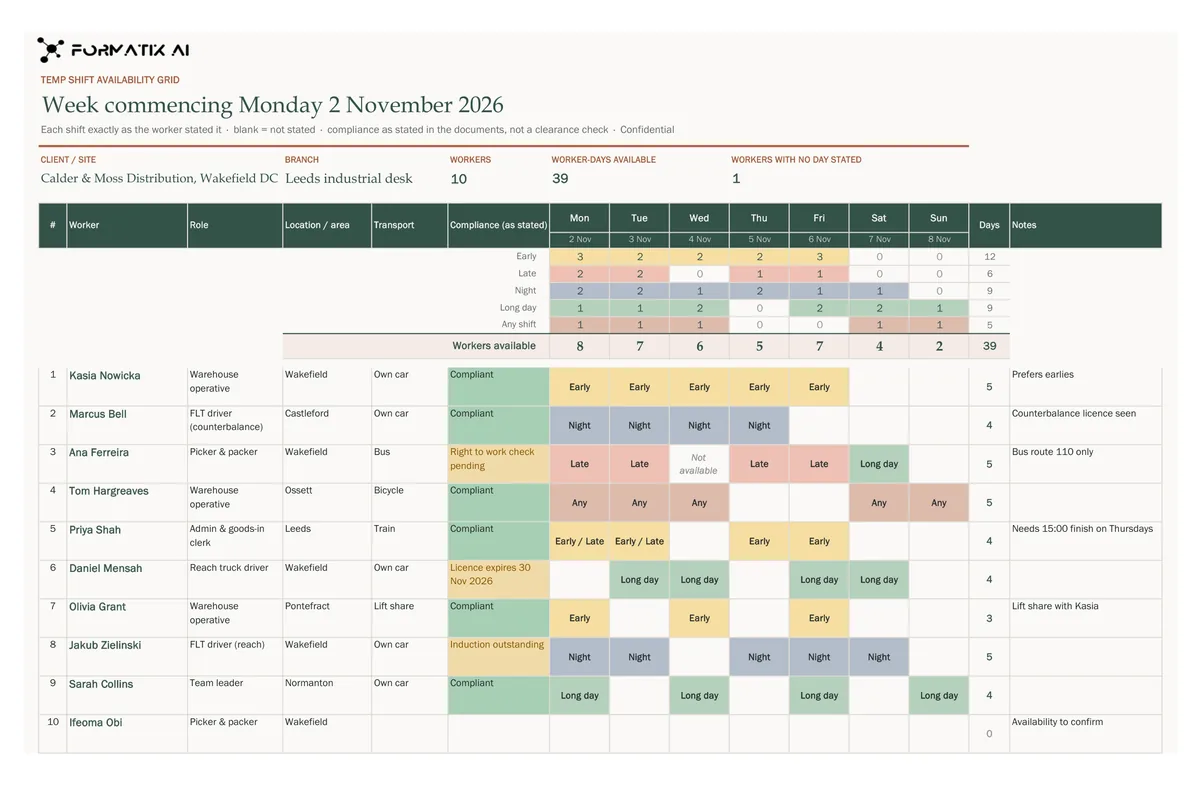
A week's shift availability for a temp pool in Excel: workers down the side with role, location, transport and compliance status as stated, Monday to Sunday across with each day's date from the week-commencing date, each cell the shift the worker said they can do (early, late, night, long day; blank when not stated), and live counts of workers available per day and per shift.
- Client or site, branch and week commencing
- Live counts of workers available per day and per shift
- Workers with role, location, transport and compliance status as stated
- Monday to Sunday: the shift each worker said they can do
- Notes
What it's for: Seeing who can cover which shifts in the week ahead.
ExcelDelivered as an Excel workbook you can edit and share.
Who uses it
Temp desks and branch coordinators
The week's availability for a pool on one sheet.
Industrial and logistics staffing
Shift cover by day and shift type at a glance.
Care and hospitality staffing
Who said they can work each day, and who has not answered.
How you use it
- 1
Pick the template
Open Formatix, choose this template in Studio, and give us your website. We pull your logo, colours and fonts and rebuild the template in your brand. You see a sample before you use it.
- 2
Drop the details and availability notes
Upload each worker's registration details with their availability messages for the week and the booking notes. One credit fills one row.
- 3
Check and send
The filled workbook appears for checking. Edit anything, then download the editable Excel file.
Download or automate? The free download is a plain file you fill in by hand. In Formatix the template is rebuilt in your brand, with your logo, colours and fonts taken from your website, and filled from a CV or your notes in about a minute. What you keep is the finished document: an editable Word, PowerPoint or Excel file.
Ask for changes in plain words, such as "move the photo to the right" or "add a Languages section", and the template is updated with the rest of its formatting kept. If you already have a document you send clients, upload that instead and Formatix turns it into a template. How Studio builds templates
Questions about this template
- What does a blank cell mean?
- That the worker did not mention that day. Formatix never assumes a worker is free, never copies one day's answer to another and never reads a usual pattern or a past week as this week.
- Is compliance status checked?
- No. It is copied as the documents state it, such as "Right to work check pending". Formatix never decides that a worker is compliant and never writes "Not compliant" unless the documents say so.
- How are the day dates worked out?
- From the week-commencing date, only when your notes give a full date. A week-commencing date that is not a Monday is flagged rather than corrected.
- What do the counts show?
- Workers available each day and for each shift type, and the days each worker is available. They update as you edit the cells.
Related templates and pages
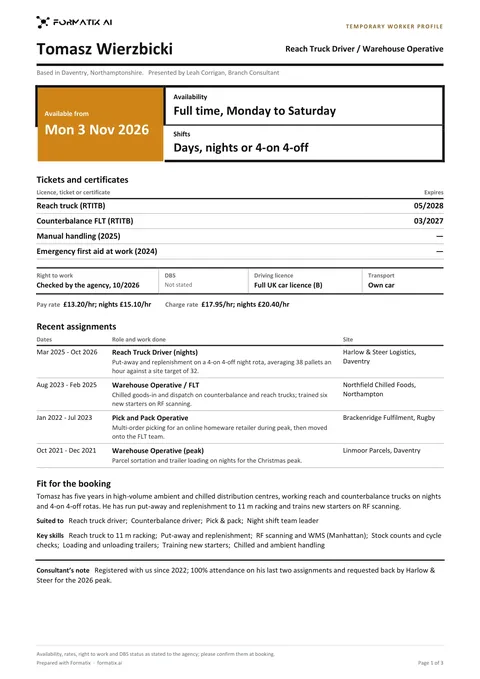 WordTemporary worker profileA strictly one-page profile a staffing agency sends a client with a temp booking: the role put forward and when the worker can start, availability and shifts in large type, tickets and licences with any stated expiry, right to work, DBS, driving licence and transport on one line, pay and charge rate only as stated, a short table of recent assignments, their fit for the booking and key skills. Never infers a rate or availability.
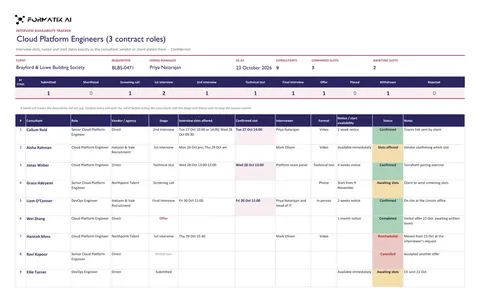 ExcelInterview availability trackerAn interview scheduling tracker in Excel for one IT requisition: one row per consultant with role, vendor or agency, stage, the interview slots offered and the confirmed slot as stated, interviewer, format, notice or start availability as stated, status and notes, under live counts of confirmed and awaited slots and a count per stage.
Use the temp shift availability grid in your brand
Give us your website, and the template is rebuilt with your logo, colours and fonts. Your first ten documents are free, with no card, valid for 14 days.
Formatix fills it from the CV for you: see our CV formatting software, or bulk CV formatting for a whole shortlist at once.