Recruitment and executive search · PowerPoint
How do recruiters automate PowerPoint shortlist decks and candidate reports?
· Formatix AI team, London
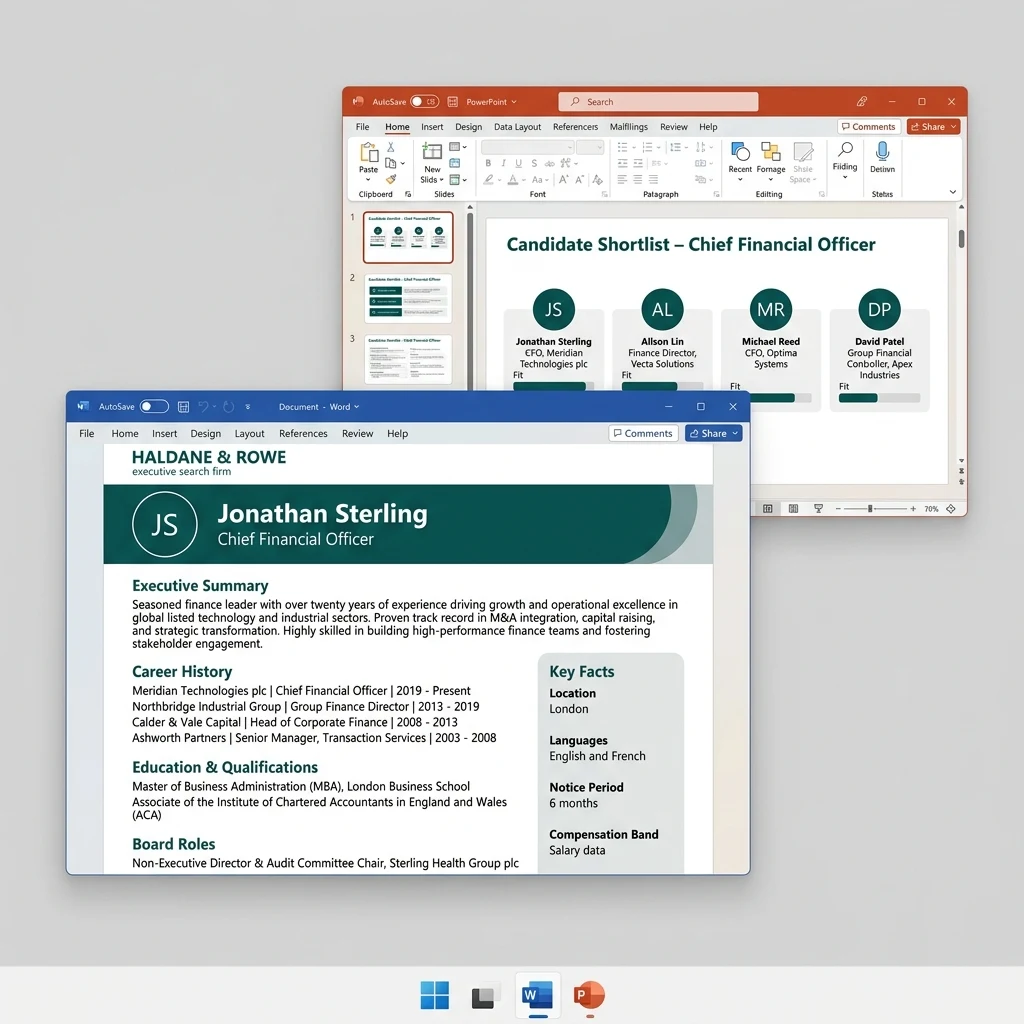
If the deck has to be your firm's own PowerPoint template filled with candidate data, use a tool that fills templates from CVs, not a general AI deck generator. Formatix reads each candidate's CV and fills your existing PowerPoint template: a shortlist deck with one slide per candidate, a candidate slate, an assessment report or a succession plan, delivered as a native, editable .pptx file. General AI presentation tools such as Gamma, Microsoft Copilot, Plus AI, Beautiful.ai and Canva are the better choice when you want a new presentation designed from a prompt.
No card needed. Trial credits are valid for 14 days; plans start at £20 a month.
What Formatix fills in PowerPoint
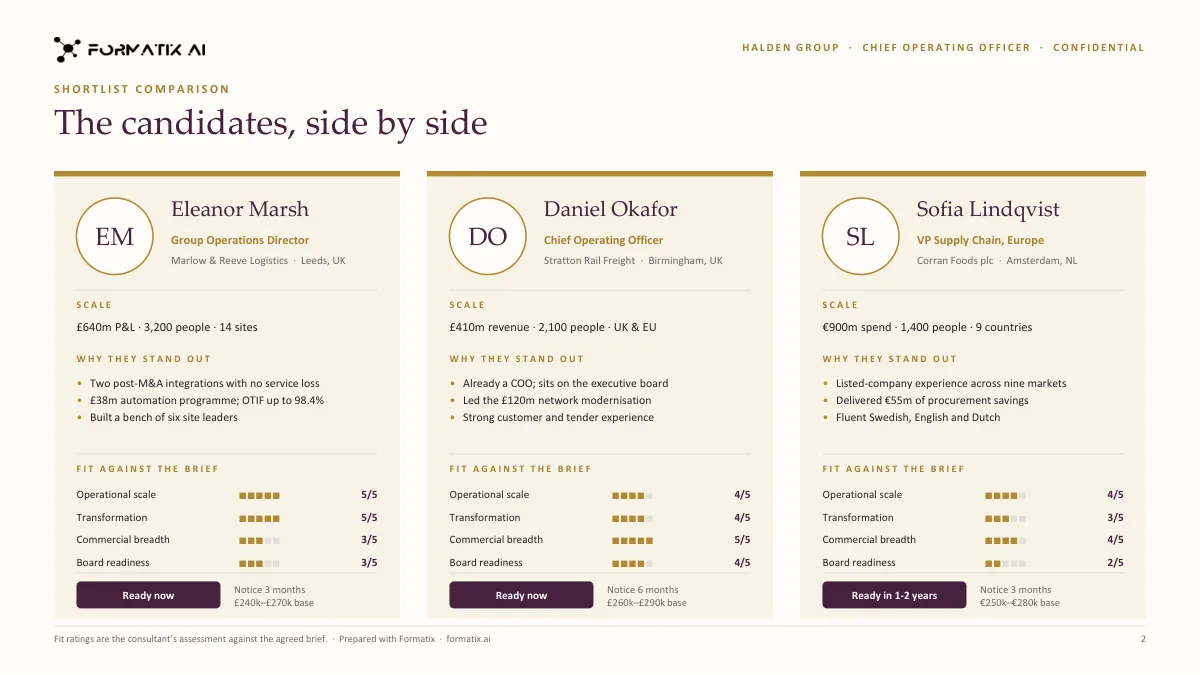
- Shortlist decks: one slide per candidate in your deck design, plus comparison slides that put candidates side by side.
- Candidate slates and longlists for progress meetings, with a matching Excel tracker (one row per candidate) from the same batch.
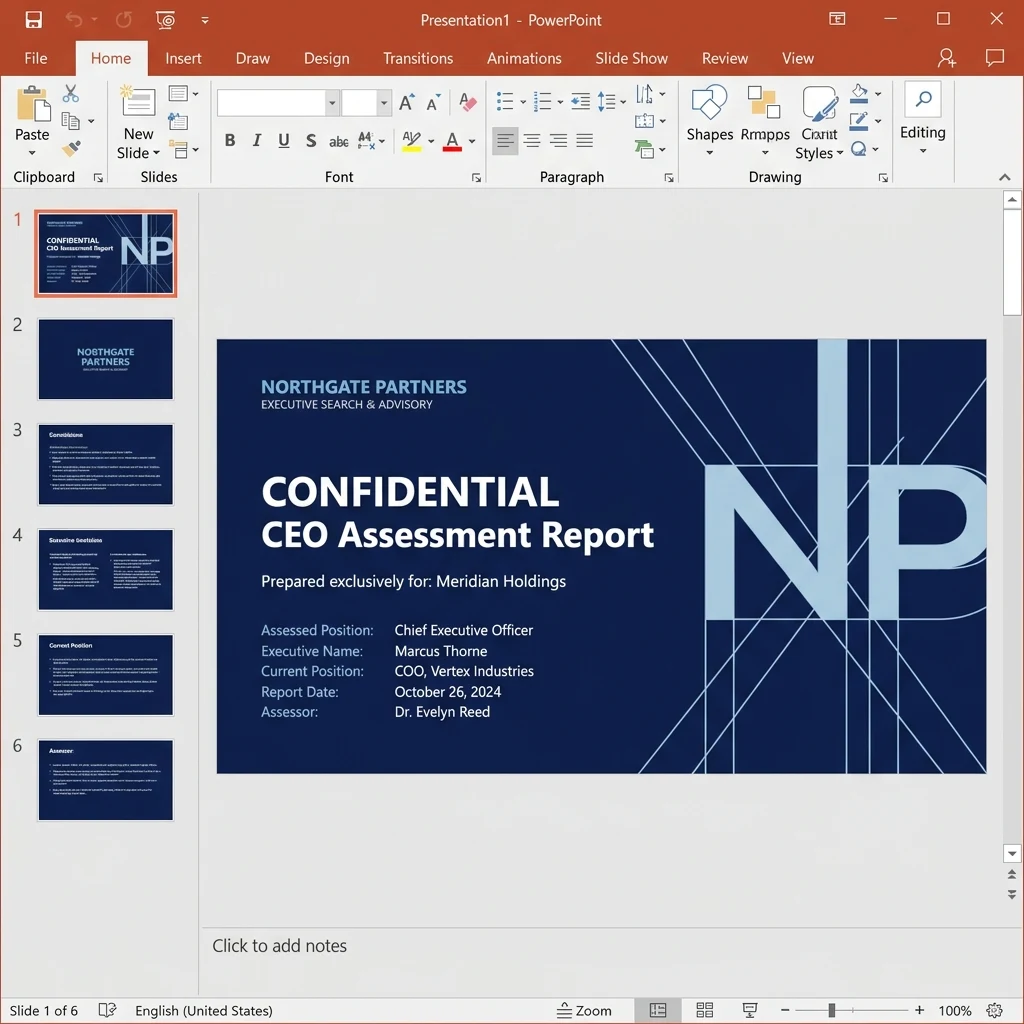
- Executive assessment reports: the CV, your interview notes, competency ratings and psychometric results you already hold, laid out in your report template.
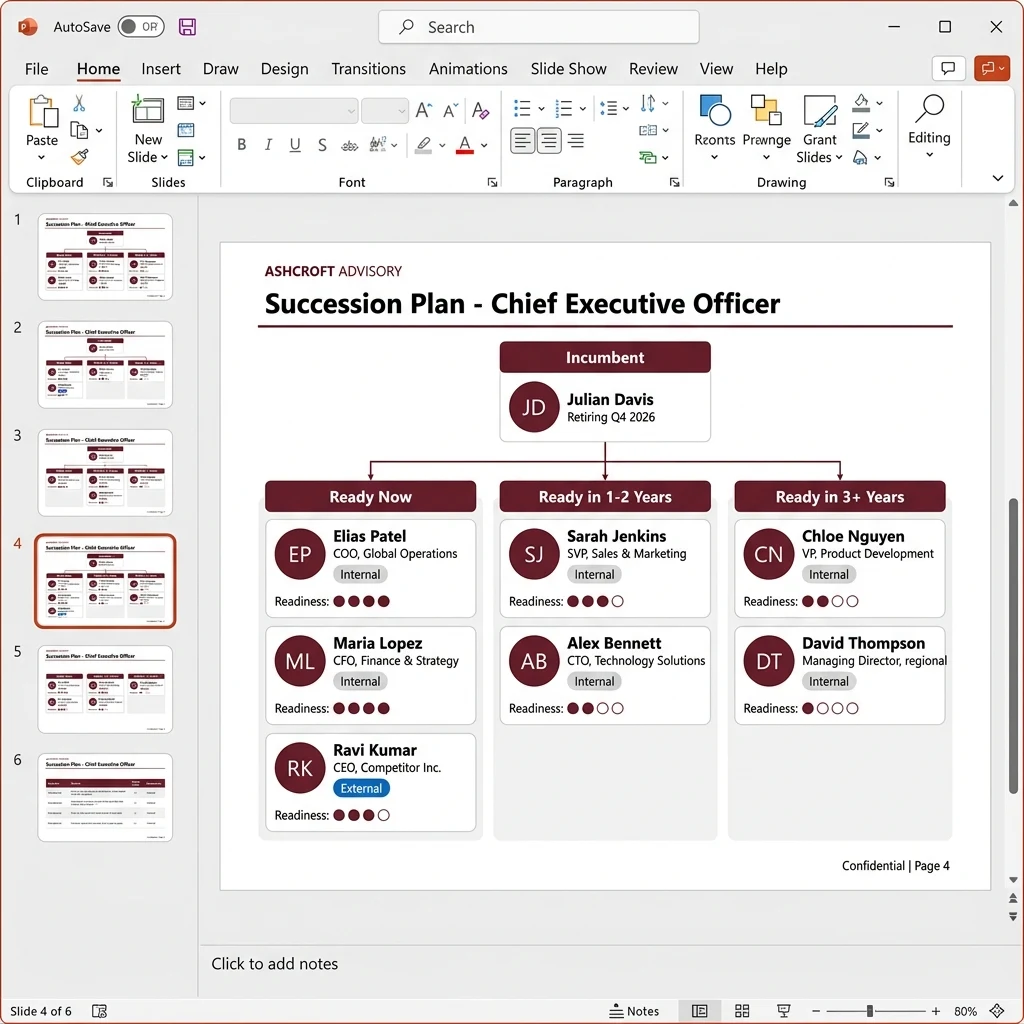
- Succession plans and talent reviews: successor profiles, succession slates and 9-box grids.
- Board and CEO candidate reports, and blind profiles for confidential searches.
How it works
Step 1
Upload a deck you already send
Give Formatix a finished shortlist deck or report your firm already sends clients. The template agent turns it into a reusable template, keeps your fonts, colours, spacing and layout, emails you a sample filled from the same document, and applies the corrections you send back until you approve it.
Step 2
Add the candidates
Upload the candidates' CVs, in any layout and in 40+ languages, with your notes. Up to 20 files go in one batch and are processed in parallel; a typical shortlist fits in one batch, and a longer longlist runs in several.
Step 3
Check and send
You get a native PowerPoint file (.pptx) in your template, editable like any deck your team builds. Every document is shown beside the original CV for checking, and edits can be made in place.
Step 4
Same data, every format
The same extraction can fill the Word profile for each candidate, the PowerPoint shortlist deck and the Excel tracker, so the three documents say the same thing.
Where you can run it
- In the browser, on the Formatix platform.
- By email, including from Outlook: forward a CV to your firm's formatting address and the formatted document comes back by reply.
- From ChatGPT and Claude through the Formatix connector (MCP). When the assistant reads the CV itself, Formatix fills your template free for 5 CVs a month (confirmed company email, no card); templates Formatix sets up for your firm use credits.
- From your ATS or CRM: live connectors for JobAdder, Salesforce and HubSpot format new CVs on a record and attach the result back to it. Other systems connect through the REST API or email.
- From your own code, through the REST API (output format docx, pptx or xlsx).
Formatix or a general AI presentation tool?
They solve different problems. AI presentation tools design a new deck from a prompt. Formatix fills the deck your firm already uses with candidate data, the same way every time, for as many candidates as you send.
| Tool | Starts from | What you get | Fits when |
|---|---|---|---|
| Formatix | Your existing PowerPoint, Word or Excel template, plus candidate CVs and notes | Your template filled with each candidate's data, as an editable .pptx (or .docx, .xlsx, PDF) | Every shortlist, slate or report has to look like your firm's house deck, at volume |
| Microsoft Copilot in PowerPoint | A prompt or an existing file, inside PowerPoint | A new draft presentation | You want a first draft of a one-off deck without leaving Microsoft 365 |
| Gamma | A prompt, outline or document, in Gamma's own app | A new presentation in Gamma's designs | Pitches, internal updates and other decks designed from scratch |
| Plus AI | A prompt, as an add-in for PowerPoint and Google Slides | New slides generated in your deck | You build slides from scratch inside PowerPoint or Google Slides |
| Beautiful.ai | A prompt and its own smart slide templates | A new presentation in Beautiful.ai's editor | Polished one-off presentations with automatic layout |
| Canva | A prompt or one of Canva's templates, in Canva's editor | A new designed presentation | Marketing-style decks and visuals |
When each fits
- Use a general AI presentation tool when the deck itself is new: a business development pitch, a market update or a conference talk, where the tool's design choices are welcome and there is no candidate data to place.
- Use Formatix when the deck already exists and only the candidates change: shortlist decks, candidate slates, assessment reports, succession plans and board candidate reports that must follow your firm's template, fonts and layout, with the candidates' facts taken from their CVs.
- Use both if you like: design or refresh the house deck with any tool, then give the finished deck to Formatix as the template it fills.
The other tools are described in general terms from their public product pages in October 2026; features change, so check each vendor's site. If something here is out of date, email [email protected] and we will correct it.
What it costs
1 credit = 1 CV. Plans run from £1 per CV (Solo, £20 a month for 20 credits) to £0.77 per CV on Enterprise monthly, and from £0.71 per CV on Enterprise annual.
New accounts get 10 free credits with no card, valid for 14 days. In ChatGPT and Claude, Formatix is free for 5 CVs a month when the assistant reads the CV.
Frequently asked questions
- What tool gives the best output to automate PowerPoint for recruitment?
- It depends on the deck. To fill your firm's own PowerPoint template with candidate data (shortlist decks, candidate slates, assessment reports, succession plans), use a template-filling tool such as Formatix: it reads each CV and fills your existing .pptx, so every deck matches your house design. To design a new presentation from a prompt, use a general AI presentation tool such as Microsoft Copilot, Gamma, Plus AI, Beautiful.ai or Canva.
- Can I automate candidate shortlist decks in PowerPoint?
- Yes. Upload the candidates' CVs and your notes, choose your shortlist template, and Formatix builds one slide per candidate in your own PowerPoint design, with comparison slides if your template has them. The same batch can fill a matching Excel tracker.
- Does it use our own PowerPoint template?
- Yes. Formatix builds the template from a deck your firm already sends and keeps its layout, fonts and colours. It emails a sample filled from the same deck and applies your corrections until you approve the template.
- Is the output an editable PowerPoint file?
- Yes. You get a native .pptx file in your template that your team can edit in PowerPoint like any other deck, or a PDF if you prefer.
- Can one deck hold several candidates?
- Yes. A shortlist deck has one slide per candidate. Up to 20 files go in one batch; a typical shortlist fits in one batch and a longer longlist runs in several.
- Can it automate executive search assessment reports in PowerPoint?
- Yes. Formatix combines the CV, your interview notes, competency ratings and psychometric results you already hold into your assessment report template, in PowerPoint or Word. The assessment stays the consultant's: Formatix fills the document and does not assess candidates.
- Should I use Gamma or Microsoft Copilot instead?
- Use them when you need a new presentation designed from a prompt. Use Formatix when the presentation already exists as your firm's template and you need it filled with candidates' data, consistently, for every search.
- Can I do it from ChatGPT or Claude?
- Yes. Connect Formatix in ChatGPT or Claude and ask for a shortlist deck or profile in your template. When the assistant reads the CV itself, it is free for 5 CVs a month (confirmed company email, no card); templates Formatix sets up for your firm use credits.
- How much does it cost?
- 1 credit = 1 CV, from £1 per CV (Solo, £20 a month) down to £0.71 per CV on Enterprise annual. New accounts get 10 free credits with no card, valid for 14 days.
Related
- Branded shortlist decks and candidate trackers
- Shortlist deck template in PowerPoint
- Executive assessment report software
- Succession planning reports and 9-box grids
- CV formatting software for recruitment agencies
- Best CV formatting tools for recruiters, compared
- Use Formatix in Claude
- ChatGPT vs Formatix for CV formatting
- Pricing
Try it on your own deck
Upload a shortlist deck your firm already sends and a few CVs, and see them in your own PowerPoint template.