Word template · Candidate profiles
Blind CV template: an anonymised candidate profile
A blind CV, or blind profile, is a candidate document with the identifying details removed: no name, photo, contact details, date of birth or nationality, and usually no employer names, which are replaced by a description such as "FTSE 250 retailer, London". It shows experience and fit so a client can decide on the merits, and it protects the candidate from being approached directly before terms are agreed. This template has no fields for the identifying details, so they cannot appear, and Formatix fills the rest from the CV.
Agencies use blind profiles for two reasons: clients who want to reduce bias at the shortlist stage, and the older reason, keeping the candidate's identity with the agency until the client commits. Both need a document that is anonymous by design, not a normal profile with a name deleted and a phone number left in the footer.
10 free credits, no card needed. One credit fills one document.
An editable file with neutral branding and a fictional example candidate, to fill in by hand. Formatix fills it automatically from a CV.
Diese Seite auf Deutsch · Cette page en français · Esta página en español · Deze pagina in het Nederlands · Den här sidan på svenska · Denne side på dansk · Denne siden på norsk · Questa pagina in italiano · Esta página em português
What's in the template
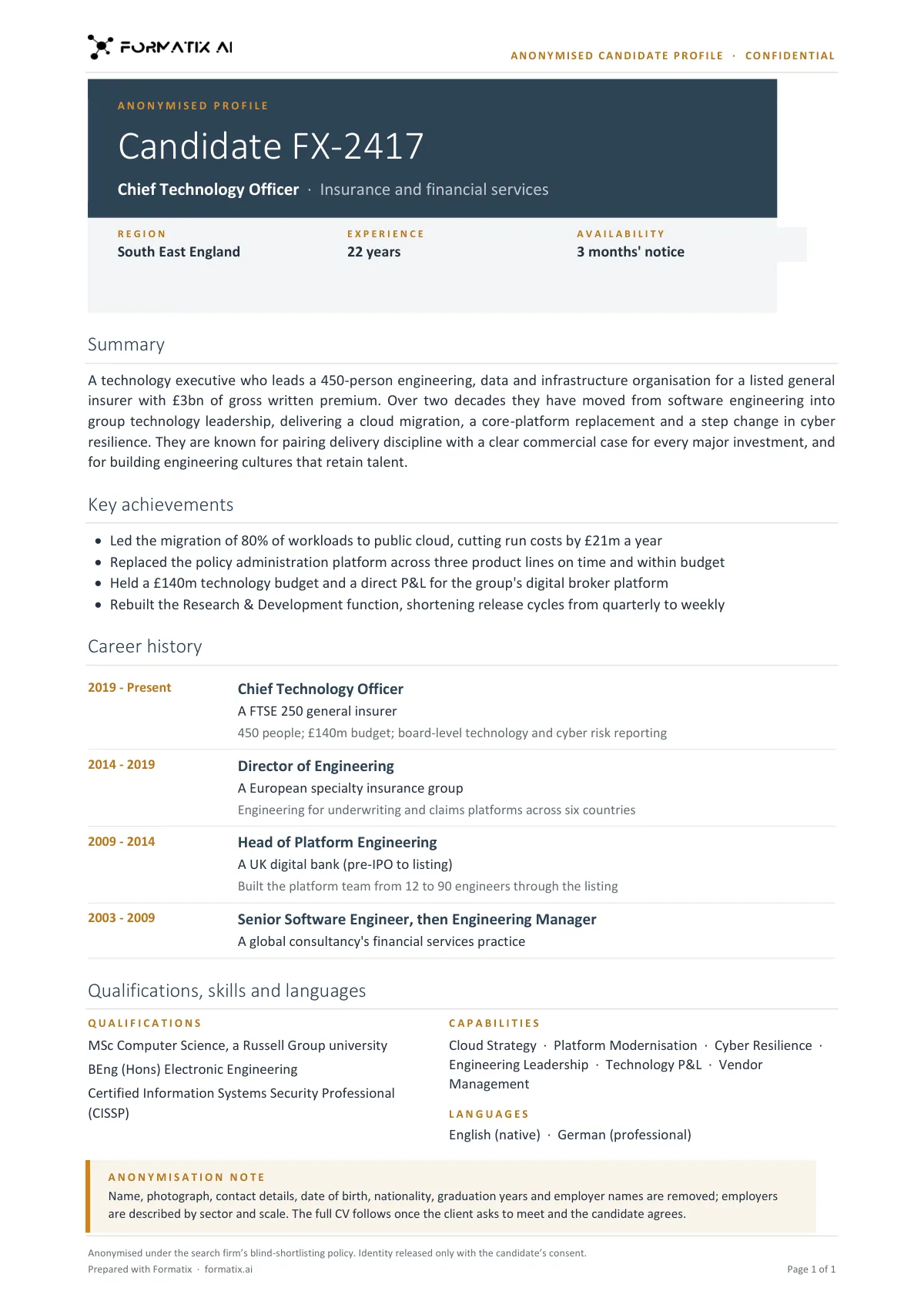
An anonymised profile that shows experience and fit without the candidate's name, contact details or photo.
- Candidate reference in place of a name, with role and sector
- Region, experience and availability
- Summary and key achievements
- Career history with employers described by sector and scale
- Qualifications, capabilities and languages
- Anonymisation note listing what was removed
What it's for: Confidential longlists, and clients who review candidates anonymously first.
WordDelivered as an editable Word file, or saved as PDF.
Who uses it
Agencies submitting to public sector, legal and financial services clients
Where anonymised shortlists are increasingly required, and where the agency's process is audited.
Search firms protecting a candidate's identity
A confidential approach or a sitting executive whose name should not travel before the client has committed.
Employers running blind recruitment
In-house teams that want one anonymised format for every candidate a manager sees.
How you use it
- 1
Pick the template
Open Formatix, choose this template in Studio, and give us your website. We pull your logo, colours and fonts and rebuild the template in your brand. You see a sample before you use it.
- 2
Drop a CV or your notes
Upload the candidate's CV, in any layout or language. For reports that carry your ratings or notes, add them alongside the CV. One credit fills one document.
- 3
Check and send
The filled document appears beside the original for checking. Edit anything in place, then download the Word, PowerPoint or Excel file, or save it as PDF.
Download or automate? The free download is a plain file you fill in by hand. In Formatix the template is rebuilt in your brand, with your logo, colours and fonts taken from your website, and filled from a CV or your notes in about a minute. What you keep is the finished document: an editable Word, PowerPoint or Excel file.
Ask for changes in plain words, such as "move the photo to the right" or "add a Languages section", and the template is updated with the rest of its formatting kept. If you already have a document you send clients, upload that instead and Formatix turns it into a template. How Studio builds templates
Questions about this template
- What is removed in a blind CV?
- Name, photo, contact details, address, date of birth, gender, nationality and, in most cases, employer names and school or university names, which are replaced by a description of the type and size of organisation. Dates and titles stay so the career can still be read.
- How does Formatix keep the identifying details out?
- The template has no placeholders for them. A template with no name field cannot show a name, whatever the CV contains. Employer names are replaced by a descriptor by the extraction prompt, which you can adjust.
- Can I keep a candidate reference number on it?
- Yes. A reference or code the agency uses internally is on the template so you can match the blind profile to the full one.
- Is a blind CV the same as CV redaction?
- Redaction blacks out details on the original document. A blind profile is a new document written from the CV without those details, which reads better and cannot leak text under a black box.
- Is there a confidential profile or candidate dossier template?
- For a candidate whose identity must stay with the firm, use this blind profile: it carries a reference code instead of the name and an anonymisation note listing what was removed. For a full, named presentation of one candidate, use the candidate presentation or the executive assessment report.
- Can I download this template?
- Yes. A free, editable Word version with neutral branding and a fictional example candidate is on this page, to fill in by hand. To have it rebuilt in your brand and filled automatically from a CV, use it in Formatix; what you keep is an editable Word file.
Use the blind profile in your brand
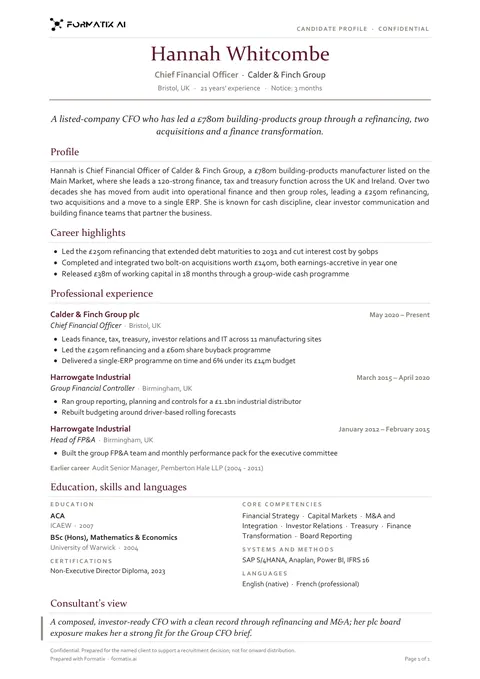
Give us your website, and the template is rebuilt with your logo, colours and fonts. Your first ten documents are free, with no card, valid for 14 days.
Formatix fills it from the CV for you: see our CV formatting software, or bulk CV formatting for a whole shortlist at once.