Word template · Candidate profiles
Temporary worker profile template, one page
A temporary worker profile is the one page a staffing agency sends a client with a temp booking, so the client can see who is coming, when they can start and on what terms. This Word template keeps every worker to one page in the agency's brand: the name, the role put forward, where the worker is based and who presents them; a ruled block with Available from, availability and shifts; tickets and certificates such as FLT, CSCS or food hygiene, with any expiry as stated; right to work, DBS, driving licence and transport in one line, with the pay and charge rate below; up to four recent assignments; a short paragraph on their fit for the booking, the roles they suit and key skills; and the consultant's note. Formatix fills it from the worker's CV and your registration notes, and any booking fact that is not stated prints "Not stated".
Temp desks send clients a lot of profiles and the client looks for the same few things every time: when the worker can start, which shifts, the rate, right to work and the tickets they hold. This template puts those at the top of one page for every worker. Availability and rates are never guessed, and right to work and DBS are shown only as a short status your notes give, never as document numbers.
10 free credits, no card needed. One credit fills one document.
Diese Seite auf Deutsch · Cette page en français · Esta página en español · Deze pagina in het Nederlands · Den här sidan på svenska · Denne side på dansk · Denne siden på norsk · Questa pagina in italiano · Esta página em português
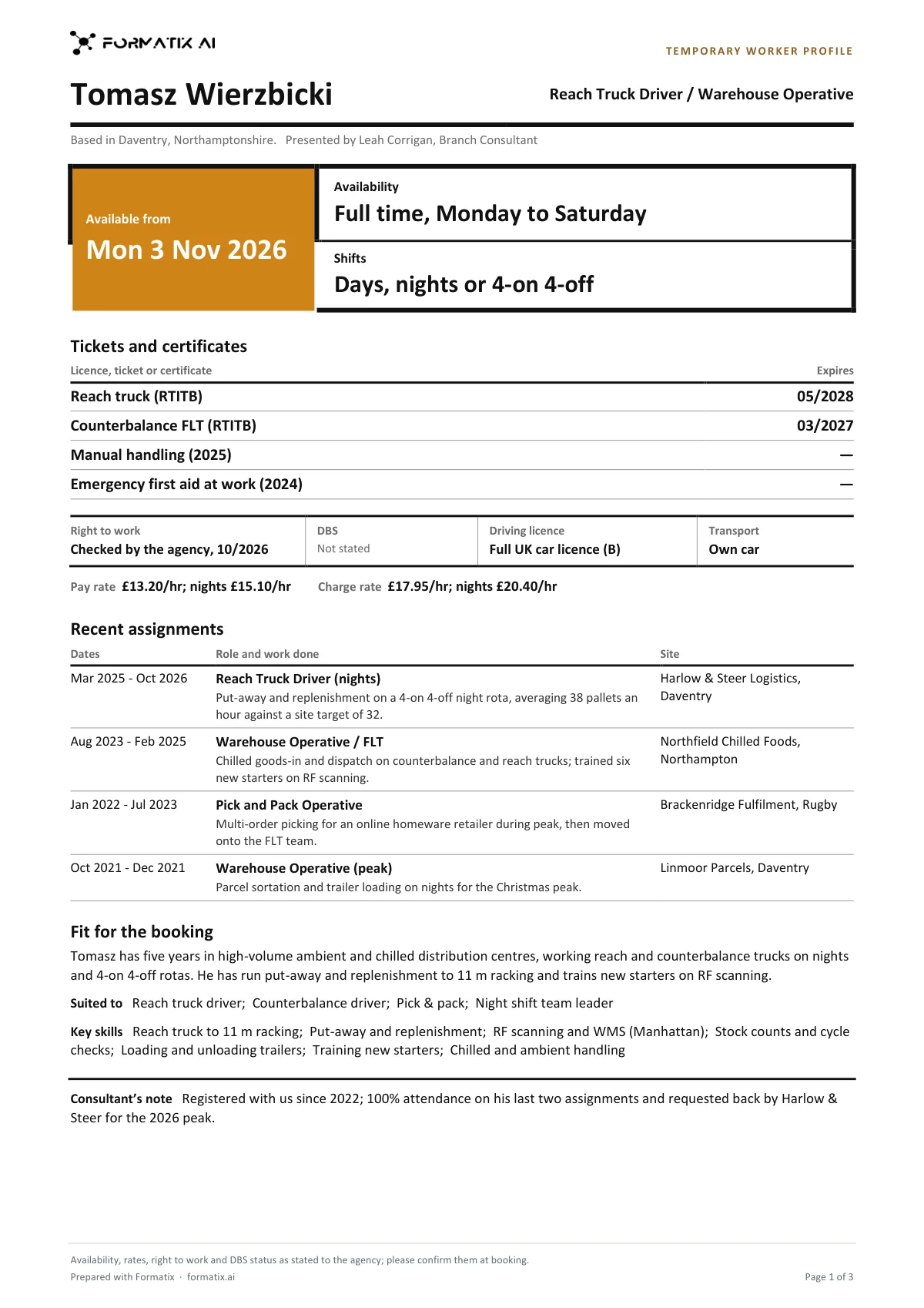
What's in the template
A strictly one-page profile a staffing agency sends a client with a temp booking: the role put forward and when the worker can start, availability and shifts in large type, tickets and licences with any stated expiry, right to work, DBS, driving licence and transport on one line, pay and charge rate only as stated, a short table of recent assignments, their fit for the booking and key skills. Never infers a rate or availability.
- Name, role put forward, base and who presents them
- Available from, availability and shifts as stated
- Tickets and certificates, expiry as stated
- Right to work, DBS, driving licence, transport, pay and charge rate as stated
- Recent assignments
- Fit for the booking, roles suited to and key skills
- Consultant's note
What it's for: Sending a temp worker to a client with a booking, on one page.
WordDelivered as an editable Word file, or saved as PDF.
Who uses it
Industrial and driving desks
Warehouse, logistics and driving workers with their tickets, shifts and licence on one page.
Hospitality, office and care support desks
A consistent page for every temp you put forward, whatever the sector.
Branch consultants
Profiles for a temp shortlist in minutes, in your agency's brand.
How you use it
- 1
Pick the template
Open Formatix, choose this template in Studio, and give us your website. We pull your logo, colours and fonts and rebuild the template in your brand. You see a sample before you use it.
- 2
Drop the CV and your notes
Upload the worker's CV with your registration or call notes: availability, shifts, agreed pay and charge rates, right to work and DBS status, licence and transport. One credit fills one document.
- 3
Check and send
The filled document appears beside the original for checking. Edit anything in place, then download the Word file, or save it as PDF.
Download or automate? The free download is a plain file you fill in by hand. In Formatix the template is rebuilt in your brand, with your logo, colours and fonts taken from your website, and filled from a CV or your notes in about a minute. What you keep is the finished document: an editable Word, PowerPoint or Excel file.
Ask for changes in plain words, such as "move the photo to the right" or "add a Languages section", and the template is updated with the rest of its formatting kept. If you already have a document you send clients, upload that instead and Formatix turns it into a template. How Studio builds templates
Questions about this template
- Will it fill in a pay rate or availability?
- Only as the worker or your notes state them. A charge rate is never worked out from a pay rate, holiday pay or a margin is never added, and no rate is taken from the role or the region. A start date is never taken from the end of the last job, and nights or weekends are never assumed.
- How are right to work and DBS shown?
- As a short status, only when your notes give one, such as "Checked by the agency, 10/2026". No document type, passport, share code, visa or certificate number is printed, and a check is never assumed to have been done. The page footer asks the client to confirm availability, rates, right to work and DBS status at booking.
- Does it always fit on one page?
- Yes, that is what it is built for. Each part has a limit: up to four recent assignments, seven key skills, five tickets and certificates, and a short fit paragraph and consultant's note.
- Is there a list of what is missing?
- Not a separate one. Each booking fact that is not stated prints "Not stated", so the gaps are visible on the page itself.
- What personal details are left off?
- The worker's email, phone, street address, date of birth, age, nationality, National Insurance number, health and right to work documents are never printed. The location shows the town or area only.
Related templates and pages
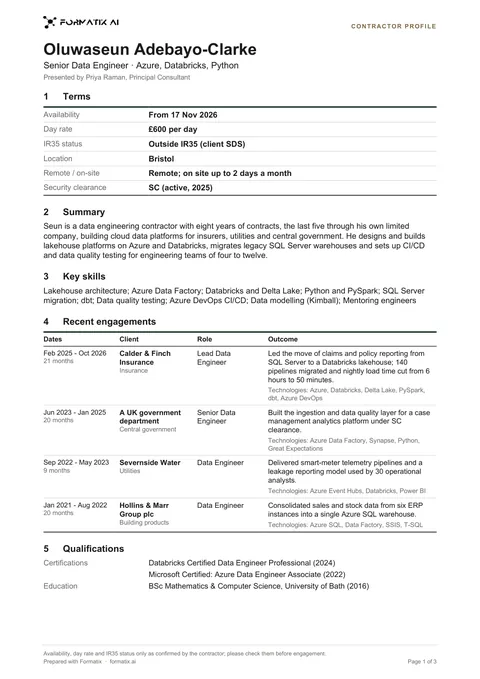 WordContractor profileA short contractor submission profile of one to two pages: set out like a spec sheet: availability, day rate, IR35 status, location, remote working and security clearance as a plain terms table up front (only as confirmed), a short summary and the key skills, the most recent engagements as a table of dates, client, role and outcome, then certifications and education. Never infers a rate, IR35 status or availability.
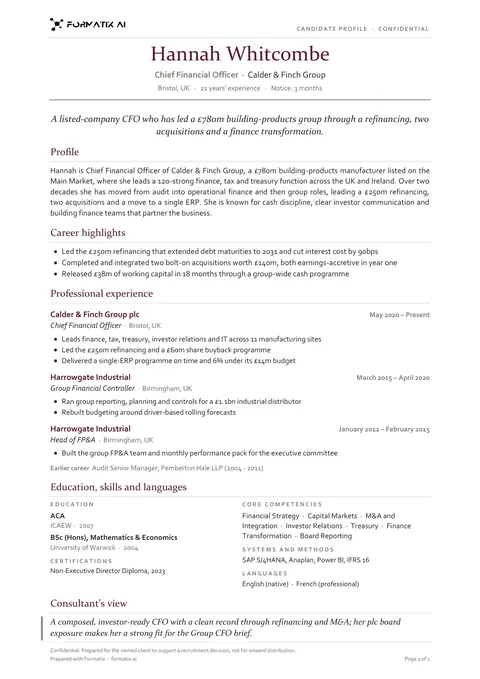 WordCandidate profile (classic)A traditional one-page candidate profile with a clear career history, laid out the way clients expect to read a CV from an agency.
Use the temporary worker profile in your brand
Give us your website, and the template is rebuilt with your logo, colours and fonts. Your first ten documents are free, with no card, valid for 14 days.
Formatix fills it from the CV for you: see our CV formatting software, or bulk CV formatting for a whole shortlist at once.