Use case · Tenders and bid proposals
Tender and bid CV formatting: every staff CV in the format the tender asks for
Formatix AI converts your staff CVs into your company template, or into the CV format a tender or bid requires, in bulk. You upload the required Employee CV or key-expert form once, then the CVs of the proposed team in whatever layout each person keeps them; Formatix fills one CV per person in the required structure as an editable Word file, with an Excel key personnel schedule and a PowerPoint team overview from the same batch. Your proposal team checks each CV beside the original before it goes into the submission.
It is built for architecture, engineering, project management, cost consultancy and construction supervision firms that put 10 to 30 CVs into every proposal: consultancies bidding for public works and developer projects in Qatar, the UAE and Saudi Arabia, firms answering UK public-sector tenders and frameworks, and international development consultancies proposing key experts for projects financed by the World Bank and other development banks.
Most firms describe the job the same way: reformat employee CVs into our standard format for proposals, or into the client's own form when a tender issues one. Formatix does both from the same upload.
No credit card. Your first ten CVs are free, and the trial credits are valid for 14 days.
Why tender CVs take so long
Almost every request for proposals sets its own CV format. A Gulf client issues an Employee CV form with the proposed position, nationality, years of experience in total, with the firm and in the region, professional registrations and a table of relevant projects. A development-bank RFP asks for a key-expert CV with an employment record, language skills and a table that ties each assigned task to prior work. A UK public-sector tender caps CVs at a page limit in the buyer's own layout. None of them looks like the CVs your staff keep.
So a proposal coordinator rebuilds every CV by hand in the days before the deadline: copying dates and project names across, recalculating years of experience, trimming to the page limit and chasing engineers for a missing registration number. With 20 key staff that is days of work on every bid, done when the team has the least time, and the same people are rebuilt again for the next tender in a different form.
The cost is not only time. A project described two ways by two people who worked on it together, or a position title that does not match the staffing schedule, is the kind of inconsistency evaluators notice, and in some procurements a CV that does not follow the required form can make the proposal non-compliant.
How to convert CVs into your company CV format for proposals
- 1
Upload the required CV format once
Upload the Employee CV form from the tender documents, the key-expert CV from the RFP, or your firm's own bid CV template, in Word. Formatix turns it into a reusable template that keeps the layout, tables, fonts and logo, and emails you a sample filled from a real CV. Reply with corrections in plain words until it is right.
- 2
Drop in the team's CVs
Upload the proposed team's CVs as a batch: Word, PDF, scans, or CVs from an earlier bid in another client's format, in English, Arabic or more than 40 other languages. Add a short note per person with the proposed position and anything the bid should lead with, such as the projects to put first.
- 3
Check and submit
Each CV comes back in the required structure, about thirty seconds per CV, shown beside the original for checking. Edit in place, then download editable Word files, one per person or one combined pack, with the Excel schedule and the PowerPoint team slides from the same extraction.
Four templates for bid teams
The Studio library has four templates written for proposals. Each is rebuilt in your brand before you use it. When a tender issues its own form, upload that form instead: the client's format always wins.
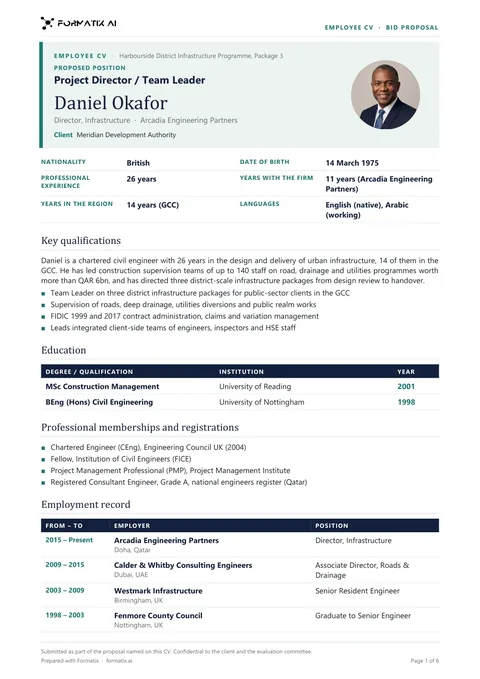 WordTender employee CV (Word)One Employee CV per person in one document: proposed position, nationality, years of experience in total, with the firm and in the region, education, professional registrations, key qualifications, languages, an employment record table and relevant projects with client, value, role and duties.
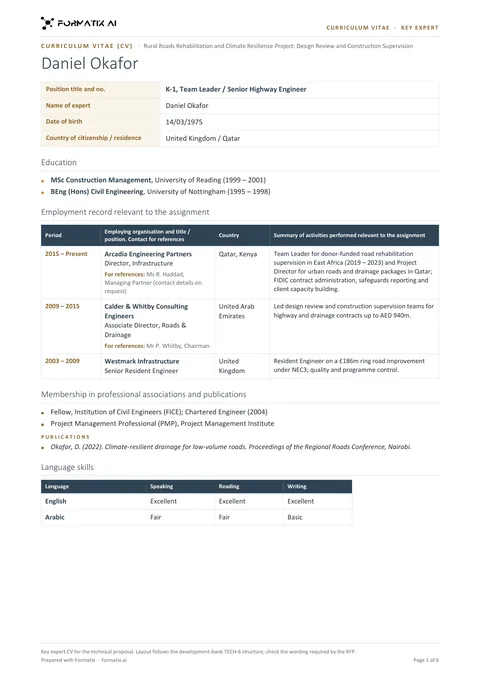 WordDevelopment-bank key expert CV (Word)A key-expert CV that follows the structure of the CV in the World Bank's Form TECH-6: position, education, employment record relevant to the assignment, professional associations, languages and adequacy for the assignment. It is not an official form.
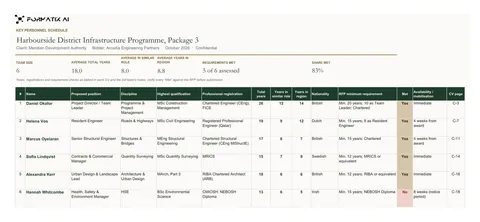 ExcelKey personnel schedule (Excel)The bid team on one sheet: position, discipline, qualification, registration, total years, years in a similar role and in the region for each person, beside the RFP minimum and a Met column, under a live summary.
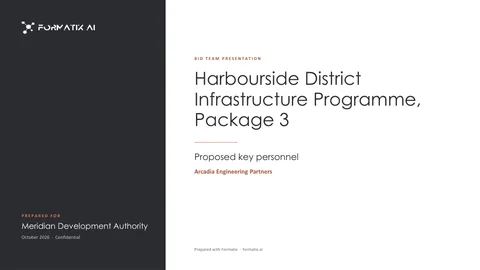 PowerPointBid team presentation (PowerPoint)A cover, an overview of up to twelve people, then one slide per key person with qualifications, experience and up to four projects, for the proposal or an interview.
What a tender CV usually asks for, and where each field comes from
- Proposed position and staff category: from your note for each person, so the wording matches the staffing schedule exactly.
- Nationality, date of birth and contact details, where the form asks for them: from the CV.
- Years of experience in total, with the firm and in the country or region: derived from the dates in the employment record, then checked by your team.
- Education and professional registrations, such as chartered status, a society membership or a licence number: from the CV, in the order the form sets.
- Employment record: reverse chronological, in the form's columns.
- Relevant project experience: the projects named in the CV, laid out in the form's table with client, location, dates, value and the person's role where the CV gives them.
- Languages, with proficiency where the form asks for it.
Formatix places only what is in the CV and your notes. If a CV has no project value or no registration number, that cell stays empty for your team to complete. Nothing is invented, and whether a person meets a minimum requirement stays your team's judgement.
Every document the CV section needs
| Format | What you get |
|---|---|
| Word | Employee CVs or key-expert CVs in the tender's form, fully editable, one file per person or one combined pack. |
| Excel | The key personnel schedule and compliance matrix, one row per proposed person, from the same batch. |
| PowerPoint | A team overview and one slide per key person for the technical proposal or an interview. |
| Any of the above saved as PDF for portals that ask for it. |
A worked example
Take Alderbank Consulting Engineers, a fictional firm bidding for construction supervision of a highway upgrade. The RFP asks for 14 key staff in its own Employee CV form and a schedule of the team against minimum qualifications and years of experience.
The bid coordinator uploads the client's form as a template and gets a filled sample by email. She then uploads the 14 CVs, some in Word, some PDFs from the last bid, with a one-line note for each: the proposed position and the two projects to put first. Formatix returns 14 CVs in the client's form and an Excel schedule with each person's degree, registration and years of experience beside the RFP's minimums. She corrects two dates where a CV contradicted itself, adds a licence number one engineer had left off, and the CV section is ready for the bid manager's review.
Data protection
Staff CVs are personal data. Formatix AI Ltd (company number 15626717) is registered with the UK Information Commissioner's Office (ICO) under registration number ZC184545. Personal data is handled under the UK GDPR and the Data Protection Act 2018 (and the EU GDPR for EU customers). For the CVs your firm uploads, Formatix acts as a processor for your firm, and a data processing agreement is available on request.
Processing is hosted in the UK and EU, encrypted in transit. Files are kept for the retention period your account sets, then deleted. Customer data and uploaded CVs are not used to train AI models.
If your firm is established in the Gulf, using Formatix means transferring personal data abroad, so check the rules that apply to you, such as Qatar's Law No. 13 of 2016, the UAE's Federal Decree-Law No. 45 of 2021 (or the DIFC or ADGM rules in those free zones) or Saudi Arabia's Personal Data Protection Law. This is general information, not legal advice.
What it costs
Formatix is free to try: 10 free CVs, no card. The trial credits are valid for 14 days. Paid plans start at £20 a month for 20 credits and are charged in local currency at checkout, for example AED 92 in the UAE, SAR 95 in Saudi Arabia and US$30 elsewhere in the Gulf. One credit formats one CV, so a 20-person CV pack uses 20 credits.
Larger plans bring the price down to £0.77 a CV, and all prices are public on the pricing page.
Frequently asked questions
- Can Formatix convert our staff CVs into our own company template?
- Yes. Upload your own Word, PowerPoint or Excel template, or a finished sample document your firm already sends, and Formatix builds a reusable template from it that keeps your layout, fonts and logo. You check a filled sample, then upload staff CVs one at a time or in bulk, and each is filled into your template as an editable file. Formatix is free to try: 10 free CVs, no card.
- Can Formatix use the CV format the tender gives us?
- Yes. Upload the form from the tender documents, in Word, and Formatix turns it into a template that keeps its layout and tables. You receive a sample to check before using it, and your CVs come out in the tender's format, not ours.
- Can it produce a whole CV pack in one go?
- Yes. Upload the team's CVs as a batch and you get one CV per person in the required format, or one Word document with the whole pack, together with an Excel key personnel schedule from the same extraction.
- Does it calculate years of experience, with the firm and in the region?
- It derives them from the dates in each employment record, following the rules set in the template, for example counting only roles in the GCC towards years in the region. Your team should check them, as with every field, because CVs often have gaps or overlapping dates.
- Will it invent projects or qualifications to meet the RFP requirements?
- No. Formatix places only what is in the CV and in your notes. Missing information stays blank for the bid team to complete, and whether a person meets a minimum requirement is your team's judgement.
- Can it read Arabic CVs?
- Yes. It reads CVs in more than 40 languages, including Arabic, and writes the content into your template. If the tender requires the CV itself in Arabic, test a real Arabic template first.
- Is it suitable for World Bank and other development-bank proposals?
- Yes, for the CV work. The development-bank key expert CV template follows the structure of the CV in Form TECH-6 of the World Bank's Request for Proposals for consulting services. It is not an official form, so where the RFP includes its own version, upload that one.
- What does it cost?
- Free to try: 10 free CVs, no card, with trial credits valid for 14 days. Paid plans start at £20 a month for 20 credits, and one credit formats one CV.
Templates and guides for bid teams
- Tender employee CV template
- Development-bank key expert CV template
- Key personnel schedule template (Excel)
- Bid team presentation template (PowerPoint)
- How do I format staff CVs for a tender submission?
- What is the World Bank TECH-6 CV format?
- How to build a key personnel schedule for a bid
- Software to format CVs for bids and proposals
- Bulk CV formatting
- Pricing
Try it on your next bid
Upload the CV form from a tender and two or three staff CVs, and see the result in the required format before the deadline.