Executive search · Mandates
Mandates: run each search from the brief to the client report
Mandates is where a search firm runs each search in Formatix. Each mandate keeps its own candidates, a pipeline from longlist to placement, interview notes and interview packs, and the Word report for the client. Formatix turns the brief into a checklist and builds a longlist, showing the lines from each profile that prove each requirement. The consultant reviews every candidate, and nothing is sent to a candidate until the consultant approves it.
No credit card. Your 10 free credits are valid for 14 days.
What Mandates does
One place for the work around a search: the brief, the people, the conversations, the interviews and what the client sees.
The brief and the longlist
- Paste, upload or link the job description. Formatix turns it into a checklist of must-haves and nice-to-haves, which the consultant can edit before the search starts.
- The longlist comes from LinkedIn (through the consultant's own Chrome, or LinkedIn Recruiter results sent to Formatix), the firm's own CV database in Formatix, and a connected ATS or CRM: JobAdder, Salesforce or HubSpot.
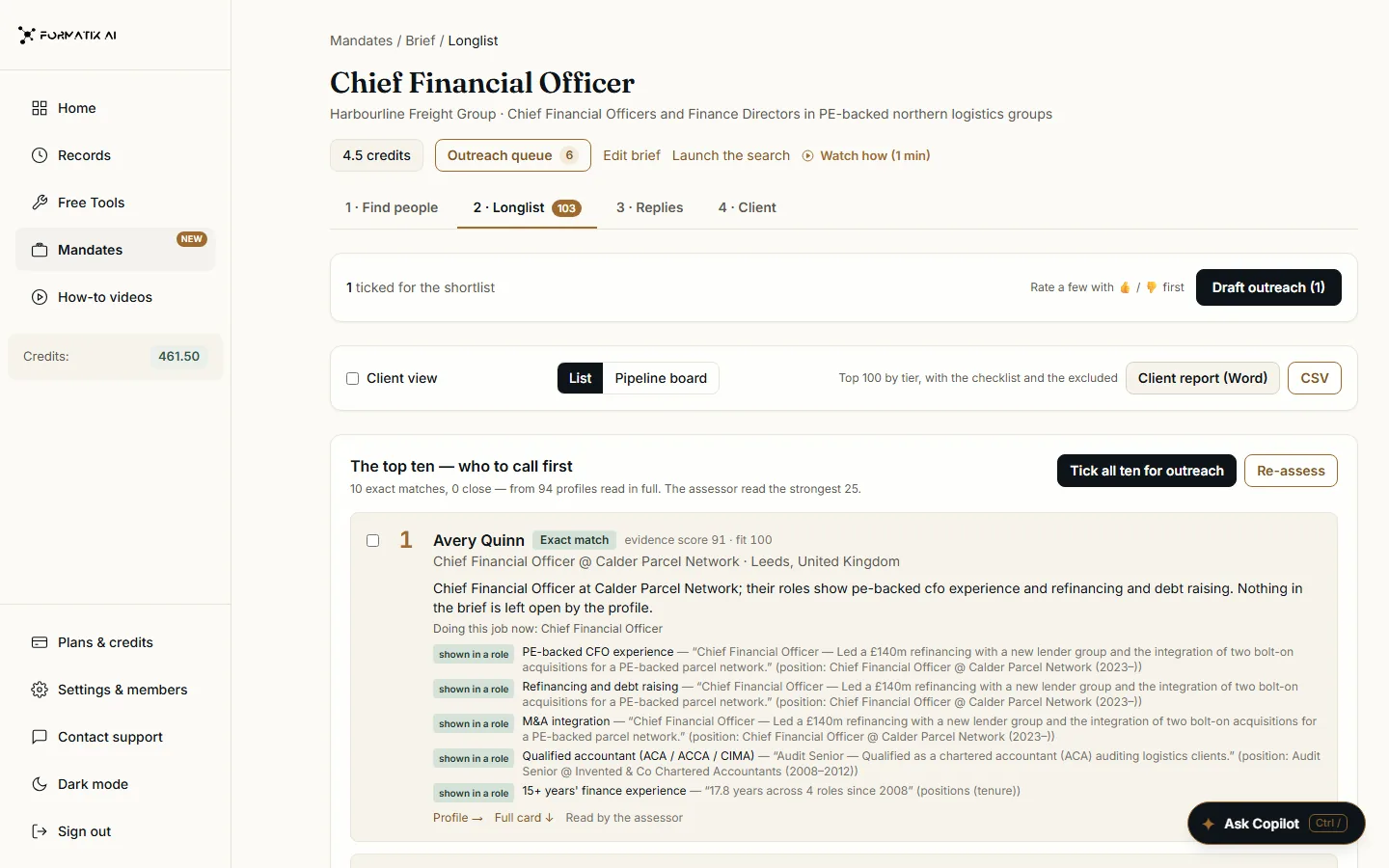
- Every candidate is scored against the checklist, with the lines from their profile that prove each requirement. The best ten sit at the top, with the rest of the longlist behind them by tier.
The pipeline
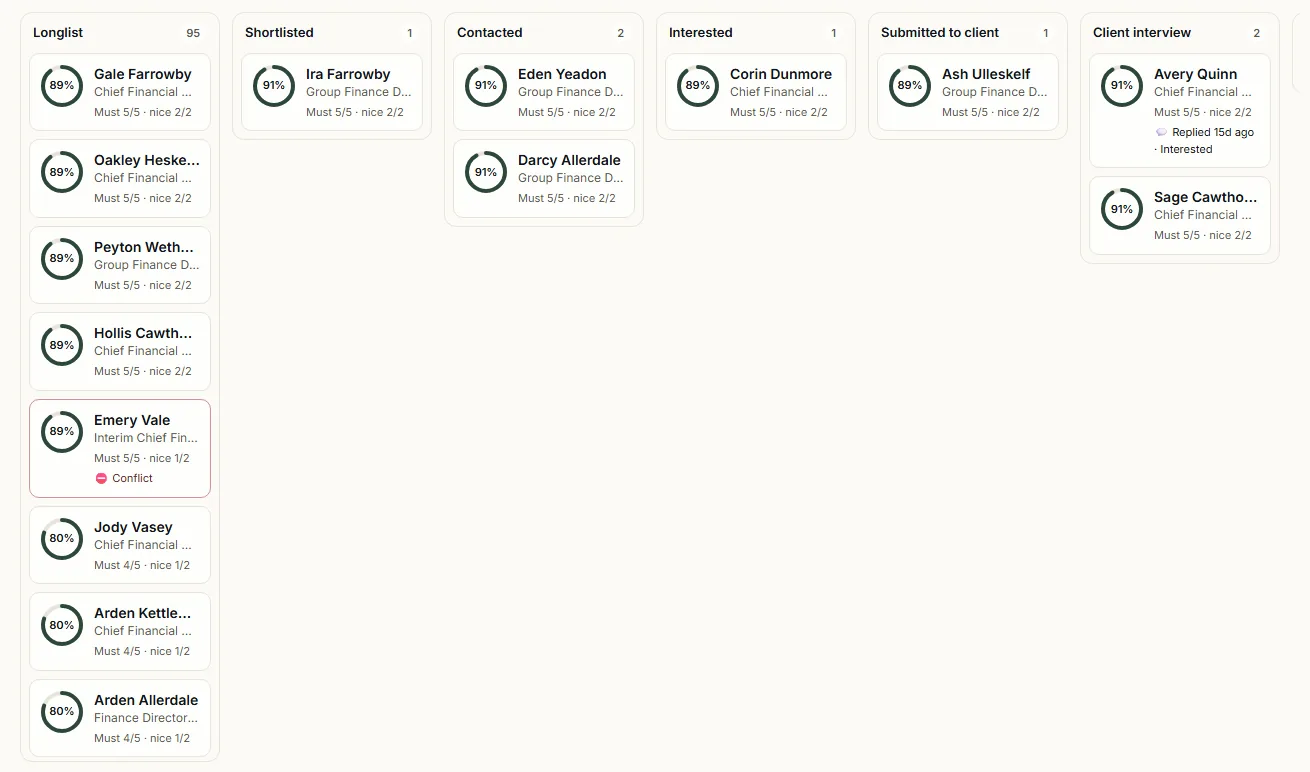
- A pipeline board for each mandate, with the stages Longlist, Shortlisted, Contacted, Interested, Submitted to client, Client interview, Offer, Placed and Dropped.
- Drag a card to move someone on. Dropping a candidate needs a reason, which stays on their record.
- Outreach drafts (a LinkedIn note, an InMail and an email) wait for approval. When a candidate replies, the reply appears under Replies; marking it interested or not interested moves them along the pipeline.
Interviews
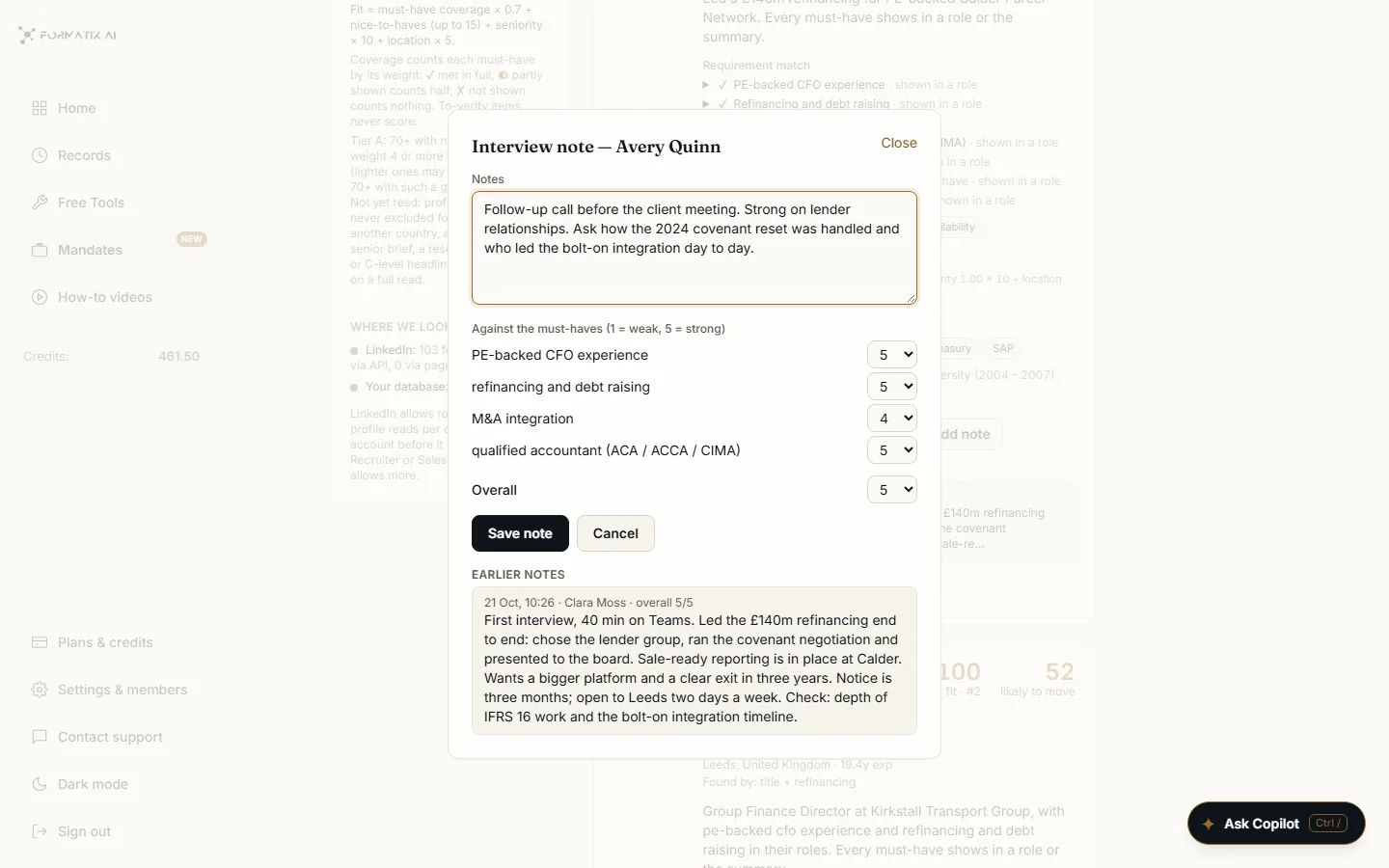
- Interview notes on each candidate, rated 1 to 5 against each must-have and overall, kept with the earlier notes, their author and the date.
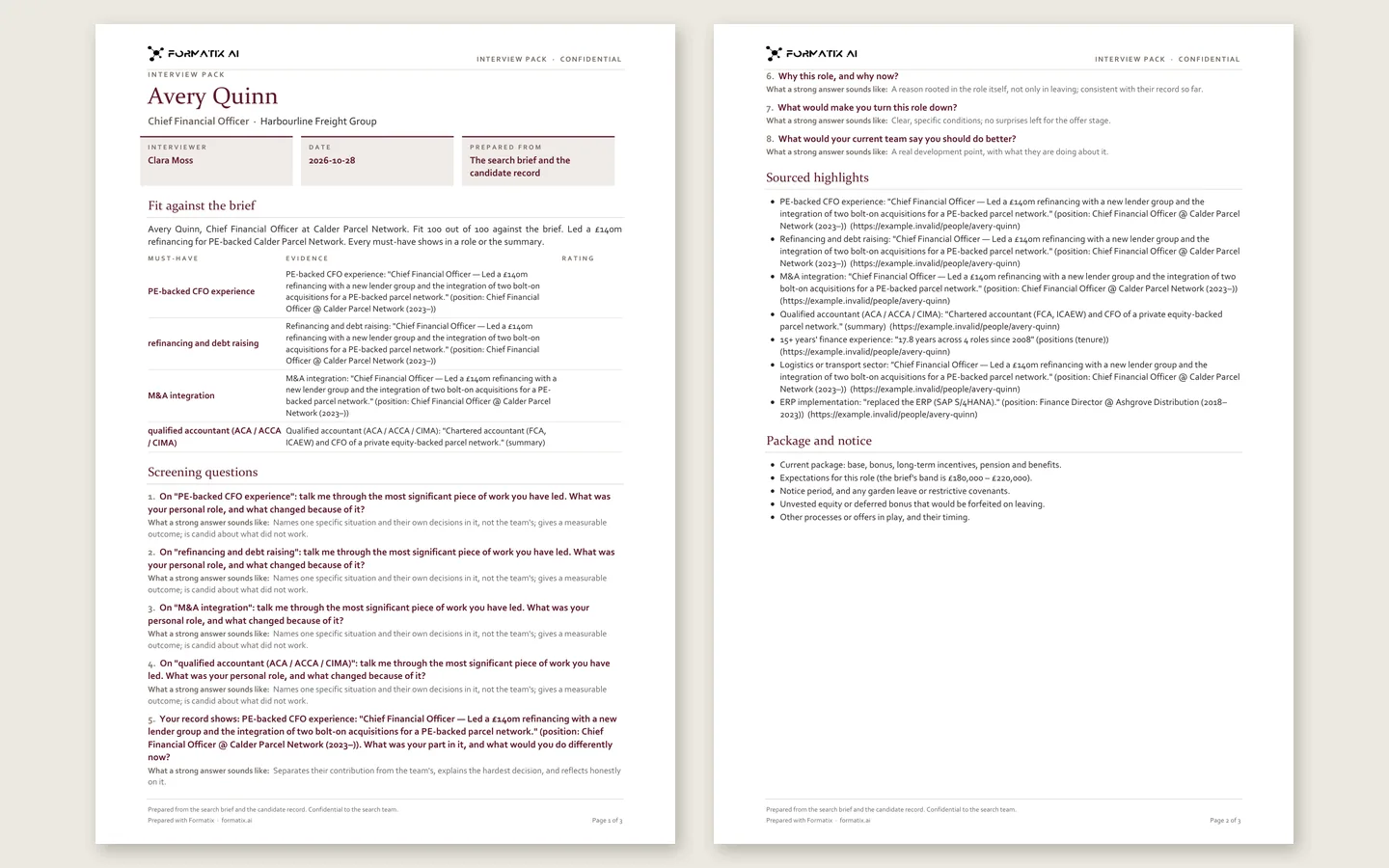
- An interview pack for each candidate in Word or PDF: fit against the brief, risk flags, screening questions written by AI from the brief (one for each must-have, with what a strong answer sounds like), sourced highlights, package and notice questions, and a page for notes.
The client report
- A Word longlist report for the client: the brief, the checklist, the method, and tier tables with ticks and the quotes behind them, plus a CSV export.
- The Client tab keeps the report, the job description and the client's contacts together.
Screens from a Formatix demo account. Halden & Co, the client and every candidate shown are invented.
How a search runs
Before the first search you connect your tools once: LinkedIn, your email, your ATS and your CV database. After that, each search follows the same order.
- 1
Start the mandate
Press New mandate and give it the role and the client. Paste the job description, upload it or use a LinkedIn job link, and add anything the client told you, such as companies to avoid.
- 2
Check the checklist
Formatix reads the brief and writes the must-haves and the nice-to-haves. Check it like a colleague's notes, change anything you like, then press Build longlist.
- 3
Review the longlist
Formatix finds people on LinkedIn through your own Chrome, and in your CV database and ATS. Everyone it finds is checked against the checklist; the best ten are at the top, each with the lines from their profile that prove each requirement.
- 4
Work the pipeline
Switch to the board. Click the circle on any card to see the evidence, then move the candidate on, or drop them with a reason.
- 5
Approve the outreach
Tick the people you want to approach and press Draft outreach: a connection note, an InMail and an email for each. Read them, change anything, then approve. Nothing is sent until you do.
- 6
Follow the replies
When someone replies, they appear under Replies with what they said. Mark them interested, or not, and they move along the pipeline.
- 7
Interview
Keep interview notes rated 1 to 5 against each must-have and overall, and make an interview pack in Word or PDF for each candidate.
- 8
Report to the client
The Client tab has the Word report, the job description and the client's contacts. The longlist also exports as CSV.
- 9
Launch the search
To announce the role, press Launch the search. Brand Hub opens with the brief already filled in from the mandate, and the search stays linked to it.
See how it works
How to use Mandates
From a brief to a rated longlist, outreach, replies and a client report.
From a mandate to a launched search
Launch a search straight from a mandate, with the brief already filled in.
Launch a search from one brief
The appointment brief, a page for the role, a LinkedIn carousel, a teaser, posts and adverts.
Where the candidates come from
A longlist draws on three places. Each candidate is scored against the brief, with the lines from their profile that prove each requirement.
LinkedIn
Through the consultant's own Chrome, or LinkedIn Recruiter results sent to Formatix. Approved LinkedIn messages open on the candidate's profile with the message filled in, and the consultant presses LinkedIn's own Send button.
Your CV database
The firm's own CV database in Formatix.
Your ATS or CRM
A connected JobAdder, Salesforce or HubSpot.
For formatting CVs, any other ATS or CRM works with Formatix by email ([email protected]), with no integration needed. See all integrations
The consultant stays in control
Formatix checks each longlist profile against the requirements in the brief and shows the lines from the profile behind each tick, so the consultant can see why someone appears on the list. The consultant reviews every profile and makes every decision.
Nothing is sent to a candidate until the consultant approves it. The consultant runs the interview and makes the call.
Mandates is a separate, optional part of the platform. Because comparing candidates against requirements is close to what Annex III, point 4 of the EU AI Act describes, the Mandates longlist check is being assessed on its own, ahead of 2 December 2027, when the high-risk rules for recruitment apply. We will publish the outcome on our EU AI Act page. CV formatting and document production do not depend on it.
Questions about Mandates
- Is Mandates an executive search CRM or ATS?
- Not a full CRM. For each search, Mandates keeps the candidates, a pipeline board from longlist to placement, interview notes and the client report. It works alongside your ATS or CRM rather than replacing it, and reads candidates from JobAdder, Salesforce or HubSpot.
- Where do the candidates on a mandate come from?
- From LinkedIn, through the consultant's own Chrome or LinkedIn Recruiter results sent to Formatix, from the firm's own CV database in Formatix, and from a connected JobAdder, Salesforce or HubSpot. Each one is scored against the brief, with the lines from their profile that prove each requirement.
- Can Formatix track candidates through a search, like an applicant tracking system?
- Yes, for each mandate. Candidates move on a pipeline board through Longlist, Shortlisted, Contacted, Interested, Submitted to client, Client interview, Offer and Placed, or are dropped with a reason. When a candidate replies to approved outreach, marking the reply interested or not moves them along the pipeline.
- Is anything sent to candidates automatically?
- No. Formatix drafts a LinkedIn note, an InMail and an email for each person you choose, and nothing is sent until the consultant approves it. On LinkedIn, the consultant presses LinkedIn's own Send button.
- Does Formatix help with candidate interviews?
- Yes. Consultants keep interview notes on each candidate, rated 1 to 5 against each must-have and overall, and can generate an interview pack in Word or PDF with fit against the brief, risk flags and screening questions written by AI from the brief, one for each must-have. The consultant runs the interview and makes the call.
- Is the Mandates longlist check high-risk under the EU AI Act?
- It is being assessed separately, ahead of 2 December 2027, when the Annex III recruitment rules apply. CV formatting and document production are assessed as not high-risk, and firms that do not use Mandates do not use this feature. The summary is on our EU AI Act page.
Run your next search in Mandates
Start free with 10 credits, no card needed, or book a demo and we will show you a search from the brief to the client report.