Recruitment · Interviews
Interviews: candidate notes you can check, ready for the client
Interviews turns a recorded candidate interview or reference call into notes a recruiter can send. Record in the browser on a laptop or phone, upload the recording or a transcript, or paste your own notes. Formatix writes the notes under your headings and checks every quote, word for word, against the transcript. A name, number or company the candidate never said is flagged for you to check. The notes then go into your firm's own report template, your ATS, or an email to the client.
No credit card. Your 10 free credits are valid for 14 days.
What Interviews does
Everything between the end of a candidate call and the note your client reads.
Capture the conversation
- Record in the browser on a laptop or a phone. The recording is kept on the device while you record, so a closed tab or a lost connection does not lose the interview.
- Or upload the recording, or a transcript downloaded from Teams, Zoom or Google Meet (Word, PDF, text, VTT or SRT), or paste your own notes.
- Connect Outlook or Google Calendar to see the interviews coming up.
- Before anything starts, you confirm the candidate agreed to the call being recorded and processed by AI.
Notes you can check
- Notes under your firm's own headings, or the standard ones: summary, motivation, experience, package, notice, location, concerns and next steps.
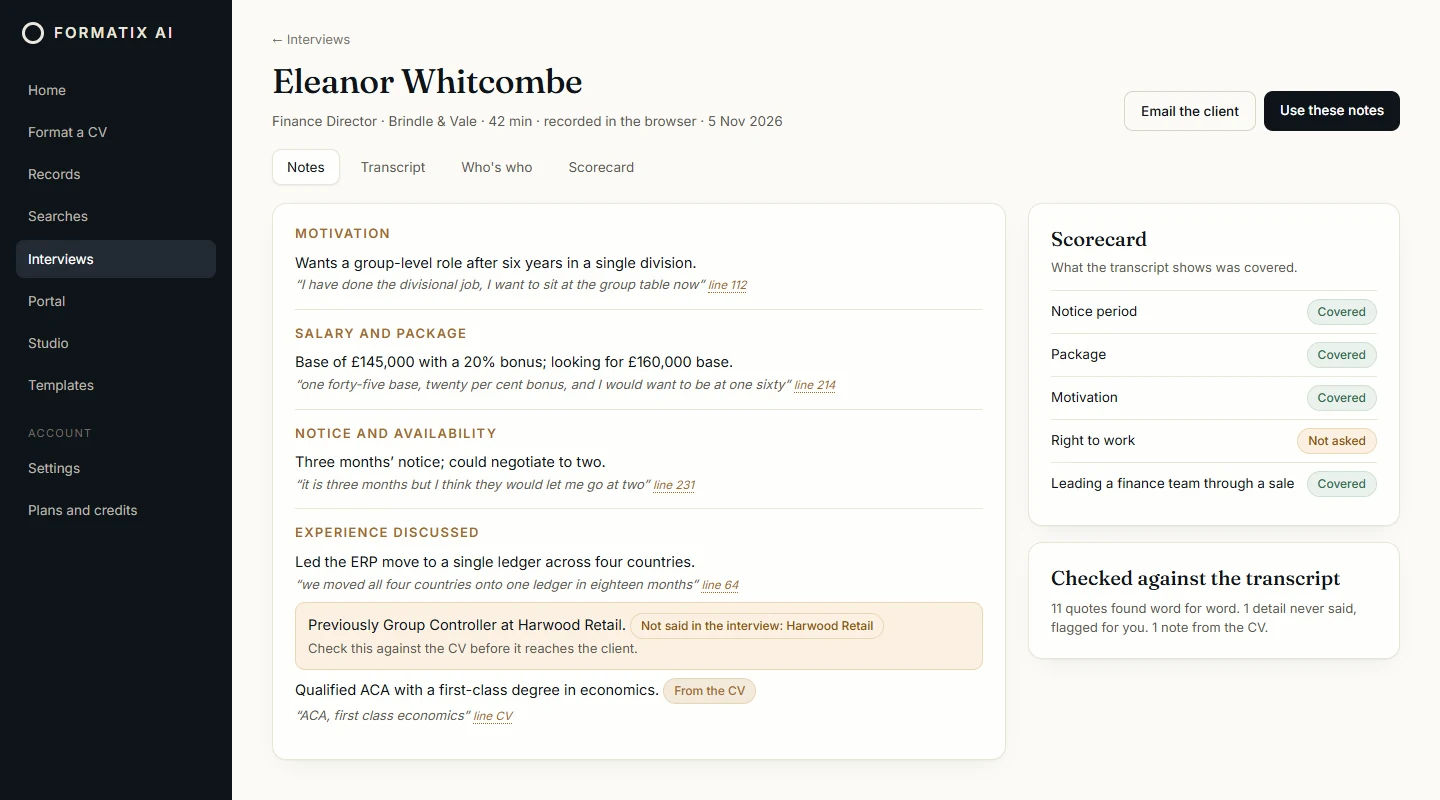
- Every quote is checked word for word against the transcript. A note whose quote cannot be found is marked for you to check rather than passed as fact.
- Names, companies and numbers that were never said in the interview are flagged. Details taken from the CV rather than the call are marked as coming from the CV.
- Who's who: name each speaker once, and every note links back to the line in the transcript it came from.
During the call
- Prepare the questions from the brief before the call. The must-asks (notice period, package, right to work and motivation) are always there.
- While you record, Formatix listens each minute and ticks off the questions that came up, so you can see what is still to cover before the call ends. You can tick any item yourself.
- After the call, the scorecard shows which questions were asked and answered, with the lines from the transcript.
Reference calls
- Switch the interview to a reference call and add the referee's name and how they know the candidate.
- The notes use reference headings: how they worked together, strengths, development areas, performance, working style, why the candidate left, whether they would hire them again, and any concerns.
After the call
- Use the notes in a client report in your firm's own Word, PowerPoint or PDF template, with the CV.
- Compare the candidates for one role side by side, export the grid to Excel, or share it with the client on your client portal.
- Ask a question across all your interviews, such as who can start in March, and get answers with the quotes behind them.
- Draft the email to the client with the notes, and save the notes to Manatal or Ezekia after you have read them.
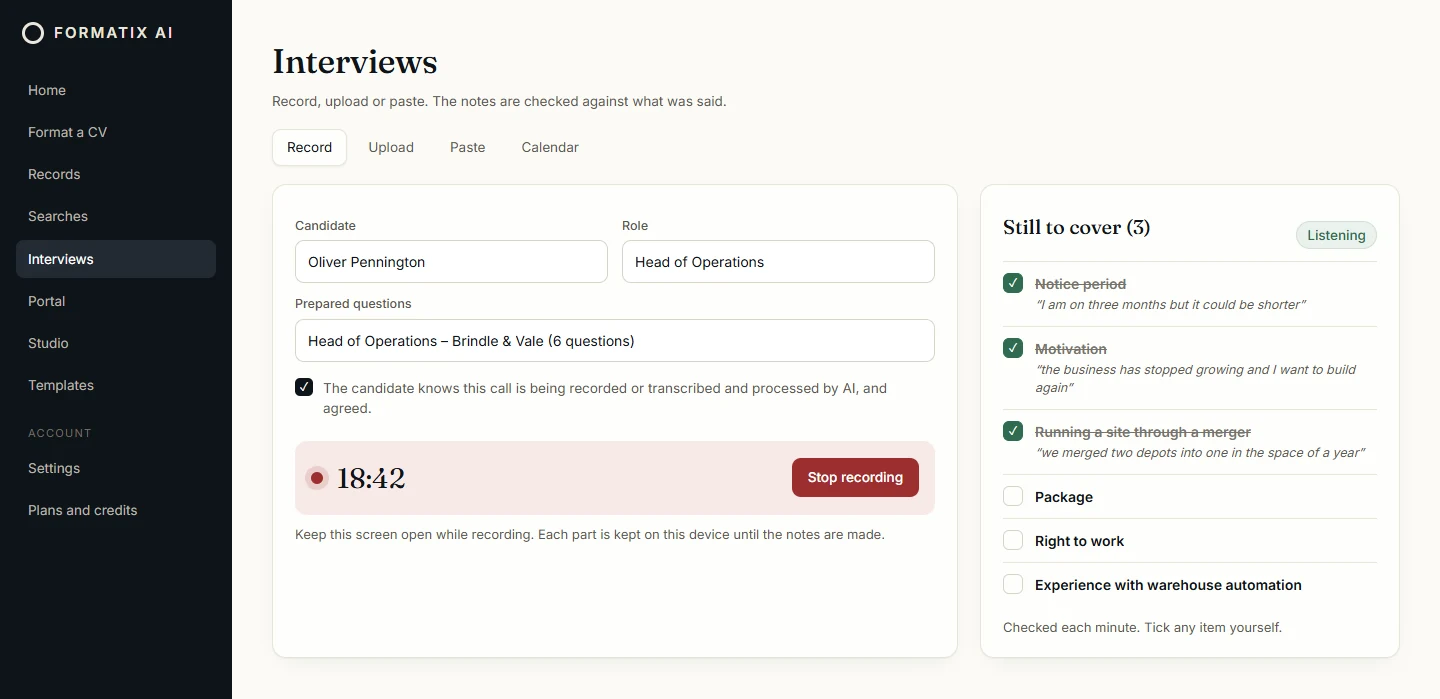
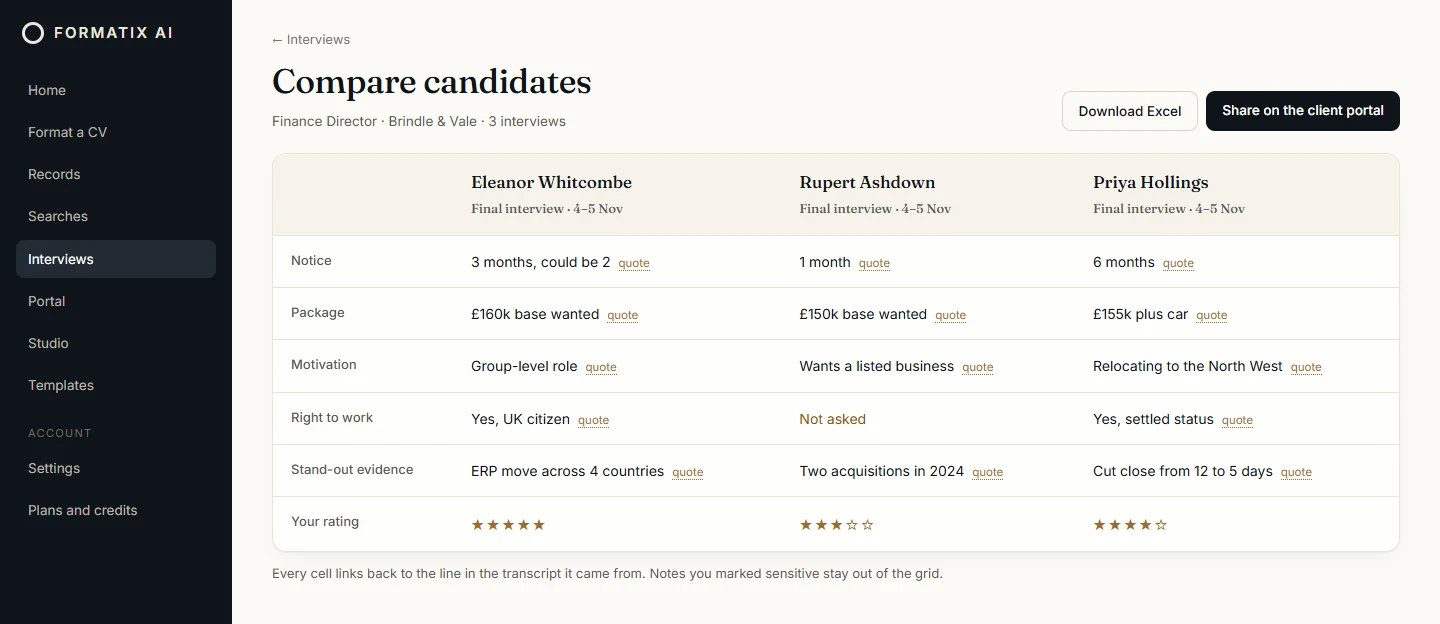
Illustrations of Formatix screens. Halden & Co, Brindle & Vale and every candidate shown are invented.
How an interview runs
The same four steps for a first interview, a final interview or a reference call.
- 1
Set it up
Add the candidate's name and the role, paste the brief or pick your prepared questions, and confirm the candidate agreed.
- 2
Record or upload
Record in the browser and watch the list of questions still to cover, or upload the recording or transcript afterwards.
- 3
Check the notes
Read the notes under your headings. Anything flagged, such as a quote that is not in the transcript or a detail never said, is shown for you to check.
- 4
Send it on
Put the notes into a client report in your template, save them to your ATS, compare candidates, or draft the email to the client.
Works with the tools you already use
Interviews fits around the calls, calendars and systems a recruiter already has.
Teams, Zoom and Google Meet
Upload the recording or the transcript file from the call, or record in the browser while you talk.
Outlook and Google Calendar
See the interviews coming up from your calendar.
Manatal and Ezekia
Start an interview from a search, and save the notes to the candidate's record after you have reviewed them.
Notes can also go into any Formatix template: Word, PowerPoint, Excel or PDF. See all integrations
Checked, not invented
AI notes are only useful if you can trust them. Formatix checks every quote against the transcript, flags names, numbers and companies that were never said, and marks what came from the CV, so nothing reaches a client without you seeing where it came from.
Formatix does not rank or reject candidates. The recruiter reads the notes, makes the judgement and decides what the client sees.
The recording is deleted as soon as the transcript is saved. The live prompts during a call keep nothing: each minute of audio is checked and deleted at once.
Questions about Interviews
- What is Formatix Interviews?
- An AI interview note taker for recruiters and executive search firms. It turns a recorded candidate interview or reference call into notes under your headings, checks every quote against the transcript, and puts the notes into your firm's own client report template, your ATS or an email to the client.
- Does it make things up?
- It is built not to. Every quote in the notes is checked word for word against the transcript, and any name, company or number that was never said in the interview is flagged for you to check. Details taken from the CV are marked as coming from the CV.
- Can I use it with Teams, Zoom or Google Meet?
- Yes. Upload the recording or the transcript file from Teams, Zoom or Google Meet, or record in the browser on your laptop while you talk. You can also connect Outlook or Google Calendar to see the interviews coming up.
- Does it work for reference checks?
- Yes. Switch the interview to a reference call and add the referee. The notes use reference headings, such as strengths, development areas, why the candidate left and whether the referee would hire them again.
- How is it different from Metaview or BrightHire?
- Those tools are interview note takers. Formatix Interviews takes notes too, and then does what a recruiter or search firm does next: a client report in your own branded template, a comparison of the candidates for one role, a reference check, an email draft to the client and the notes in Manatal or Ezekia. Formatix does not join calls with a bot: you record in the browser or upload the recording or transcript.
- Is the recording kept?
- No. The recording is deleted as soon as the transcript is saved. The transcript and the notes stay in your Formatix account, under your firm's retention settings.
- Does the candidate need to agree?
- Yes. Before a recording or upload starts, you confirm that the candidate (or the referee) knows the call is being recorded or transcribed and processed by AI, and agreed.
- Is it included in the free trial?
- Yes. Interviews is on every Formatix plan, including the free trial. Like the rest of Formatix it runs on credits: see the pricing page.
Take the notes on your next candidate call
Start free with 10 credits, no card needed, or book a demo and we will show you an interview from the call to the client report.