Executive search · Client portal
Client portal: one branded place for your candidates and clients
The client portal is a private website in your firm's brand where candidates and clients sign in with an emailed link, with no password to remember. Candidates give consent, upload their CV and psychometric reports, answer your questionnaire, sign documents and book interview slots. Clients follow each candidate's stage, read the reports you publish and give their feedback. Your team runs it all from a back office inside Formatix.
No credit card. Your 10 free credits are valid for 14 days.
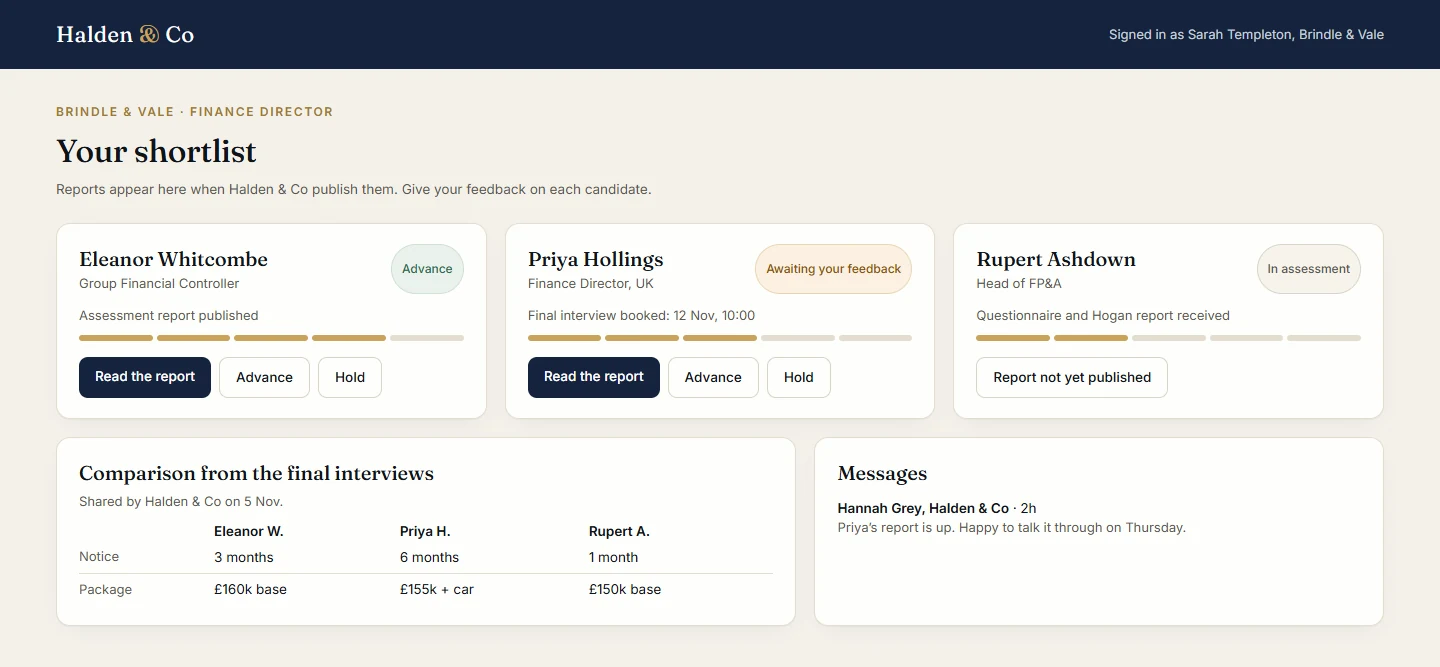
What the client portal does
It replaces the email chains, shared folders and separate portal tools around an assessment or a shortlist.
For your candidates
- Sign in with a link sent by email. Give consent, upload the CV and any Hogan or other psychometric report, and answer your questionnaire.
- Sign documents online. Each signature produces a signed PDF with a certificate page.
- Book an interview slot from the times you offer, with a calendar invite and reminders.
For your clients
- See each candidate's stage at a glance, and read only the reports you have published.
- Give feedback on each candidate (advance, hold or decline) and send messages to your team.
- See the comparison of the candidates for a role when you share it from Interviews.
For your team
- A back office for each engagement: add candidates and client contacts, or import them from a linked Manatal or Ezekia search.
- Send invites in your brand, collect files and questionnaire answers, and keep private assessor notes that clients never see.
- Produce the assessment report in one click from the CV, the psychometric report, the questionnaire answers, your notes and the interview, in your own template. Publish it to the client when you are ready.
- Connect Outlook or Google Calendar for interview slots.
In your brand
- Your logo, colours and fonts, taken from your Formatix brand kit, on every page candidates and clients see.
- Your workspace in Formatix can wear the same brand, so your team works in it too.
- Records are deleted automatically after the retention period you set, to match your client contracts.
- Your own web address for the portal is available on request.
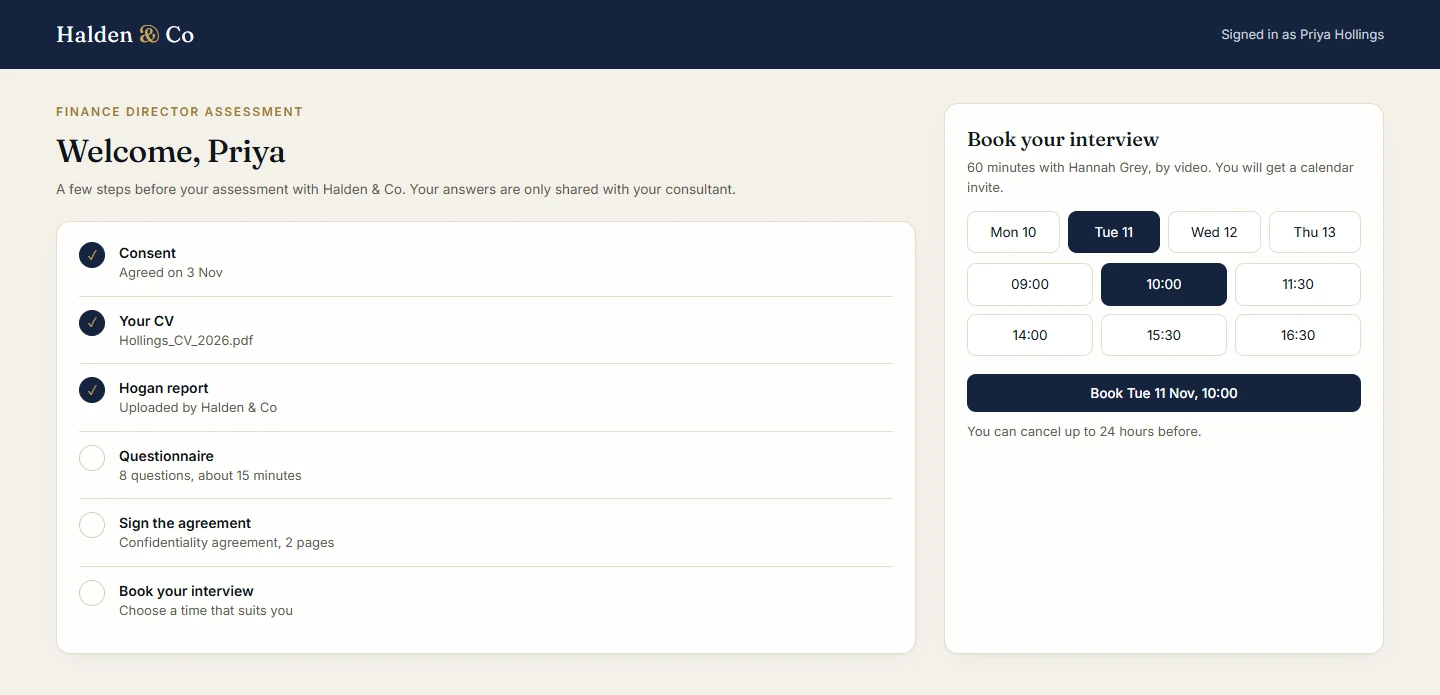
Illustrations of Formatix screens. Halden & Co, Brindle & Vale and every candidate shown are invented.
How an engagement runs
The same order for an assessment, a shortlist or a board search.
- 1
Open an engagement
Create it in the back office, link it to the search in Manatal or Ezekia if you use one, and add the client contacts.
- 2
Invite the candidates
Add them or import them from the search. Each one gets an invite in your brand and signs in with an emailed link.
- 3
Candidates complete their part
Consent, CV, psychometric report, questionnaire, signatures and an interview slot, all in one place.
- 4
Write and publish the report
Make the assessment report in your template in one click, check it, then publish it to the client.
- 5
The client responds
The client reads the report, follows each candidate's stage and gives feedback to advance, hold or decline.
Private by design
Sign-in links work once and expire, so there are no passwords to share or forget. Clients only see the reports you publish, and your private assessor notes stay inside your team.
Each firm's portal holds only that firm's engagements. Records are deleted automatically after the retention period you set.
Questions about the client portal
- What is the Formatix client portal?
- A private website in your firm's brand where candidates and clients sign in with an emailed link. Candidates upload their CV and psychometric reports, answer questionnaires, sign documents and book interviews. Clients follow each candidate, read the reports you publish and give feedback. Your team runs it from a back office in Formatix.
- Do candidates or clients need a password?
- No. They sign in with a link sent to their email address. The link works once and expires.
- Is it a SuiteDash alternative for recruiters?
- Yes, for search and assessment work. Instead of a general client portal set up by hand, the Formatix portal is built around candidates and clients: consent, CVs and psychometric reports, questionnaires, e-signatures, interview booking, published reports and client feedback, with the reports made in your own template.
- Does it work with our ATS?
- The portal can import candidates from a linked search in Manatal or Ezekia. Interview notes can be saved to the candidate's record after you have read them.
- Can the portal use our own web address?
- Yes, on request. Every portal also has its own address on Formatix in your firm's name.
- How long is candidate data kept?
- For the retention period you set. Records are then deleted automatically, so the portal follows the terms in your client contracts.
- Is it included in the free trial?
- Yes. The client portal is on every Formatix plan, including the free trial. Book a demo if you would like us to set it up in your brand with you.
Give your next engagement a portal in your brand
Start free with 10 credits, no card needed, or book a demo and we will set up a portal in your brand with you.