Board and CEO candidate reports
Board and CEO candidate reports, one-page executive profiles and blind profiles, in your house style
At board level the candidate document is read by a chair, a nominations committee or an investor, often on a tablet and often in a few minutes. It has to be short, exact and unmistakably from your firm. Formatix turns a candidate's CV and your notes into your board candidate report, a one-page executive profile or an anonymised blind profile, in Word, PowerPoint or PDF, with your typography and layout intact.
No credit card. Your 10 free credits never expire.
Why board papers take so long
A CEO or non-executive search produces a lot of paper for a small number of readers. The longlist goes to the chair as blind profiles. The shortlist goes to the nominations committee as one-page profiles. The finalists get a fuller candidate report with the career narrative, board and committee roles, and the consultant's view. Each is a different layout, and each is rebuilt by hand from the same CV.
The one-page profile is the hardest. A senior executive's career has to fit a page. Thirty years of roles, several non-executive seats and a list of trusteeships do not fit without editing, and in Word that means shrinking fonts and nudging text boxes until the footer stops moving. Then a committee member asks for the same candidate in the PowerPoint pack and it starts again.
Blind profiles add risk. Removing a name is easy; removing the employer, a job title that only one person has held, and the contact details in the footer is not. In a confidential CEO search, a single missed detail is the kind of mistake nobody wants to explain.
What goes in
The candidate's CV
A CV, a biography or a LinkedIn PDF export, in any layout and any of 40+ languages.
Your notes
Your view on motivation, fit with the brief, and anything you want the board to read. It appears in your words, under your headings.
Board and committee roles
Non-executive seats, committee chairs and trusteeships, extracted into their own section when your template has one.
A headshot, if you use one
If your profile layout includes a photo, it is placed in the frame your template defines.
What comes out
One-page executive profile
The career on a single page in your layout, as Word, PowerPoint or PDF, with each section filled to the space your template gives it.
Full board candidate report
A longer DOCX for finalists: career narrative, board roles, education, and your assessment in your structure.
Blind profile
A version built on a blind template that has no field for the name, contact details or photo, so they are never placed. Employers can be described rather than named if your template asks for it.
The committee pack slide
The same candidate as a PowerPoint slide for the nominations committee pack, from the same inputs.
A sample one-page CEO profile
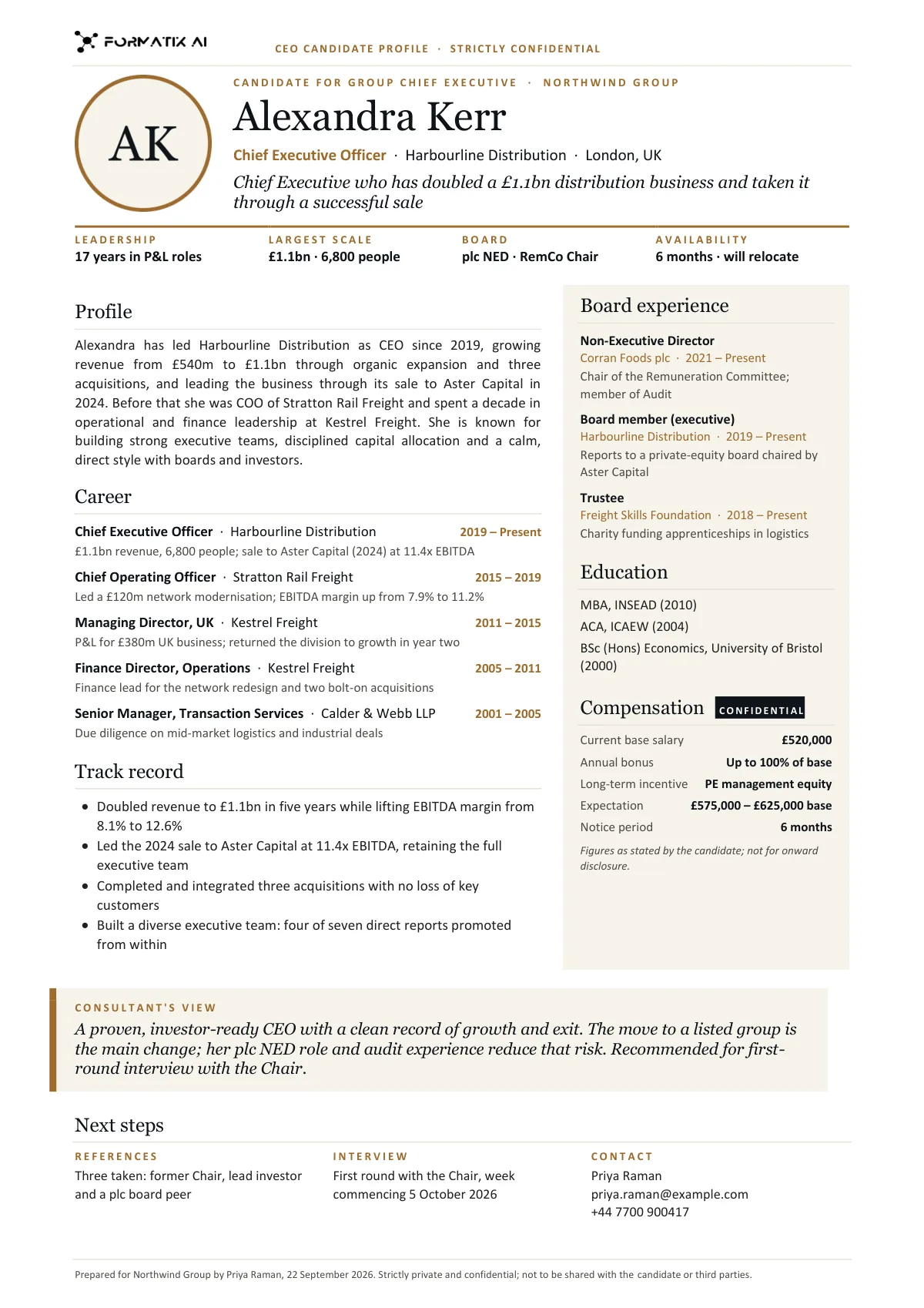
This one-page profile was produced for a fictional CEO candidate on a Formatix-owned demo template. It shows the career summary, board roles and a short consultant view fitted to a single page. Your profile would follow your own template.
How it works
- 1
Upload your board profile template
Give Formatix a profile or report your firm already sends, with the candidate removed or replaced by a dummy. It becomes a template with your fonts, colours and layout. Keep a separate blind version and a one-page version if you use them.
- 2
Add the CV and your notes
One candidate at a time, or up to 20 files in a batch for a longlist.
- 3
Choose the document
Run the same candidate through the one-pager, the full report or the blind profile. Each template has its own instructions for how much goes into each section.
- 4
Check and send
Read the Word or PowerPoint file, edit anything you want, and send it on as it is or as a PDF. For blind profiles, read every line before it leaves the firm.
What stays exactly as your brand
Typography
Your heading and body typefaces, sizes and colours, exactly as in your template.
The page
Margins, columns, rules, the position of the photo frame and the logo. A one-page template stays one page wide and one page long.
Section order
Current role first or career chronology first, board roles before or after education: your order, every time.
Your house wording
Fixed labels, disclaimers and confidentiality lines in your template stay word for word.
Who it is for
Board and CEO practices
Search consultants running chair, CEO, CFO and non-executive mandates, where the nominations committee reads every page.
Retained search firms generally
Any firm that sends one-page profiles alongside a shortlist and wants them identical in layout across consultants.
Company secretaries and in-house teams
In-house teams preparing candidate papers for their own board appointments.
Portfolio talent teams
Teams presenting leadership candidates to investment committees and portfolio boards in a house format.
Compared with doing it by hand, or with a CV formatter
Board documents are usually built by hand in Word and PowerPoint. CV formatters such as Allsorter, HireAra and CV-Transformer reformat the CV into a house template; they stop at the CV, and a board pack needs more than one document per candidate.
| Formatix | By hand in Word or PowerPoint | CV-only formatters | |
|---|---|---|---|
| One-page profile | Filled to the space your template gives each section | Shrinking fonts until it fits | Usually a multi-page CV |
| Blind profile | A separate blind template with no name, contact or photo fields | Manual redaction, easy to miss a detail | Anonymisation of the CV, where offered |
| Committee pack in PowerPoint | Same inputs, your slide design | Rebuilt by hand | Rarely |
| Consultant's view | Placed in your words under your headings | Typed in | Not covered |
| Output formats | Word, PowerPoint, Excel and PDF | Whatever you build | Mostly Word or PDF |
| Cost | From £20 a month; 10 free credits to start | Consultant and associate time | Often quote-only |
One-page profile
- Formatix:
- Filled to the space your template gives each section
- By hand:
- Shrinking fonts until it fits
- CV-only formatters:
- Usually a multi-page CV
Blind profile
- Formatix:
- A separate blind template with no name, contact or photo fields
- By hand:
- Manual redaction, easy to miss a detail
- CV-only formatters:
- Anonymisation of the CV, where offered
Committee pack in PowerPoint
- Formatix:
- Same inputs, your slide design
- By hand:
- Rebuilt by hand
- CV-only formatters:
- Rarely
Consultant's view
- Formatix:
- Placed in your words under your headings
- By hand:
- Typed in
- CV-only formatters:
- Not covered
Output formats
- Formatix:
- Word, PowerPoint, Excel and PDF
- By hand:
- Whatever you build
- CV-only formatters:
- Mostly Word or PDF
Cost
- Formatix:
- From £20 a month; 10 free credits to start
- By hand:
- Consultant and associate time
- CV-only formatters:
- Often quote-only
Detailed comparisons: Allsorter, HireAra, CV-Transformer.
Pricing in one line
Plans start at £20 a month for 20 credits, and every new account gets 10 free credits with no card and no expiry. Full details are on the pricing page.
Questions people ask
- Can Formatix fit a long executive career onto one page?
- It fills your one-page template according to that template's instructions, for example the last three roles in full and earlier roles as a single line each. The result is an editable Word or PowerPoint file, so you can adjust what made the cut before sending.
- How do blind profiles work?
- You keep a separate blind template that simply has no field for the candidate's name, contact details or photo, so those are never placed. The template can also ask for employers to be described instead of named, for example 'FTSE 250 industrial group'. You should still read every blind profile before it goes out; confidentiality is the consultant's call.
- Can the same candidate appear as a one-pager and a full report?
- Yes. Run the same CV and notes through each template. Each document follows its own layout and instructions.
- Can the committee receive the profiles in PowerPoint?
- Yes. Formatix fills PowerPoint templates as well as Word and Excel, and any of them can be exported as PDF.
- Does Formatix write the assessment of the candidate?
- No. The consultant's view comes from your notes, in your words. Formatix places it in your layout and is instructed not to add opinions of its own.
- Does it work with our ATS?
- Formatix has a JobAdder integration and an API. With any other system you can upload files directly or connect through the API.
- Where is the data processed?
- In the UK and EU, under GDPR. Nothing you upload is used to train AI models.
Send the board the profile they expect from you
Upload a one-page profile your firm already uses and run a candidate through it. Ten free credits, no card, no expiry.
Other executive search documents
Executive assessment reports
Interview notes, the CV, your competency ratings and psychometric results laid into your firm's assessment report, with rating bars drawn from your scores.
Read moreShortlist and longlist decks
One slide per candidate in your PowerPoint design, comparison slides and a matching Excel tracker, from the same batch of CVs.
Read moreSuccession planning and talent-review packs
For CHROs and talent teams: 9-box grids, succession slates with readiness ratings, successor profiles and promotion cases in your template.
Read morePsychometric results in your report
Results you hold from Hogan, SHL, Saville Wave, DISC and similar instruments, charted in your house style inside your own report.
Read more