Shortlist decks
Longlist and shortlist decks in PowerPoint, built from the candidates' CVs, in your own deck design
In most retained searches the shortlist reaches the client as a deck, presented at the progress meeting and forwarded around the leadership team afterwards. Formatix builds that deck from the candidates' CVs and your notes, one slide per candidate in your own PowerPoint design, with an Excel tracker from the same batch so the deck and the tracker always agree.
No credit card. Your 10 free credits never expire.
The deck the night before the progress meeting
A shortlist deck looks simple: a title slide, a slide per candidate, a comparison slide and a next-steps slide. Building one is not. Each candidate slide needs the current role, a career summary, the key achievements against the brief and your commentary, trimmed to fit placeholders that were designed for a tidy candidate, not a real one with eleven roles.
Then the search moves. Two candidates withdraw, three are added from the longlist, and the client wants the deck again next week with the new names and the updated comments. The Excel tracker that the researcher maintains drifts away from the deck, and someone spends the morning of the meeting reconciling the two.
Longlists are worse: thirty or forty candidates, each needing a line or a slide, usually assembled by a researcher copying from LinkedIn and CVs into a template last updated by someone who has since left.
What goes in
The candidates' CVs
PDF or Word, in any layout and any of 40+ languages, up to 20 files in one batch.
Your notes on each candidate
Commentary, motivation, status and anything else you show the client. Your wording is kept.
The brief, for comparison slides
The criteria from the brief that your comparison slide sets candidates against, if your deck has one.
Your deck and tracker templates
The PowerPoint deck and Excel tracker you already use, converted once into Formatix templates.
What comes out
The shortlist deck (PPTX)
One slide per candidate in your slide design, fully editable in PowerPoint.
Comparison slides
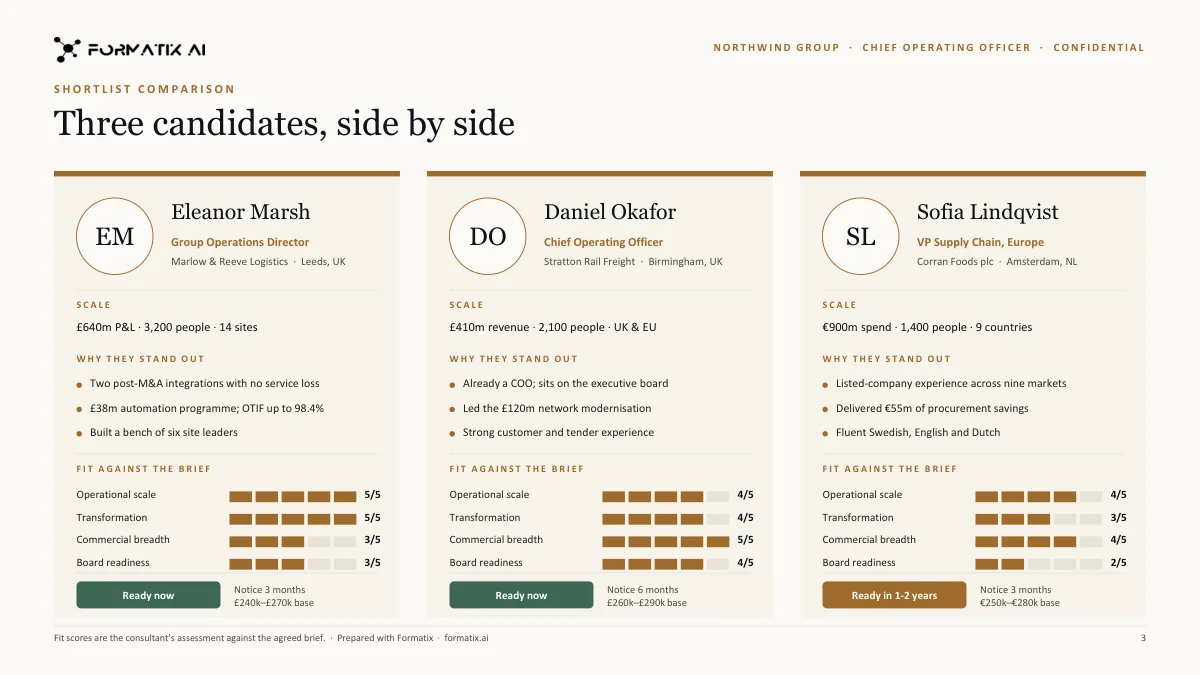
Candidates side by side against the criteria your template defines, using the information from their CVs and your notes.
An Excel tracker (XLSX)
One row per candidate from the same batch, so the tracker matches the deck.
A PDF for forwarding
The deck as a PDF for clients who forward it around the leadership team.
A sample shortlist slide
This slide was produced for a fictional candidate on a Formatix-owned demo deck. It shows the kind of candidate slide Formatix fills from a CV and consultant notes. Your deck would keep your own slide masters and design.
How it works
- 1
Upload your deck
Give Formatix the shortlist deck you already present, with candidate details removed or replaced. It becomes a template that keeps your slide masters, fonts, colours and placeholder positions. Do the same with your Excel tracker.
- 2
Drop the shortlist
Upload the candidates' CVs and your notes, up to 20 files per batch.
- 3
Get the deck and the tracker
Formatix fills a slide per candidate and a row per candidate from the same extraction.
- 4
Edit, present, repeat
Refine the slides in PowerPoint. When the shortlist changes, run the new candidates through the same template rather than rebuilding the deck.
What stays exactly as your brand
Slide design
Your masters, layouts, colours and fonts. The deck looks like your deck because it is your deck.
Placeholder positions
Photos, logos, text boxes and tables stay where your designer put them.
Tracker columns
Your Excel column order, headings and formatting, exactly as you use them.
Fixed slides
Title, methodology and next-steps slides in your template stay as they are.
Who it is for
Retained search consultants
Consultants presenting shortlists at progress meetings who want the deck done before the meeting prep, not instead of it.
Researchers and associates
The people who currently build longlists and trackers by hand, and who would rather be researching.
In-house executive recruiting teams
Teams presenting candidate slates to hiring executives in the company's own deck design.
Interim and board practices
Practices that present several candidates side by side and need the comparison to be consistent.
Compared with doing it by hand, or with a CV formatter
Shortlist decks are usually built by hand in PowerPoint. CV formatters such as Allsorter, HireAra and CV-Transformer reformat each CV into a house template; they stop at the CV, and a shortlist is a set of candidates, not a single document.
| Formatix | By hand in Word or PowerPoint | CV-only formatters | |
|---|---|---|---|
| One slide per candidate | Filled from the CV and your notes in your deck design | Copied and trimmed by hand | Not produced: output is a CV per candidate |
| Excel tracker | From the same batch, so it matches the deck | Maintained separately | Not produced |
| Updating the shortlist | Run new candidates through the same template | Rebuild slides | Reformat new CVs, then rebuild slides |
| Your slide masters | Kept | Kept | Not applicable |
| Output formats | PowerPoint, Excel, Word and PDF | Whatever you build | Mostly Word or PDF |
| Cost | From £20 a month; 10 free credits to start | Consultant and researcher time | Often quote-only |
One slide per candidate
- Formatix:
- Filled from the CV and your notes in your deck design
- By hand:
- Copied and trimmed by hand
- CV-only formatters:
- Not produced: output is a CV per candidate
Excel tracker
- Formatix:
- From the same batch, so it matches the deck
- By hand:
- Maintained separately
- CV-only formatters:
- Not produced
Updating the shortlist
- Formatix:
- Run new candidates through the same template
- By hand:
- Rebuild slides
- CV-only formatters:
- Reformat new CVs, then rebuild slides
Your slide masters
- Formatix:
- Kept
- By hand:
- Kept
- CV-only formatters:
- Not applicable
Output formats
- Formatix:
- PowerPoint, Excel, Word and PDF
- By hand:
- Whatever you build
- CV-only formatters:
- Mostly Word or PDF
Cost
- Formatix:
- From £20 a month; 10 free credits to start
- By hand:
- Consultant and researcher time
- CV-only formatters:
- Often quote-only
Detailed comparisons: Allsorter, HireAra, CV-Transformer.
Pricing in one line
Plans start at £20 a month for 20 credits, and every new account gets 10 free credits with no card and no expiry. Full details are on the pricing page.
Questions people ask
- Does Formatix keep our PowerPoint slide masters?
- Yes. The template is made from your own deck, so the masters, layouts, fonts, colours and placeholder positions are preserved. The output is a normal PPTX you can edit.
- How many candidates can go into one deck?
- You can upload up to 20 files in one batch. For a longer longlist, run it in several batches.
- Can it produce a comparison slide?
- Yes, if your deck has one. The template defines the criteria, and the slide is filled from the candidates' CVs and your notes. Check it before presenting: the comparison is only as good as the material behind it.
- Can we get an Excel tracker as well?
- Yes. Convert your tracker into a template once and each batch can fill it with one row per candidate.
- What happens when the shortlist changes?
- Run the new candidates through the same template and add their slides to the deck. Your earlier slides, including any edits you made, are untouched.
- Can candidates' CVs be in different languages?
- Yes. Formatix works in 40+ languages, so an international shortlist can go into a single English deck.
- Does it connect to our ATS?
- Formatix has a JobAdder integration and an API. Otherwise you can upload CVs directly, or work from ChatGPT, Claude or Perplexity through the Formatix MCP server.
Give the progress meeting your attention, not the deck
Upload the shortlist deck you already present and run your current shortlist through it. Ten free credits, no card.
Other executive search documents
Executive assessment reports
Interview notes, the CV, your competency ratings and psychometric results laid into your firm's assessment report, with rating bars drawn from your scores.
Read moreBoard and CEO candidate reports
One-page executive profiles, full candidate reports for the nominations committee and blind profiles for confidential longlists.
Read moreSuccession planning and talent-review packs
For CHROs and talent teams: 9-box grids, succession slates with readiness ratings, successor profiles and promotion cases in your template.
Read morePsychometric results in your report
Results you hold from Hogan, SHL, Saville Wave, DISC and similar instruments, charted in your house style inside your own report.
Read more