For CHROs and talent teams
Succession planning reports and talent-review packs, in your company's own template
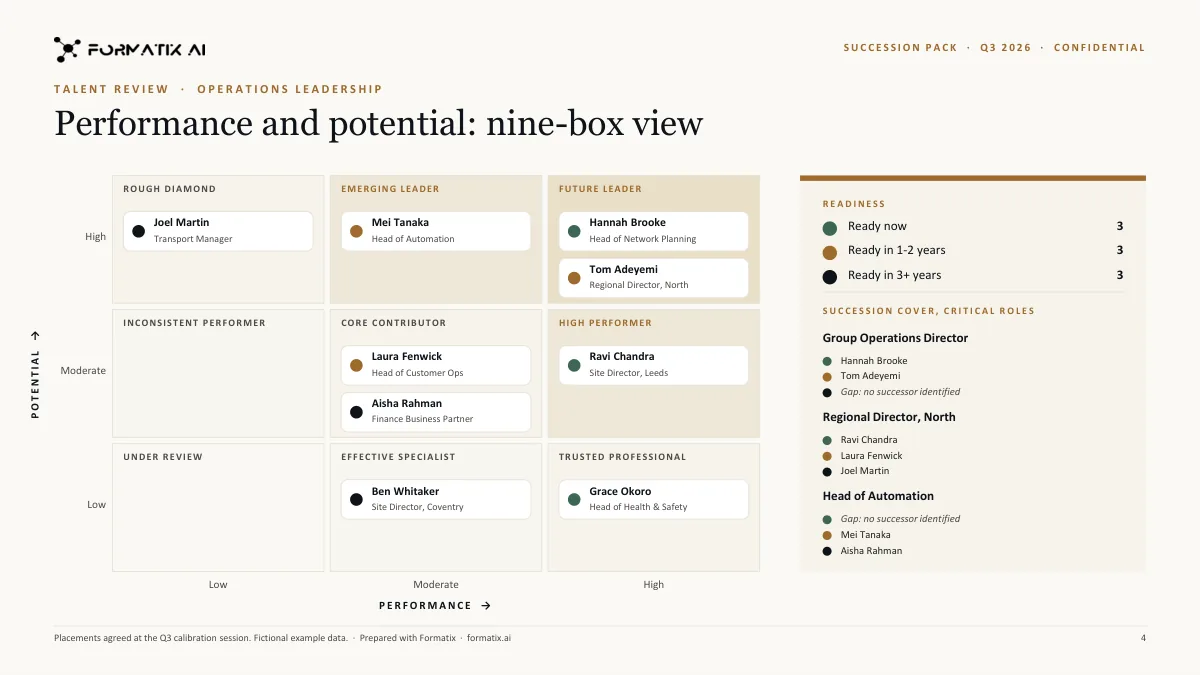
For a CHRO or head of talent, the talent review is one of the few HR documents the board reads closely. Formatix takes what your team already holds, internal profiles or CVs, the performance and potential ratings agreed in calibration, readiness assessments and development notes, and produces the pack in your company's PowerPoint, Word or Excel template: a 9-box grid with each name where calibration placed it, a succession slate for each critical role with readiness ratings, and a one-page profile for each successor.
No credit card. Your 10 free credits never expire.
After calibration, the pack
The hard part of a talent review is the conversation: the calibration sessions where leaders agree who sits where, who is ready now and who is two years away. Then the pack has to be built, and that is where the days go. The HR system's export does not look like a board slide. The 9-box is drawn by hand in PowerPoint and names are dragged from box to box as the discussion changes. Successor profiles were last updated at the previous review.
Each HR business partner writes promotion cases and successor profiles slightly differently, so the pack that reaches the executive committee is a patchwork. When the nominations committee asks for the CFO succession slate on one page, someone rebuilds it from the spreadsheet on the evening before the meeting.
The data is sensitive, and the people building the pack are senior. Neither is a good reason for them to spend their time aligning text boxes.
What goes in
Internal profiles or CVs
An internal profile, CV or career summary for each person, in PDF or Word, in any of 40+ languages.
Calibrated ratings
The performance and potential ratings, and the readiness category, agreed in calibration. Formatix places people where you placed them; it does not rate anyone.
Development notes
Strengths, development actions and the moves being considered, in your words.
Promotion case notes
The line manager's or HRBP's case for a promotion, to be laid into your promotion case template.
What comes out
9-box slide
Your 9-box design with each person's name in the box your calibration agreed, using your own axis labels.
Succession slates
One slide or page per critical role, listing successors with the readiness ratings you supplied.
Successor profiles
A one-page profile per successor in your template, from their internal profile and your notes.
Promotion cases and a tracker
Promotion case documents in Word and an Excel tracker with one row per person.
A sample talent-review slide
This slide was produced on a Formatix-owned demo template for a fictional leadership team. It shows a 9-box grid filled from placements supplied as input. Your pack would use your own design and your own axis labels.
How it works
- 1
Start from last cycle's pack
Upload the talent-review deck or succession report you used last time, with names removed or replaced. Formatix turns it into a template, keeping your design, your 9-box layout and your readiness labels.
- 2
Add this cycle's inputs
Profiles, calibrated ratings, readiness and notes, up to 20 files per batch.
- 3
Get the pack
The 9-box, the succession slates, the successor profiles and the tracker, filled from the same inputs so they agree with each other.
- 4
Review before it goes to the board
The pack is editable PowerPoint, Word and Excel. Check every placement against your calibration record before it circulates.
What stays exactly as your brand
Your company template
Corporate fonts, colours, slide masters and the classification label your board papers carry.
Your 9-box
Your axis names, box labels and colours, whether you call the top-right box 'Star' or 'Future leader'.
Your readiness scale
Ready now, 1 to 2 years, 3 to 5 years, or whatever categories your framework uses.
Your structure
Role by role, business unit by business unit or level by level: the pack follows the order of your template.
Who it is for
CHROs and chief people officers
Leaders who present succession to the board and the nominations committee and want the pack to be consistent every cycle.
Heads of talent and leadership development
The owners of the talent-review process, who today assemble the pack after calibration.
HR business partners
HRBPs writing successor profiles and promotion cases who want them in one format across the business.
Search and advisory firms
Firms running succession or leadership-assessment projects for clients and delivering the output in the client's template.
Compared with doing it by hand, or with a CV formatter
Talent-review packs are usually assembled by hand in PowerPoint from spreadsheet exports; the talent modules in HR systems produce reports in their own layout rather than yours. CV formatters such as Allsorter, HireAra and CV-Transformer are built for agency CVs; they stop at the CV and have no notion of a 9-box or a succession slate.
| Formatix | By hand in Word or PowerPoint | CV-only formatters | |
|---|---|---|---|
| 9-box grid | Names placed from your calibrated ratings, in your design | Drawn and dragged by hand | Not supported |
| Succession slates | Filled per role with your readiness ratings | Rebuilt from the spreadsheet | Not supported |
| Successor profiles | One page each, one format across the business | Each HRBP's own format | CV reformatting only |
| Who decides ratings and placements | Your calibration. Formatix only places them | Your calibration | Not applicable |
| Output formats | PowerPoint, Word, Excel and PDF | Whatever you build | Mostly Word or PDF |
| Cost | From £20 a month; 10 free credits to start | Senior HR time | Often quote-only |
9-box grid
- Formatix:
- Names placed from your calibrated ratings, in your design
- By hand:
- Drawn and dragged by hand
- CV-only formatters:
- Not supported
Succession slates
- Formatix:
- Filled per role with your readiness ratings
- By hand:
- Rebuilt from the spreadsheet
- CV-only formatters:
- Not supported
Successor profiles
- Formatix:
- One page each, one format across the business
- By hand:
- Each HRBP's own format
- CV-only formatters:
- CV reformatting only
Who decides ratings and placements
- Formatix:
- Your calibration. Formatix only places them
- By hand:
- Your calibration
- CV-only formatters:
- Not applicable
Output formats
- Formatix:
- PowerPoint, Word, Excel and PDF
- By hand:
- Whatever you build
- CV-only formatters:
- Mostly Word or PDF
Cost
- Formatix:
- From £20 a month; 10 free credits to start
- By hand:
- Senior HR time
- CV-only formatters:
- Often quote-only
Detailed comparisons: Allsorter, HireAra, CV-Transformer.
Pricing in one line
Plans start at £20 a month for 20 credits, and every new account gets 10 free credits with no card and no expiry. Full details are on the pricing page.
Questions people ask
- Does Formatix decide where people sit on the 9-box?
- No. Placements, ratings and readiness come from your calibration. Formatix puts each name where you placed it, in your design. Check the finished grid against your calibration record before it circulates.
- Can we use our own 9-box labels and readiness categories?
- Yes. They come from your template, so whatever your framework calls the boxes and the readiness levels is what appears.
- Is employee data used to train AI models?
- No. Nothing you upload is used to train AI models, and data is processed in the UK and EU under GDPR.
- Can we produce a board version and a detailed HR version?
- Yes. Keep two templates, for example a one-page board summary and a full pack for the executive committee, and run the same inputs through each.
- How many people can go into one pack?
- Up to 20 files per batch. Larger populations can be run in several batches into the same templates.
- Can the pack be updated at the next review cycle?
- Yes. The templates stay in your account, so the next cycle starts from the same design with the new cycle's inputs.
- Can we connect it to our HR system?
- Formatix has an API your team can use to send documents from other systems. It does not have a built-in integration with HR systems.
Spend the talent review on the talent
Upload last cycle's pack, check the sample, and build this cycle's from your calibration notes. Ten free credits, no card.
Other executive search documents
Executive assessment reports
Interview notes, the CV, your competency ratings and psychometric results laid into your firm's assessment report, with rating bars drawn from your scores.
Read moreBoard and CEO candidate reports
One-page executive profiles, full candidate reports for the nominations committee and blind profiles for confidential longlists.
Read moreShortlist and longlist decks
One slide per candidate in your PowerPoint design, comparison slides and a matching Excel tracker, from the same batch of CVs.
Read morePsychometric results in your report
Results you hold from Hogan, SHL, Saville Wave, DISC and similar instruments, charted in your house style inside your own report.
Read more