PowerPoint template · Shortlists
LinkedIn-style candidate bio template, three to a slide
LinkedIn bio profiles are short candidate summaries laid out like a LinkedIn profile, so a client can scan a longlist or an early shortlist in minutes. This PowerPoint template opens with a cover naming the role, the client and the candidates in the selection, then shows three candidate cards to a slide, each with a photo, name, current role and company, a LinkedIn-style headline, location, a factual bio of 40 to 60 words, the three previous roles and education. Formatix fills one card per CV from a batch of CVs, in the firm's design; nothing is copied from a LinkedIn page unless it is in the documents supplied.
Before a client reads full profiles, they want to know who is on the list. A slide of three cards answers that at the pace clients read LinkedIn, with the facts checked against the CV and the look of the firm, not the network.
10 free credits, no card needed. One credit fills one document.
For recruitment and search firms. Formatix formats your candidates' CVs into your firm's template; it is not a tool for writing your own CV.
An editable file with neutral branding and a fictional example candidate, to fill in by hand. Formatix fills it automatically from a CV.
Diese Seite auf Deutsch · Cette page en français · Esta página en español · Deze pagina in het Nederlands · Den här sidan på svenska · Denne side på dansk · Denne siden på norsk · Questa pagina in italiano · Esta página em português
What's in the template
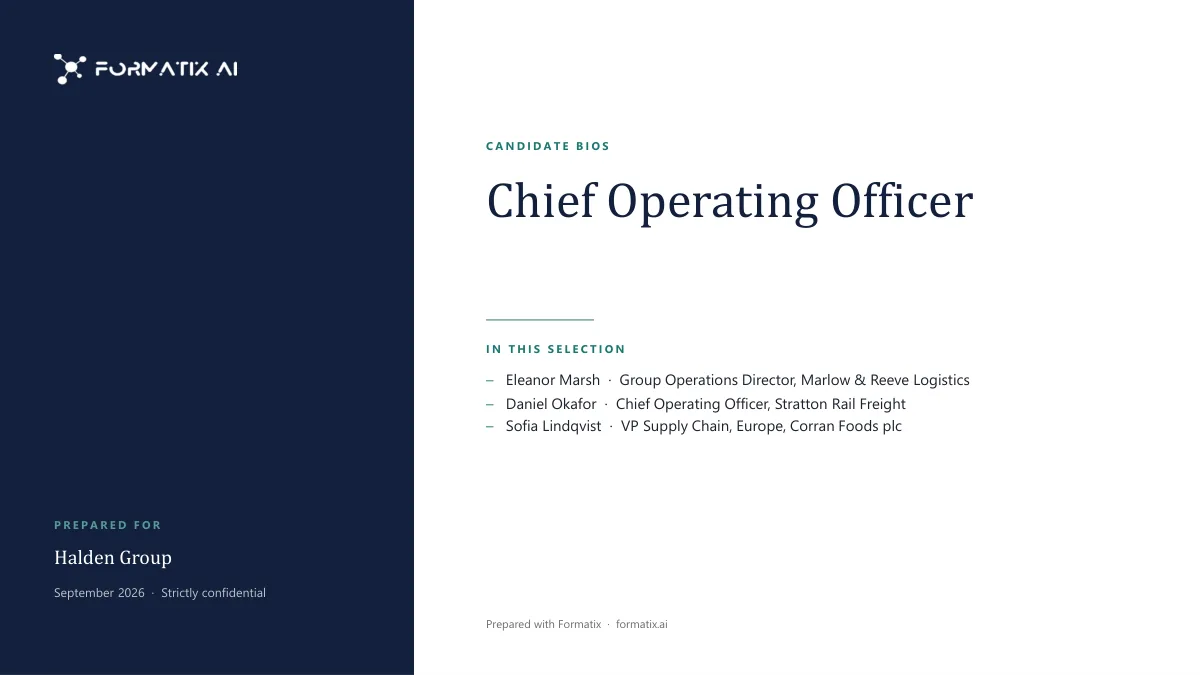
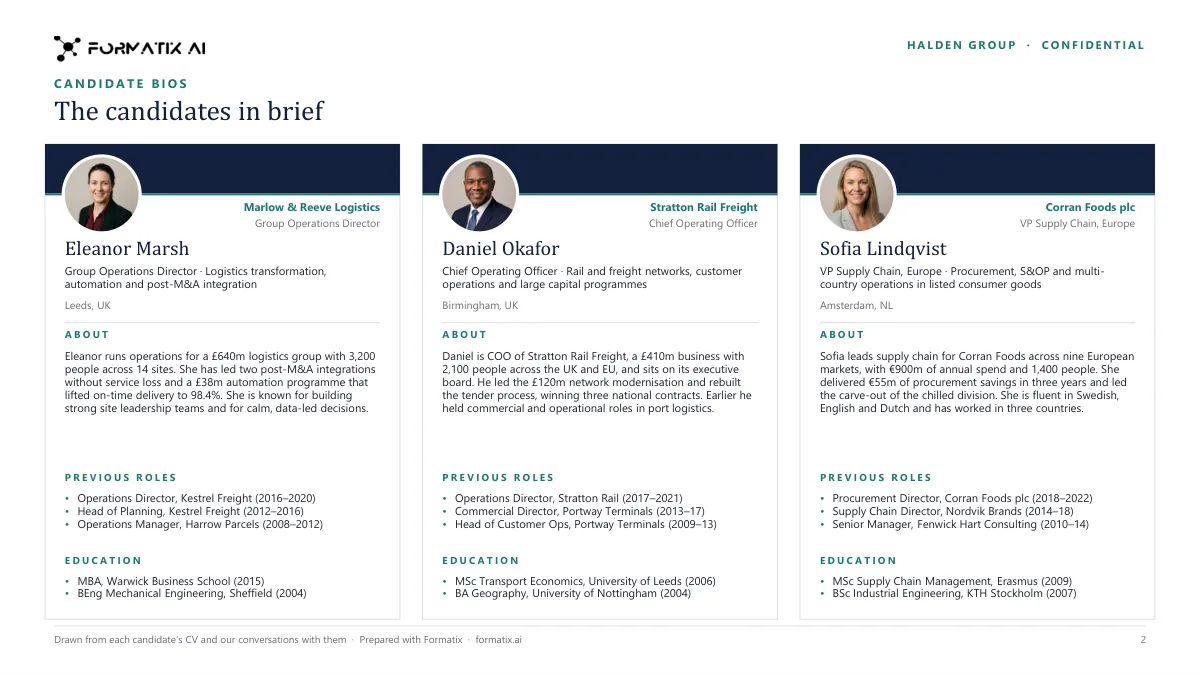
Short bios of several candidates in the style of a LinkedIn profile: headline, current role, a short bio, previous roles and education, three to a slide.
- Cover with the role, the client and the candidates in the selection
- Three candidate cards to a slide, each with photo, name, current role and company
- A LinkedIn-style headline and location
- A short factual bio of 40 to 60 words
- Previous roles and education
What it's for: Introducing a longlist or shortlist to a client quickly, before the full profiles.
PowerPointDelivered as an editable PowerPoint file, or saved as PDF.
Who uses it
Executive search firms at longlist stage
A first look at the candidates for the client, before the full profiles.
Agencies presenting several candidates
Short bios for a hiring manager who wants the list on one or two slides.
Research teams
Turning a batch of CVs into a readable selection for the consultant's review.
Every slide of the example
The example is in Formatix branding with fictional content. When you pick this template, it is rebuilt with your logo, colours and fonts before you use it.
How you use it
- 1
Pick the template
Open Formatix, choose this template in Studio, and give us your website. We pull your logo, colours and fonts and rebuild the template in your brand. You see a sample before you use it.
- 2
Drop the CVs
Upload the CVs of the candidates in the selection as one batch, in any layout or language, with the role and client if you want them on the cover. One credit fills one candidate's card.
- 3
Check and send
The filled document appears beside the original for checking. Edit anything in place, then download the Word, PowerPoint or Excel file, or save it as PDF.
Download or automate? The free download is a plain file you fill in by hand. In Formatix the template is rebuilt in your brand, with your logo, colours and fonts taken from your website, and filled from a CV or your notes in about a minute. What you keep is the finished document: an editable Word, PowerPoint or Excel file.
Ask for changes in plain words, such as "move the photo to the right" or "add a Languages section", and the template is updated with the rest of its formatting kept. If you already have a document you send clients, upload that instead and Formatix turns it into a template. How Studio builds templates
Questions about this template
- What is on each bio card?
- The candidate's photo, name, current title and company, a headline in the style of LinkedIn, the location, a factual bio of 40 to 60 words with one or two measured achievements, the three previous roles with years, and up to two degrees or qualifications.
- How many candidates fit on a slide?
- Three. Upload the CVs as one batch and Formatix fills one card per candidate, three to a slide, after a cover that lists everyone in the selection.
- Is the content taken from LinkedIn?
- No. Every fact comes from the CVs and notes you supply. A LinkedIn PDF export can be used as the source, but nothing is copied from a live profile, and the LinkedIn URL and contact details are never printed.
- Does it rate the candidates?
- No. The bios are factual. Opinions such as "known for" appear only when your notes or references say so; for ratings against the brief, use the shortlist deck or the scorecard matrix.
- Can I download this template?
- Yes. A free, editable PowerPoint version with neutral branding and fictional example content is on this page, to fill in by hand. To have it rebuilt in your brand and filled automatically, use it in Formatix; what you keep is an editable PowerPoint file.
Related templates and pages
 PowerPointShortlist deckA PowerPoint deck that opens with the shortlist, then shows the candidates side by side with fit against the brief.
 PowerPointCandidate presentationA five-slide presentation of one candidate for the client: profile and key facts, career history, key achievements, education, the consultant's assessment and next steps.
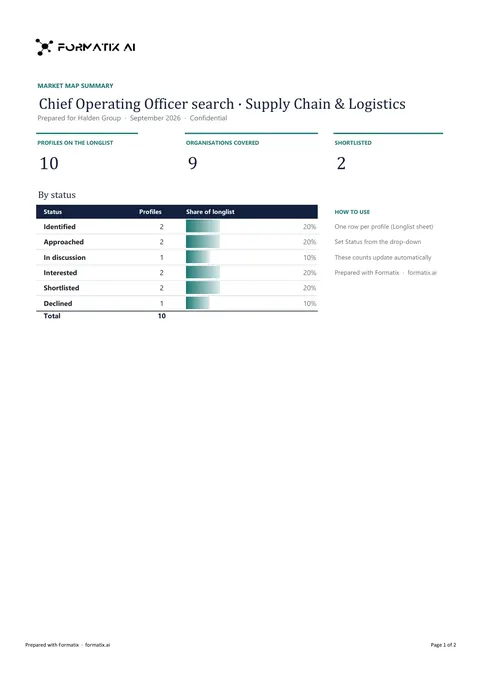 ExcelLonglist and market mapA workbook that maps the market for a search: target organisations, the people in each and where they stand in the process.
Use the linkedin bio profiles in your brand
Give us your website, and the template is rebuilt with your logo, colours and fonts. Your first ten documents are free, with no card, valid for 14 days.
Formatix fills it from the CV for you: see our CV formatting software, or bulk CV formatting for a whole shortlist at once.