Psychometric report integration
Put psychometric results from Hogan, SHL, Saville Wave or DISC into your own branded report
Your firm uses an instrument, a qualified practitioner debriefs the candidate, and the client receives the provider's report in the provider's design, attached to yours. Formatix lets you bring the results you hold into your own report instead. You upload the instrument's results and your practitioner's interpretation notes; Formatix lays them into your branded template and draws the scores you supply as charts in your house style. The interpretation remains the work of your practitioner.
No credit card. Your 10 free credits never expire.
Two documents where the client wanted one
Psychometric results usually arrive as a PDF from the provider: accurate, well designed and entirely in the provider's brand. The firm's assessment report is in the firm's brand. The client gets both, reads the firm's, and has to cross-reference the provider's to see what a score meant.
Consultants who want one document end up screenshotting charts from the provider's PDF, which look out of place and blur when printed, or redrawing scales by hand in Word for every candidate. When a firm uses more than one instrument, each with its own scales, every report becomes a small design project.
None of that is assessment work. The practitioner's interpretation is the valuable part, and it deserves to sit next to the scores in a document that looks like the firm made it.
What Formatix does, and what it never does
Formatix takes the results you upload and the notes you write, and lays them into your report template, drawing the scores you supply as bars, scales or profiles in your house style.
Formatix never administers, scores, interprets or generates a psychometric assessment. It does not produce a Hogan, SHL or Saville report, and it does not analyse a candidate's personality. Every word of interpretation comes from your practitioner's notes.
Your agreement with the instrument provider may govern how results can be reproduced and shared with clients. Check it before you include scores in a client report; Formatix does not change what you are permitted to share.
What goes in
The results you hold
The results report from the provider, or the scale scores you want to show, for an instrument your firm is licensed to use.
Your practitioner's interpretation
The debrief notes and interpretation written by your qualified practitioner, in their words.
The rest of the assessment
Interview notes, competency ratings and the CV, if the profile is part of a fuller assessment report.
Which scales to show
Your template decides which scales appear and how, so clients see what you choose to show and nothing else.
What comes out
A personality profile section
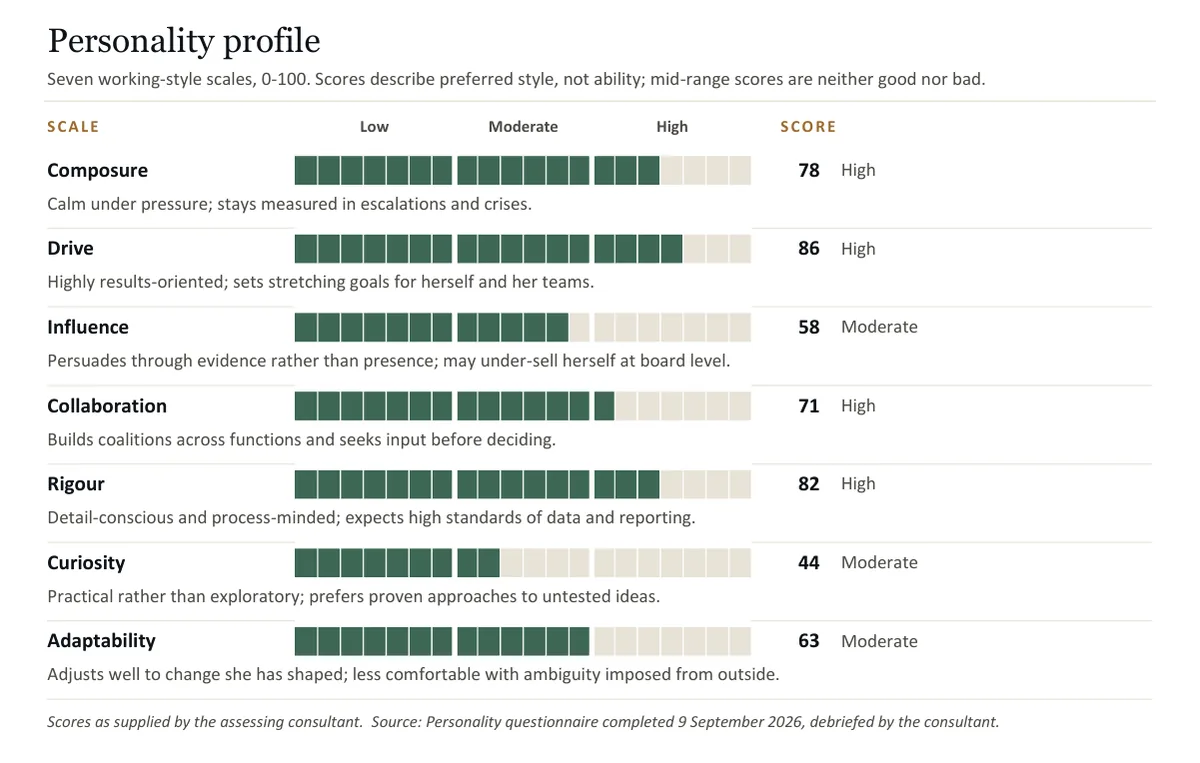
The scores you supplied drawn in your chart style, next to your practitioner's interpretation.
Inside your assessment report
The profile sits in your assessment report as one section of one document, in Word or PDF.
A one-page summary
A single-page profile summary for the client or the board, if your template has one.
Consistent across instruments
Each instrument can have its own template section, so a firm using two instruments still sends one house style.
A sample personality-profile section
This is the personality-profile part of a sample assessment report for a fictional candidate, on a Formatix-owned demo template. The scores and the interpretation were supplied as input, as they would be by your practitioner; Formatix laid them out and drew the charts.
How it works
- 1
Show us where the profile goes
Upload your assessment report template with its personality or psychometric section, or a report you have sent with details removed. Formatix turns it into a template that keeps your chart style.
- 2
Upload the results and the notes
The results you hold and your practitioner's interpretation, alongside the CV and interview notes if this is a full report.
- 3
Formatix lays it out
The scores you supplied are drawn in your charts; the interpretation goes under your headings, in your practitioner's words.
- 4
Your practitioner checks it
Every score and every sentence should be checked against the source before the report goes out. The file is editable Word, so corrections are quick.
What stays exactly as your brand
Your chart style
Bars, dots or bands, in your colours, on the scale your template defines.
Your fonts and layout
The profile section uses the same typography and page layout as the rest of your report.
Your section structure
Where the profile sits in the report, and what it is called, is up to your template.
Your disclaimers
Any fixed wording about the instrument, the practitioner or confidentiality stays exactly as written.
Who it is for
Search firms with in-house practitioners
Firms whose consultants or psychologists are qualified to use an instrument and want the results in the firm's own report.
Leadership assessment practices
Practices that combine interviews, psychometrics and simulations into a single written assessment.
In-house talent and assessment teams
Teams using an instrument for senior selection or development who report to executives in the company template.
Coaches and development providers
Providers who debrief results and write development reports for clients in their own brand.
Compared with doing it by hand, or with a CV formatter
Today most firms either attach the provider's PDF or redraw charts by hand. CV formatters such as Allsorter, HireAra and CV-Transformer reformat the CV; they stop at the CV and have no section for psychometric results.
| Formatix | By hand in Word or PowerPoint | CV-only formatters | |
|---|---|---|---|
| Who interprets the results | Your practitioner. Formatix lays out their notes | Your practitioner | Not covered |
| How scores appear | Drawn in your chart style from the scores you supply | Screenshots or hand-drawn scales | Not supported |
| Documents the client receives | One report in your brand | Your report plus the provider's PDF | A CV plus the provider's PDF |
| Multiple instruments | A template section for each, one house style | Each one redrawn | Not supported |
| Output formats | Word, PowerPoint, Excel and PDF | Whatever you build | Mostly Word or PDF |
| Cost | From £20 a month; 10 free credits to start | Consultant time | Often quote-only |
Who interprets the results
- Formatix:
- Your practitioner. Formatix lays out their notes
- By hand:
- Your practitioner
- CV-only formatters:
- Not covered
How scores appear
- Formatix:
- Drawn in your chart style from the scores you supply
- By hand:
- Screenshots or hand-drawn scales
- CV-only formatters:
- Not supported
Documents the client receives
- Formatix:
- One report in your brand
- By hand:
- Your report plus the provider's PDF
- CV-only formatters:
- A CV plus the provider's PDF
Multiple instruments
- Formatix:
- A template section for each, one house style
- By hand:
- Each one redrawn
- CV-only formatters:
- Not supported
Output formats
- Formatix:
- Word, PowerPoint, Excel and PDF
- By hand:
- Whatever you build
- CV-only formatters:
- Mostly Word or PDF
Cost
- Formatix:
- From £20 a month; 10 free credits to start
- By hand:
- Consultant time
- CV-only formatters:
- Often quote-only
Detailed comparisons: Allsorter, HireAra, CV-Transformer.
Pricing in one line
Plans start at £20 a month for 20 credits, and every new account gets 10 free credits with no card and no expiry. Full details are on the pricing page.
Questions people ask
- Does Formatix interpret Hogan, SHL or Saville Wave results?
- No. Formatix never administers, scores, interprets or generates psychometric assessments. The interpretation comes from your qualified practitioner's notes; Formatix places it in your report and draws the scores you supply.
- Does Formatix produce a Hogan or SHL report?
- No. It does not produce any provider's report. It lays results you already hold into your own firm's report template.
- Which instruments does it work with?
- Results from any instrument you hold in document form, including Hogan, SHL, Saville Wave and DISC. Formatix is not affiliated with or endorsed by any of these providers.
- Are we allowed to reproduce the scores in our own report?
- That depends on your agreement with the instrument provider, which may govern how results are reproduced and shared. Check it before including scores in a client report; Formatix does not change what you are permitted to share.
- Can we show only some scales?
- Yes. Your template decides which scales appear. Scales the template does not include are not shown.
- What if two instruments use different scales?
- Each instrument can have its own section in the template, with its own scale, so both appear correctly in one house style.
- Where are the results processed?
- In the UK and EU, under GDPR. Nothing you upload is used to train AI models.
One report, in your brand, with the results where they belong
Upload your assessment report template and one set of results you hold, and see the profile section in your house style. Ten free credits, no card.
Other executive search documents
Executive assessment reports
Interview notes, the CV, your competency ratings and psychometric results laid into your firm's assessment report, with rating bars drawn from your scores.
Read moreBoard and CEO candidate reports
One-page executive profiles, full candidate reports for the nominations committee and blind profiles for confidential longlists.
Read moreShortlist and longlist decks
One slide per candidate in your PowerPoint design, comparison slides and a matching Excel tracker, from the same batch of CVs.
Read moreSuccession planning and talent-review packs
For CHROs and talent teams: 9-box grids, succession slates with readiness ratings, successor profiles and promotion cases in your template.
Read more
Hogan, SHL, Saville Wave and DISC are trademarks of their respective owners. Formatix is not affiliated with or endorsed by them.