Healthcare and locum agencies
NHS Employment Check Standards checklist
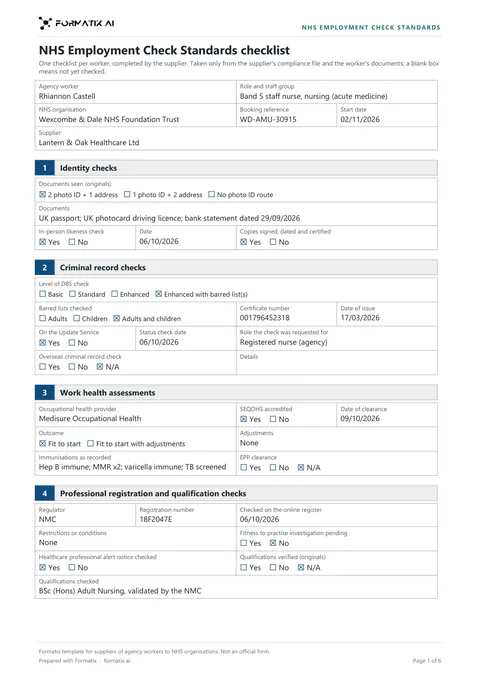
The NHS Employment Check Standards are the six pre-employment checks NHS Employers sets out for everyone working in the NHS, agency workers included. Formatix fills a supplier's checklist against them for one worker, from the CV and your compliance file, marks a check only where your file confirms it, and lists what is still needed before the worker is submitted.
No credit card. Your first ten CVs are free, and the trial credits are valid for 14 days.
What it is
NHS Employers publishes six standards: identity checks, criminal record checks, work health assessments, professional registration and qualification checks, right to work checks, and employment history and reference checks. Trusts and managed service providers expect agencies to show them for every worker.
The Formatix template takes them in that order (as listed in July 2026), after the booking: the worker, role, NHS organisation, booking reference, start date and supplier. Each standard has its own details, such as the identity route and documents seen, the DBS level, barred lists, certificate number and Update Service check, the OH provider and clearance, the regulator and register check date, the right to work check, and the referees. It ends with the supplier's confirmation and a Still needed box.
Registration and DBS numbers are copied character for character. Health details are limited to the OH outcome and the immunisation status your OH record states.
What Formatix fills in
| Field | Filled from |
|---|---|
| Worker, role, NHS organisation, booking reference, start date, supplier | The booking and your notes |
| Identity route, documents seen, in-person check and date, copies certified | Your compliance file |
| DBS level, barred lists, number, issue date, Update Service, status check date | The DBS certificate and your file; a CV line fills the details only |
| OH provider, SEQOHS, clearance date and outcome, immunisations, EPP clearance | The OH clearance, as stated |
| Regulator, registration number, register check date, restrictions, HPAN check | The register check in your file |
| Right to work type, date, continuous or time-limited, follow-up | The right to work record |
| Employment history period, gaps explained, referees | Your file and the references received |
| Supplier sign-off name, position and date | Your notes, never today's date by default |
What stays blank
| Field | Why it stays blank |
|---|---|
| A check your file does not confirm | It stays empty. It is never No because it is not mentioned, or Yes because it is usual. |
| Registration rows for a worker with no professional registration | Left empty for a healthcare support worker rather than guessed. |
| Any health detail beyond the OH outcome and immunisation status | Never written, nor date of birth, document numbers, National Insurance number or address. |
The Still needed list
The checklist ends with a "Still needed before submission" box: for example the OH clearance outcome and date, the DBS certificate number and issue date, a reference covering a recent period, an Update Service status check, or EPP clearance for theatre work. Obtain them, then remove the box before sending.
Frequently asked questions
- Is this an official NHS form?
- No. It is a Formatix template laid out on the six NHS Employment Check Standards. Its footer says it is not an official NHS form, and it carries no NHS logo. If a trust gives you its own checklist, upload that instead.
- Does Formatix check the register or the DBS?
- No. It copies what your file says. The checks stay with your compliance team.
- Does it work with our ATS or CRM?
- JobAdder, Salesforce, HubSpot and Ezekia connect to Formatix natively on every plan, including the free trial. Any other ATS or CRM works with Formatix by email: send the CV and your notes to [email protected] and the filled document comes back.
More for this kind of firm
- For healthcare and locum agenciesApplication forms, assignment checklists and candidate profiles filled from the CV and compliance file.
- Locum doctor application formA locum doctor application form sets out a doctor's registration, qualifications, posts and procedural experience in the detail a trust asks for before a locum placement.
- NHS clinical agency assignment checklistThe temporary worker assignment checklist is the form a supplier completes for every booking with an NHS trust under the RM6281 Clinical and Healthcare Staffing framework.
- NHS non-clinical agency assignment checklistThe non-clinical temporary worker assignment checklist is the form a supplier completes for every booking of an administrative, corporate, IT, legal, scientific or estates worker under the RM6277 framework.
- Agency worker placement checklistAn agency worker placement checklist confirms the booking, pay, documents, registration, DBS, occupational health, training and references for each worker an agency places with an NHS trust.
- Locum CV compliance reviewA locum CV compliance review checks a locum doctor's CV against what trusts require in the CV before the agency submits it.
- End-of-assignment reportAn end of assignment assessment report records the Buyer's view of a temporary worker when an assignment ends, for the supplier's file and the worker.
- Nurse and allied health candidate profileA nurse and allied health candidate profile puts a nurse, midwife, allied health professional or healthcare scientist forward for a trust placement with the placement checks first.
- Care worker profileA care worker profile is the one page a care agency sends to care homes, home care and social care clients with a booking.
Try it on your next booking
Upload the form you have to send, a CV and the compliance documents, and see what gets filled in.
No credit card. Your first ten CVs are free, and the trial credits are valid for 14 days.
Formatix template for suppliers of agency workers to NHS organisations. Not an official NHS form. Sections follow the six NHS Employment Check Standards published by NHS Employers (July 2026).