Healthcare and locum agencies
Locum doctor application form
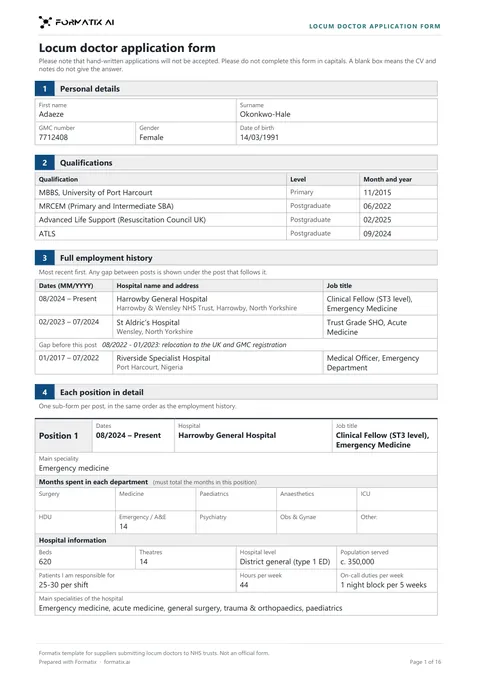
A locum doctor application form sets out a doctor's registration, qualifications, posts and procedural experience in the detail a trust asks for before a locum placement. Formatix fills it from the doctor's CV and your notes, copies every date, month count and procedure number exactly as written, leaves anything those documents do not state blank, and ends with a list of what to ask the doctor for.
No credit card. Your first ten CVs are free, and the trial credits are valid for 14 days.
What it is
Agencies supplying locum doctors complete a detailed form for each doctor they put forward. Beyond the CV, it asks for the GMC number, the gap before each post and its reason, the months spent in each department, information about each hospital, the procedures done each week, career totals per procedure and a self-declaration of competence.
The Formatix template has these sections: personal details, qualifications, the full employment history, one section per post (main specialty, months in each department, hospital information, departments worked, daily duties, procedures per week, other procedures, paediatric duties and oncology involvement), practical experience with career totals, the self-declaration procedures checklist, the consolidated summary of experience, and a Still needed box for the agency.
Ticks, dates and numbers on this form come only from the doctor's documents and your notes. Anything they do not state is left blank and added to the Still needed list. If a trust or client gives you its own form, upload it and Formatix builds the template from that instead.
What Formatix fills in
| Field | Filled from |
|---|---|
| First name, surname and GMC number | The CV or your notes |
| Gender and date of birth | The CV or your notes, only when stated; gender is never guessed from a name or title |
| Primary, secondary and postgraduate qualifications, with month and year | The CV |
| Employment history: dates, hospital name and address, job title | The CV, every post, most recent first |
| Gap before each post and its explanation | Dates from the CV; the reason only as the doctor gave it |
| Main specialty, months in each department, departments worked, daily duties | The CV and your notes, as stated for that post |
| Hospital information: beds, theatres, level, population served, patients, hours, on-calls | The CV or your notes, copied as written |
| Procedures per week and career totals per procedure | The CV, a logbook summary or your notes, copied as written |
| Self-declaration checklist: regular procedures (competent) and desirable procedures (competent or exposed) | Only what the doctor has declared, in the CV, a previous form or your notes |
| Consolidated summary of experience: months and comments per department, chemotherapy | Months stated in the posts; chemotherapy Yes or No only when stated |
What stays blank
| Field | Why it stays blank |
|---|---|
| A date, month count or procedure number the documents do not give | Formatix never estimates one from a job length, a grade or a rota, or works out a weekly figure from a total. |
| A procedure the doctor has not declared | It stays unticked. A box is never ticked because a procedure is usual for the grade, and never marked No by default. |
| A summary row where a post does not state its months | The summary adds up months only when every post it draws on states them; otherwise the row stays blank rather than guessed. |
| The reason for a gap the doctor has not explained | The gap dates are printed with "reason not stated" and the explanation goes on the Still needed list. |
The Still needed list
The form ends with a "Still needed before submission" box for the agency. It lists, most important first, every item the form asks for that the CV and notes do not give: for example the GMC number, the dates of a post, an explanation for a gap, months in each department or the self-declaration of competence. Ask the doctor for them, then remove the box before the form goes to the trust.
Frequently asked questions
- Is this an official form?
- No. It is a Formatix template for suppliers submitting locum doctors to NHS trusts, and it says so in its footer. It carries no NHS logo. If your client issues its own form, upload it and Formatix builds the template from that.
- Does Formatix check the doctor's registration?
- No. It copies the GMC number and qualifications from the documents you provide. Checking them stays with your compliance team.
- What can I upload with the CV?
- Anything that holds the doctor's details: notes from a call, a previous application form, a logbook summary or an email. They can be a separate document, pages added to the CV or notes typed in with it.
- Does it work with our ATS or CRM?
- JobAdder, Salesforce, HubSpot and Ezekia connect to Formatix natively on every plan, including the free trial. Any other ATS or CRM works with Formatix by email: send the doctor's CV and your notes to [email protected] and the filled document comes back.
More for this kind of firm
- For healthcare and locum agenciesApplication forms, assignment checklists and candidate profiles filled from the CV and compliance file.
- NHS clinical agency assignment checklistThe temporary worker assignment checklist is the form a supplier completes for every booking with an NHS trust under the RM6281 Clinical and Healthcare Staffing framework.
- NHS non-clinical agency assignment checklistThe non-clinical temporary worker assignment checklist is the form a supplier completes for every booking of an administrative, corporate, IT, legal, scientific or estates worker under the RM6277 framework.
- Agency worker placement checklistAn agency worker placement checklist confirms the booking, pay, documents, registration, DBS, occupational health, training and references for each worker an agency places with an NHS trust.
- Locum CV compliance reviewA locum CV compliance review checks a locum doctor's CV against what trusts require in the CV before the agency submits it.
- End-of-assignment reportAn end of assignment assessment report records the Buyer's view of a temporary worker when an assignment ends, for the supplier's file and the worker.
- Nurse and allied health candidate profileA nurse and allied health candidate profile puts a nurse, midwife, allied health professional or healthcare scientist forward for a trust placement with the placement checks first.
- Care worker profileA care worker profile is the one page a care agency sends to care homes, home care and social care clients with a booking.
Try it on your next booking
Upload the form you have to send, a CV and the compliance documents, and see what gets filled in.
No credit card. Your first ten CVs are free, and the trial credits are valid for 14 days.
Formatix template for suppliers submitting locum doctors to NHS trusts. Not an official form.