Excel template · Trackers and spreadsheets
Market compensation benchmark template in Excel
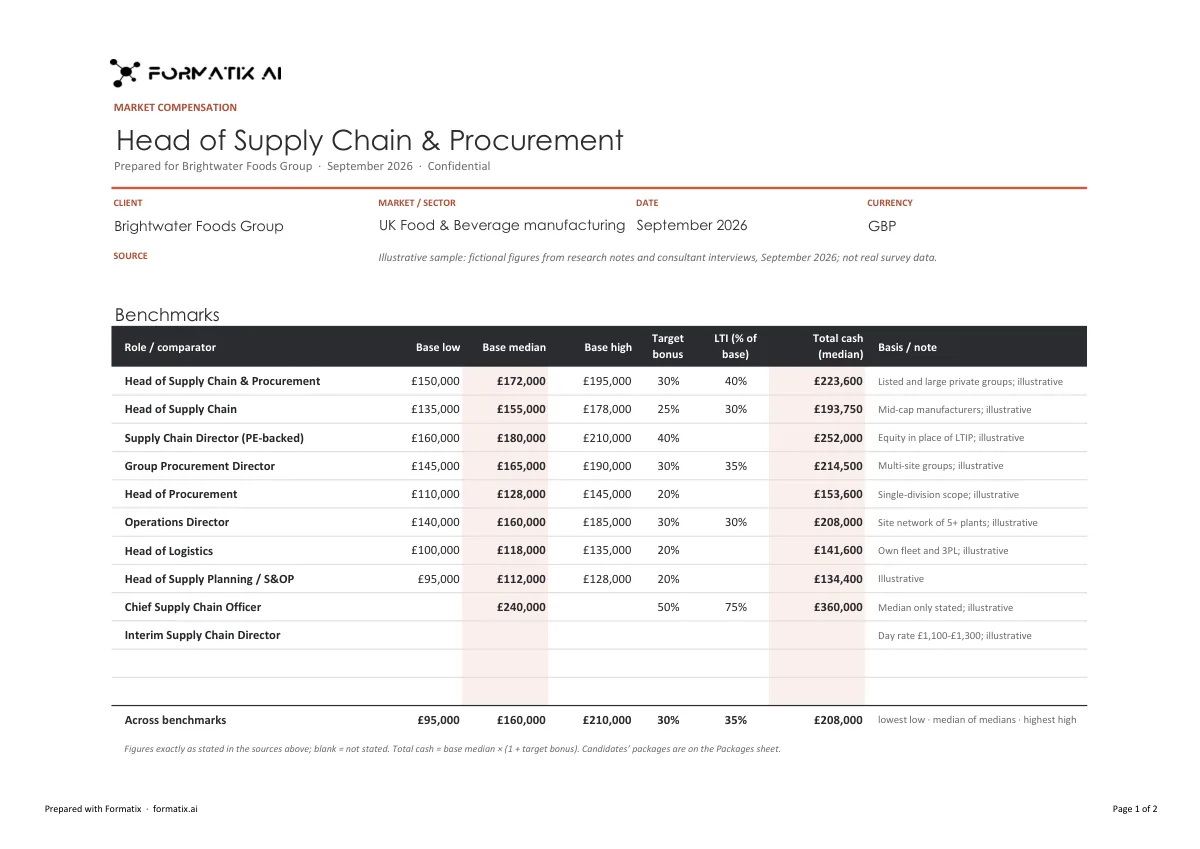
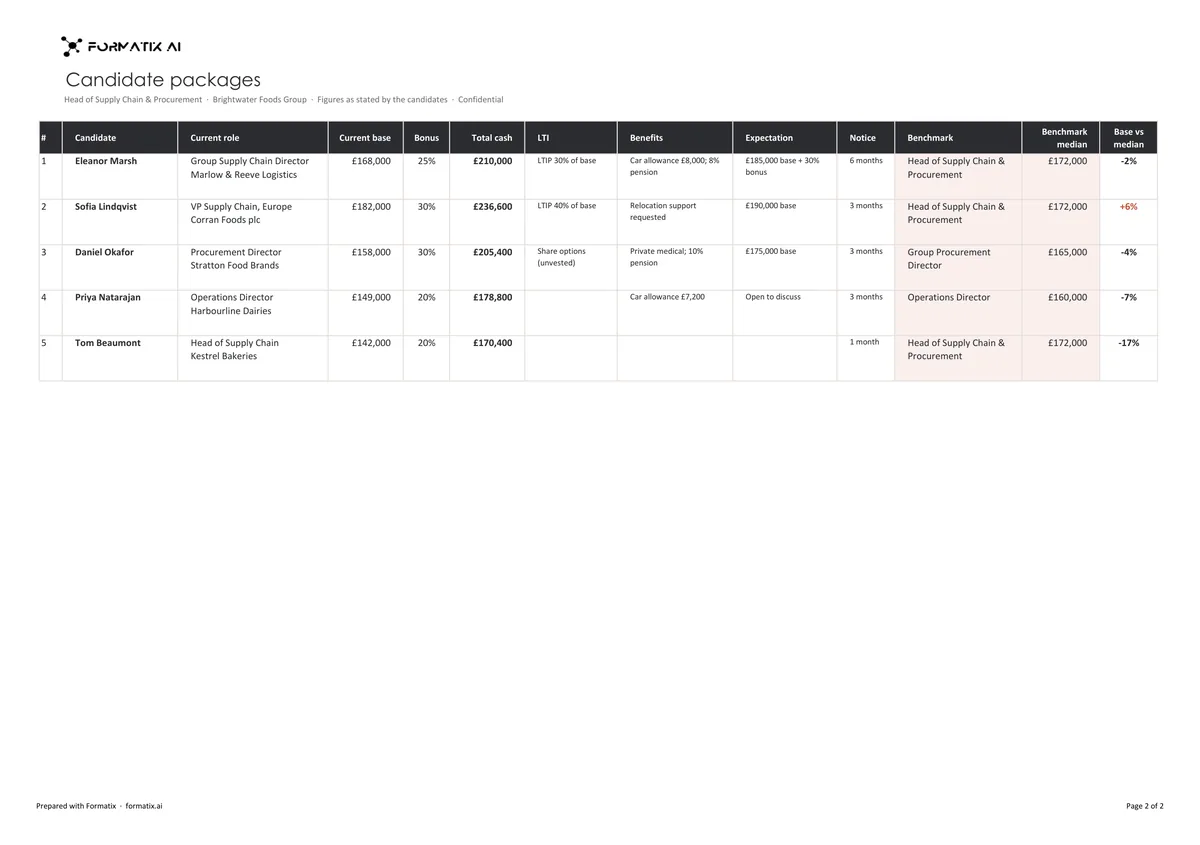
A market compensation workbook sets out what a role is paid in the market and where the shortlist sits against it, so the client can set the package and plan the offer. This Excel template has two sheets in the firm's brand: benchmarks for up to twelve roles or comparators, with base salary low, median and high, target bonus, long-term incentive and the basis of each figure, with total cash calculated in the workbook; and candidate packages, one row per shortlisted candidate with current base, bonus, total cash, LTI, benefits, expectation and notice period, compared with the benchmark median. Formatix fills it from your pay research and the packages the candidates have stated, copying every figure exactly.
Offers fail on packages more than on anything else, and the numbers usually live in a consultant's notebook. Putting the market and the shortlist in one workbook, with the source of every benchmark, lets the client see the gap before the offer, not after it is declined.
10 free credits, no card needed. One credit fills one document.
An editable file with neutral branding and a fictional example candidate, to fill in by hand. Formatix fills it automatically from a CV.
What's in the template
A compensation workbook in Excel: market benchmarks by role with base, bonus and long-term incentive ranges, and the shortlisted candidates' stated packages against them.
- Benchmarks sheet: up to 12 roles with base low, median and high, target bonus and LTI
- Total cash calculated in the workbook, with the basis of each figure
- The sources and their dates, as your research cites them
- Candidate packages sheet: current base, bonus, total cash, LTI, benefits, expectation and notice
- Each candidate's package compared with the benchmark median, calculated in the workbook
What it's for: Setting the package for a role and checking the shortlist's expectations against the market.
ExcelDelivered as an Excel workbook you can edit and share.
Who uses it
Executive search firms
Package advice to the client before the offer stage of a search.
Reward and HR teams
Benchmarks for a new or changed senior role, with the candidates' packages alongside.
Research teams
Pay survey data and soundings brought into one consistent workbook.
Every page of the example
The example is in Formatix branding with fictional content. When you pick this template, it is rebuilt with your logo, colours and fonts before you use it.
How you use it
- 1
Pick the template
Open Formatix, choose this template in Studio, and give us your website. We pull your logo, colours and fonts and rebuild the template in your brand. You see a sample before you use it.
- 2
Drop your pay research and notes
Upload the salary benchmark data or survey extracts, with the CVs and your notes of each candidate's stated package and expectations. One credit fills one candidate's row.
- 3
Check and send
The filled document appears beside the original for checking. Edit anything in place, then download the Word, PowerPoint or Excel file, or save it as PDF.
Download or automate? The free download is a plain file you fill in by hand. In Formatix the template is rebuilt in your brand, with your logo, colours and fonts taken from your website, and filled from a CV or your notes in about a minute. What you keep is the finished document: an editable Word, PowerPoint or Excel file.
Ask for changes in plain words, such as "move the photo to the right" or "add a Languages section", and the template is updated with the rest of its formatting kept. If you already have a document you send clients, upload that instead and Formatix turns it into a template. How Studio builds templates
Questions about this template
- What is in the compensation workbook?
- A benchmarks sheet with up to twelve roles or comparators, each with base salary low, median and high, target bonus and LTI as a percentage of base, the basis of the figure and total cash; the sources and their dates; and a candidate packages sheet with each candidate's current base, bonus, total cash, LTI, benefits, expectation, notice period and the comparison with the benchmark median.
- Are any figures estimated?
- No. Every salary, bonus, LTI, benefit and expectation is copied as your research or notes state it. Nothing is estimated, converted between currencies, averaged or filled from general market knowledge; a figure that is not stated is left blank.
- Who calculates total cash and the comparison?
- The workbook. Total cash and each candidate's position against the benchmark median are Excel formulas, so they update when a figure is changed.
- Where do the sources come from?
- Only the surveys, reports and soundings your documents cite, with their dates. No survey or source is ever added.
- Is this a download?
- No. The workbook is built in your brand inside Formatix and filled from your research and notes; what you download is the finished Excel file.
Related templates and pages
 PowerPointMarket intelligence briefA market intelligence brief for a client or a search: key findings, market trends, the competitive landscape, talent availability, compensation benchmarks and what it means for the search.
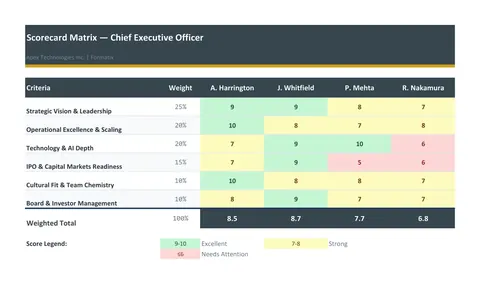 ExcelScorecard matrixA weighted evaluation matrix in Excel: the criteria and their weights down the side, one column per candidate, scores from the consultant, live weighted totals and a ranking.
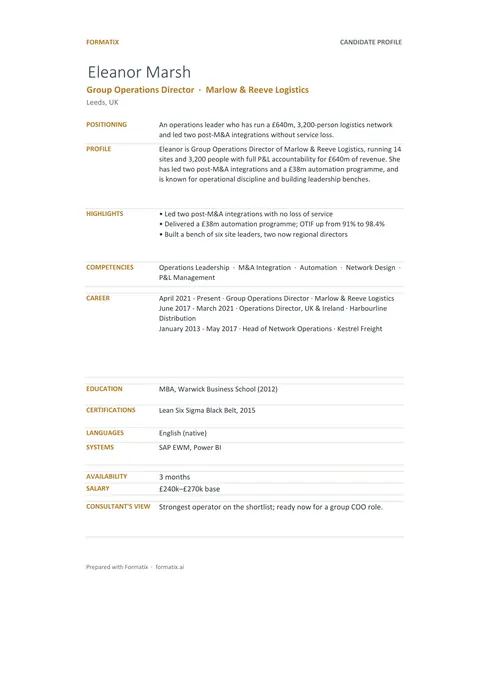 ExcelCandidate trackerAn Excel workbook with a shortlist sheet, one row per candidate, and a profile sheet for each candidate, ready to filter and share.
Use the market compensation in your brand
Give us your website, and the template is rebuilt with your logo, colours and fonts. Your first ten documents are free, with no card and no expiry.