Temporary and contract staffing
Right to work check record
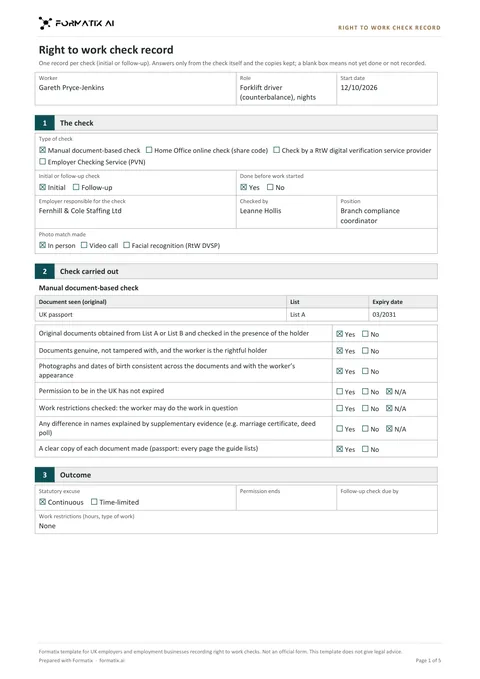
A right to work check record is the note an employer or employment business keeps of how and when it checked that a worker can work in the UK. Formatix fills it from the check you made, whether manual, online with a share code, through a digital verification provider or the Employer Checking Service, and never treats a CV line or a nationality as a check.
No credit card. Your first ten CVs are free, and the trial credits are valid for 14 days.
What it is
The Home Office employer's guide (updated 1 October 2026) sets out the prescribed checks and what an employer must do for each to have a statutory excuse, including keeping copies and recording the date the check was made.
The Formatix template records one check: the worker and job; the type of check, initial or follow-up, who made it and how the photo was matched; the steps for a manual document check or the details of an online, provider or Employer Checking Service check; the outcome (continuous or time-limited, permission end date, follow-up due, restrictions); the date the check was made; and a Still needed box.
The record sits alongside the copies you keep. Document numbers, dates of birth and immigration history are on those copies, not on the record.
What Formatix fills in
| Field | Filled from |
|---|---|
| Worker, job title, start date | The CV and your notes |
| Type of check, initial or follow-up, who made it, photo match method | The check record, only as shown |
| Manual check: documents seen with list and expiry, check steps | The document copies and your notes |
| Online check: share code, result, photo match, profile kept | The Home Office profile page and your notes |
| Digital provider or Employer Checking Service details | The provider's output or the Positive Verification Notice |
| Outcome, permission end date, follow-up due, restrictions | The check, only as recorded |
| Date the check was made | The check record, never today's date |
What stays blank
| Field | Why it stays blank |
|---|---|
| Any check field when no check is recorded | The fields stay empty and "Right to work check" goes on the Still needed list. A CV claim, a nationality or a past job is never treated as a check. |
| A follow-up date not recorded | Never calculated from the permission end date. |
| Date of birth, passport or BRP number, National Insurance number, address, immigration history | Never written on the record. |
The Still needed list
The record ends with a "Still needed to complete this check" box: for example saving a copy of the online profile page, matching the photo to the worker in person or by video call, copying the document pages the guide lists, the date the follow-up check is due, or the name and position of the person who made the check.
Frequently asked questions
- Is this a Home Office form?
- No. The Home Office does not publish a record form. The template follows the steps of its employer's guide, and its footer says it is not an official form and does not give legal advice.
- Does Formatix carry out the check?
- No. It records the check you made. Online checks, provider checks and document checks stay with you.
- Does it work with our ATS or CRM?
- JobAdder, Salesforce, HubSpot and Ezekia connect to Formatix natively on every plan, including the free trial. Any other ATS or CRM works with Formatix by email: send the CV and your notes to [email protected] and the filled document comes back.
More for this kind of firm
- For temporary and contract staffing agenciesTemp worker and contractor profiles in your format or your client's, at volume.
- Temporary worker profileA temporary worker profile is the one page a staffing agency sends a client with a temp booking, showing when the worker can start, which shifts they work, the rates and the tickets they hold.
- Contractor profile with day rate, IR35 and availabilityA contractor profile is the short summary an agency sends a client with a contract submission, with the day rate, IR35 status and availability up front and the recent engagements below.
- Temp shift availability gridA temp shift availability grid shows which workers in a temp pool can cover which shifts in the week ahead.
- Key Information Document for agency workersA Key Information Document (KID) is what an employment business must give an agency worker before they agree terms: who employs and pays them, the contract type, the rate of pay, deductions, fees, holiday, benefits and an example of pay.
- Agency worker suitability recordThe agency worker suitability record shows the checks an employment agency or employment business makes before it introduces or supplies a work-seeker, in the order of regulations 18 to 22 of the Conduct Regulations 2003.
Try it on today's candidates
Upload your profile format and a few CVs, and see them ready to send.
No credit card. Your first ten CVs are free, and the trial credits are valid for 14 days.
Formatix template for employers and employment businesses. Not an official form. This template does not give legal advice. Steps follow the Home Office "Right to work checks: an employer's guide" (updated 1 October 2026).