Word template · Candidate profiles
Locum social worker profile template
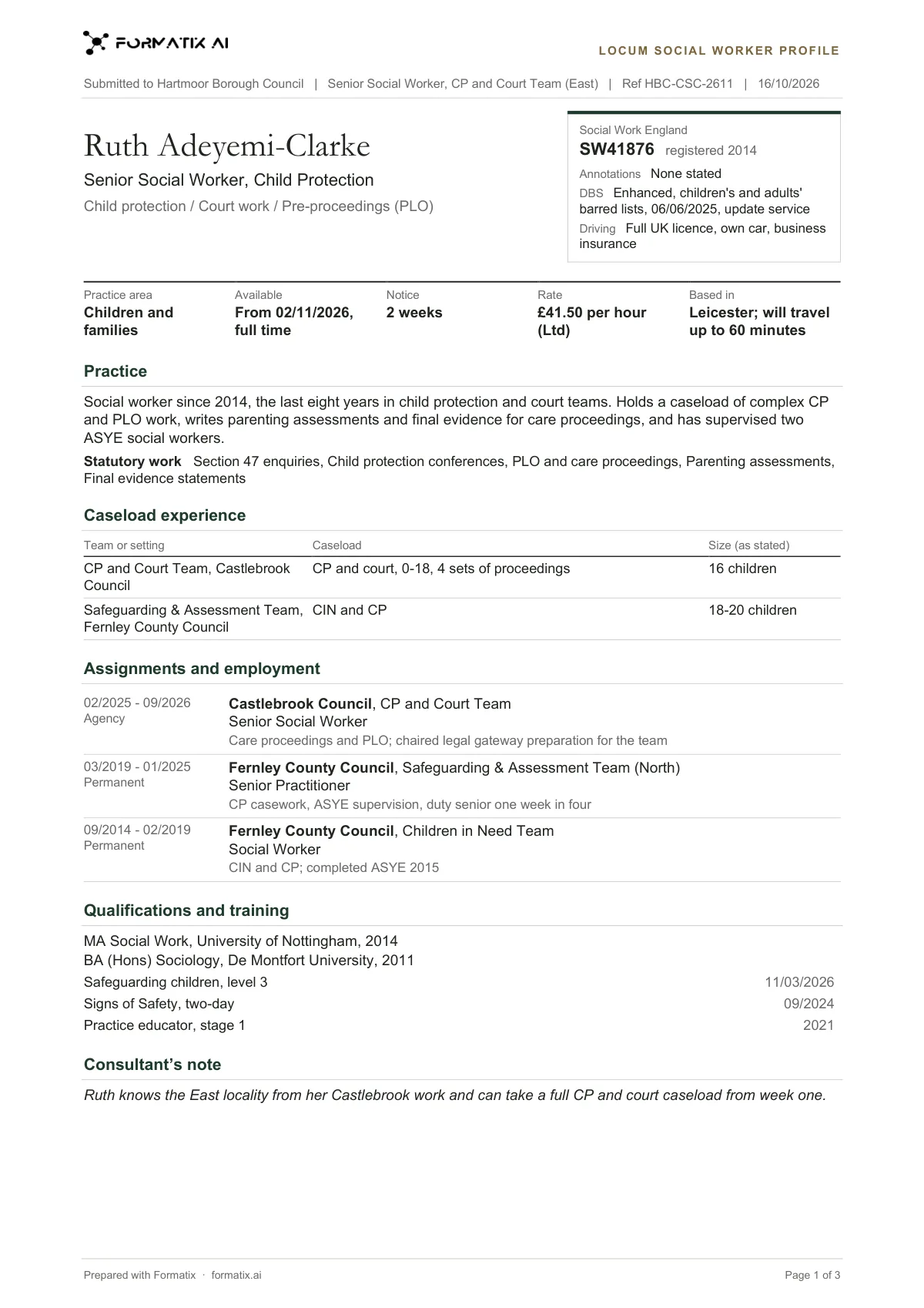
A locum social worker profile is what an agency sends a council when it puts a social worker forward for a vacancy. This Word template keeps it to one or two pages in your brand: who it is submitted to, the role and vacancy reference; the social worker's name, current title and specialisms; a registration panel (Social Work England number, year registered, AMHP and BIA annotations, DBS and Update Service, driving); their terms (practice area, availability, notice, rate and base); a short practice summary; statutory work; caseload experience with sizes only as stated; assignments and employment, most recent first; qualifications and training; and the consultant's note. Formatix fills it from the CV and your notes, and anything the council will expect that is not stated goes on a Still needed list.
Council managers read a lot of locum CVs, and they look for the same things first: registration, annotations, practice area, statutory work and when the social worker can start. This profile puts those at the top. A Mental Health Act or best interests role on the CV is not printed as an AMHP or BIA annotation unless the CV or your notes say the social worker holds it, and a caseload size is never estimated.
10 free credits, no card needed. One credit fills one document.
An editable file with neutral branding and a fictional example candidate, to fill in by hand. Formatix fills it automatically from a CV.
What's in the template
A one-to-two-page profile a locum agency sends a council with a social worker: Social Work England number, year registered, AMHP and BIA annotations, DBS and driving, practice area, availability, notice and rate as stated, a short practice summary, statutory work, caseload experience, assignments, qualifications and training. A blank answer prints Not stated.
- Submitted to, role, vacancy reference and date
- Social Work England number, annotations, DBS and driving
- Practice area, availability, notice, rate and base as stated
- Practice summary and statutory work
- Caseload experience and assignments, most recent first
- Qualifications, training, consultant's note and Still needed
What it's for: Putting a locum social worker forward to a council.
WordDelivered as an editable Word file, or saved as PDF.
Who uses it
Social work locum agencies
A consistent profile for every submission to a council, in your brand.
Children's and adults' desks
Statutory work and caseloads shown the way team managers read them.
Mental health desks
AMHP and BIA annotations shown only as held.
How you use it
- 1
Pick the template
Open Formatix, choose this template in Studio, and give us your website. We pull your logo, colours and fonts and rebuild the template in your brand. You see a sample before you use it.
- 2
Drop the CV and your notes
Upload the social worker's CV with your notes: the council and vacancy, availability, notice, the agreed rate and your view of them. One credit fills one document.
- 3
Check and send
The filled profile appears beside the original CV for checking. Fill any items on the Still needed list, then download the Word file or a PDF for the council.
Download or automate? The free download is a plain file you fill in by hand. In Formatix the template is rebuilt in your brand, with your logo, colours and fonts taken from your website, and filled from a CV or your notes in about a minute. What you keep is the finished document: an editable Word, PowerPoint or Excel file.
Ask for changes in plain words, such as "move the photo to the right" or "add a Languages section", and the template is updated with the rest of its formatting kept. If you already have a document you send clients, upload that instead and Formatix turns it into a template. How Studio builds templates
Questions about this template
- Will it state availability and rate?
- Only from your notes. Availability, notice and rate are never estimated from the market or the CV. A blank answer prints "Not stated".
- How are AMHP and BIA shown?
- As annotations, only when the CV or your notes say the social worker holds them. Having worked on Mental Health Act assessments is not the same as being an AMHP, and the profile does not treat it as one.
- Does it use the HCPC number?
- No. Social workers in England are registered with Social Work England, and the profile shows the SW number.
- What personal details stay off?
- Date of birth, home address, National Insurance number and health details are never printed.
Related templates and pages
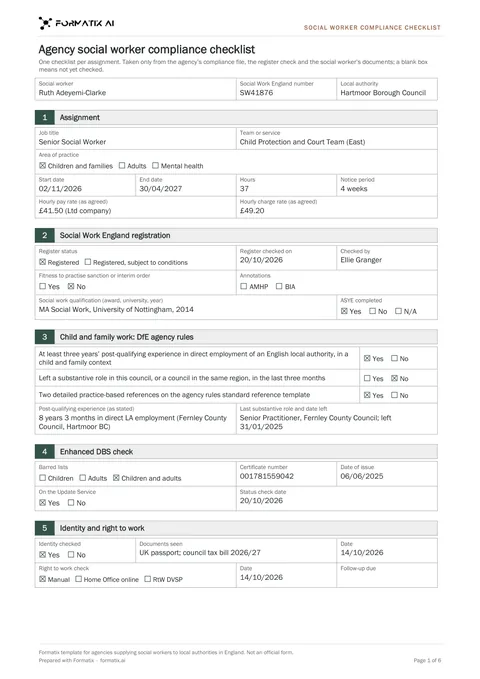 WordAgency social worker compliance checklistThe checklist a social work agency completes before a locum starts with a council in England: Social Work England registration and annotations, the DfE agency rules for child and family work (three years' post-qualifying experience, the three-month rule, two detailed references on the standard template), enhanced DBS, identity, right to work, references and other checks, with an agency declaration. Never an HCPC number. Not an official form.
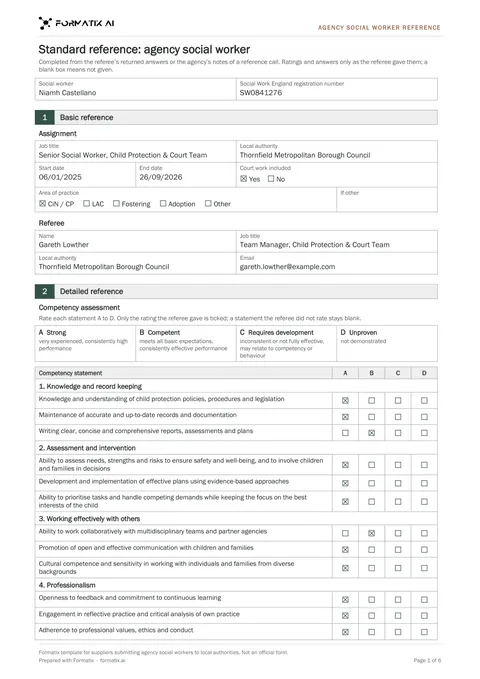 WordAgency social worker referenceThe standard reference for an agency child and family social worker, filled from the referee's returned answers or notes of a reference call: social worker and Social Work England number, assignment with area of practice and court work, referee details, A-D ratings against the twelve competency statements, fitness to practise, re-employment, development needs, additional information, the declaration with a blank signature line and a still-needed list. A referee's answer is never written when the documents do not give it. Structure based on the Department for Education's standard reference template for agency social workers (Open Government Licence v3.0). Not an official form.
Use the locum social worker profile in your brand
Give us your website, and the template is rebuilt with your logo, colours and fonts. Your first ten documents are free, with no card, valid for 14 days.
Formatix fills it from the CV for you: see our CV formatting software, or bulk CV formatting for a whole shortlist at once.