Word template · Candidate profiles
Europass-style CV template in Word
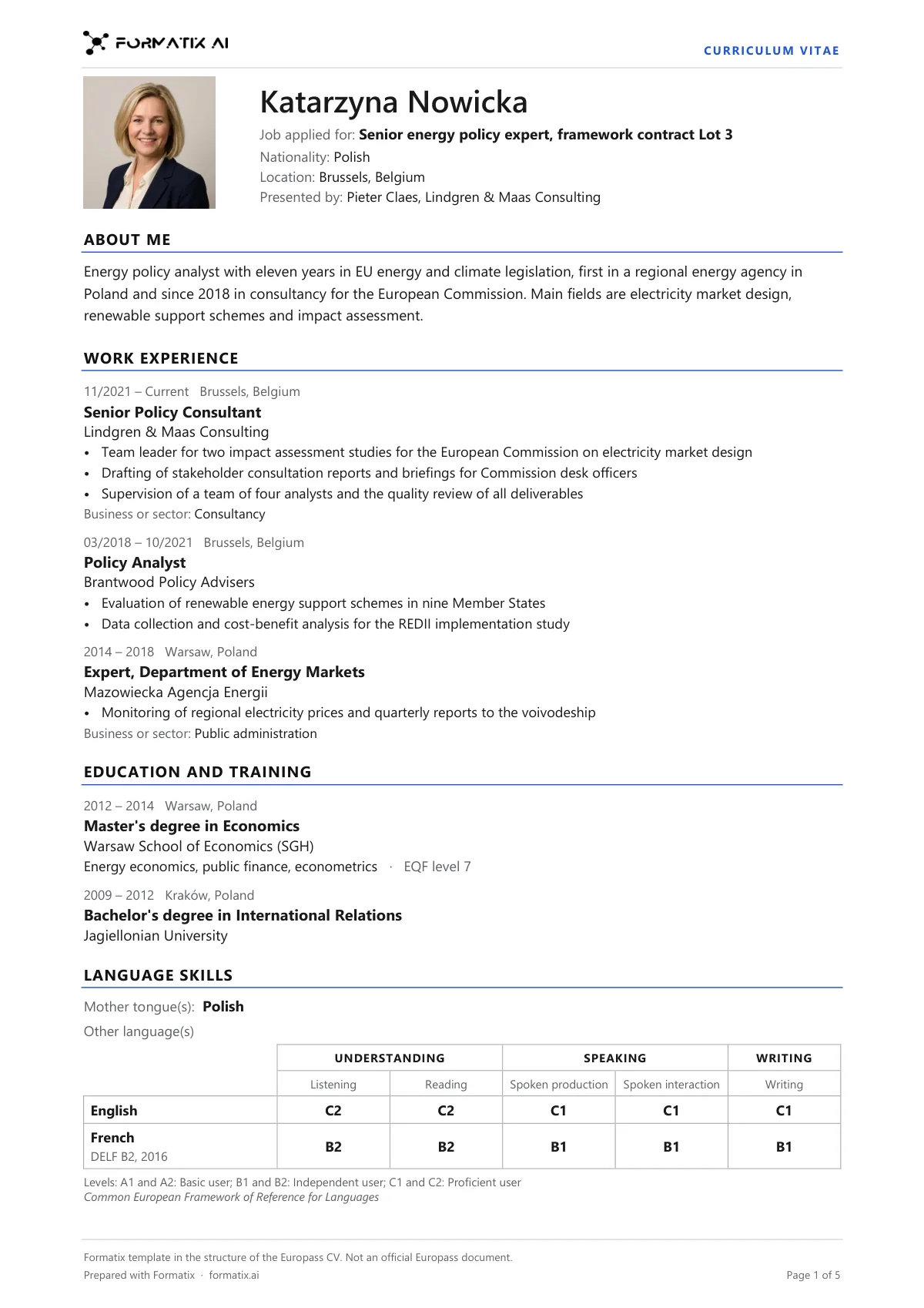
The Europass CV is the EU's standard CV format, asked for by EU institutions, EU-funded tenders and many employers across Europe. This Word template follows its section order in your brand: personal information (name, the job or lot applied for, and place of residence); About me; work experience with dates, employer, main activities and sector; education and training, with the EQF level when the CV states it; language skills, with the mother tongue and the CEFR self-assessment grid for each other language (listening, reading, spoken production, spoken interaction, writing); digital skills; driving licence; and other sections such as projects, publications or memberships. Formatix fills it from a CV in any layout or language. A grid level is printed only when the CV gives that level for that skill. It is a Formatix layout without the Europass logo, not an official Europass document. It also exists in German, French, Dutch and Spanish.
Bid teams and agencies are often asked for "a CV in Europass format" for an EU tender and rebuild each CV by hand in the Europass editor. This template does the rebuilding from the CV you already have. If the CV says only "French: fluent", that is what appears beside French, and the five grid boxes stay empty rather than being given levels the candidate never claimed.
10 free credits, no card needed. One credit fills one document.
An editable file with neutral branding and a fictional example candidate, to fill in by hand. Formatix fills it automatically from a CV.
Diese Seite auf Deutsch · Cette page en français · Esta página en español · Deze pagina in het Nederlands
What's in the template
A CV in the section order of the Europass CV, for EU institution tenders, EU job applications and clients who ask for the Europass format: personal information, about me, work experience, education and training, language skills with the CEFR self-assessment grid, digital skills, driving licence and other sections. Grid levels are printed only when the CV gives them per skill. A Formatix layout without the Europass logo; not an official Europass document. Also in German, French, Dutch and Spanish.
- Personal information: name, job applied for, place of residence
- About me
- Work experience with dates, employer, activities and sector
- Education and training, with the EQF level when the CV states it
- Language skills: mother tongue and the CEFR grid for other languages
- Digital skills, driving licence and other sections
What it's for: Sending a CV in Europass format to an EU institution, an EU-funded tender or a client who asks for it.
WordDelivered as an editable Word file, or saved as PDF.
Who uses it
Bid teams on EU-funded tenders
Team CVs in the Europass structure, in your brand, one per expert.
Agencies placing candidates with EU institutions
A Europass-style CV from whatever CV the candidate sends.
Recruiters working across Europe
The same structure in English, German, French, Dutch or Spanish.
How you use it
- 1
Pick the template
Open Formatix, choose this template in Studio, and give us your website. We pull your logo, colours and fonts and rebuild the template in your brand. You see a sample before you use it.
- 2
Drop the CV and your notes
Upload the CV in any layout or language, with a note of the tender, lot or position it is for. One credit formats one CV.
- 3
Check and submit
The Europass-style CV appears beside the original for checking. Edit anything in place, then download the Word file or save it as PDF.
Download or automate? The free download is a plain file you fill in by hand. In Formatix the template is rebuilt in your brand, with your logo, colours and fonts taken from your website, and filled from a CV or your notes in about a minute. What you keep is the finished document: an editable Word, PowerPoint or Excel file.
Ask for changes in plain words, such as "move the photo to the right" or "add a Languages section", and the template is updated with the rest of its formatting kept. If you already have a document you send clients, upload that instead and Formatix turns it into a template. How Studio builds templates
Questions about this template
- Is this the official Europass CV?
- No. It follows the section order of the Europass CV, checked against europass.europa.eu and the EEAS Europass CV template, but it is a Formatix layout and its footer says it is not an official Europass document. It carries no Europass logo. If a tender requires the Europass editor itself, use that.
- How are language levels filled in?
- The five grid boxes take a CEFR level only when the CV states that level for that skill. A single overall level, such as "C1" or "fluent", is shown beside the language exactly as written, and the grid stays empty. A word like "fluent" is never turned into a CEFR level.
- Does it include date of birth and contact details?
- No. The Europass form has fields for them, but this template leaves out email, phone, street address, date of birth, age and gender. Nationality appears only when the CV states it.
- Can it be in another language?
- Yes. The template exists in German, French, Dutch and Spanish, with every heading and label in that language and the content written in it.
- What happens with dates?
- They are shown as precisely as the CV gives them. If the CV gives only years, only years appear; a month is never added and a gap is never filled.
Related templates and pages
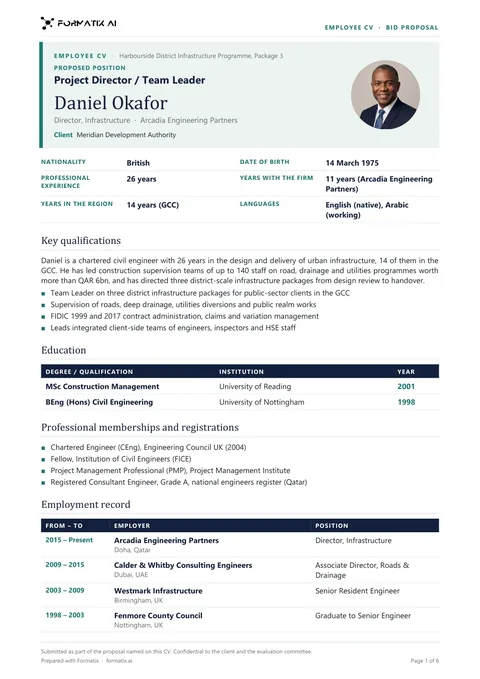 WordTender employee CVThe employee CV for tenders and bid proposals, one per proposed team member: proposed position, nationality, years of experience, with the firm and in the region, education, professional registrations, employment record and relevant projects with client, value, role and duties.
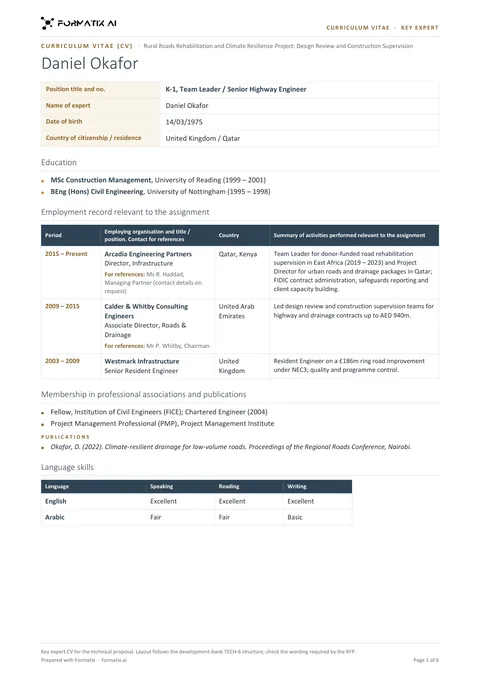 WordDevelopment bank key expert CVA key expert CV laid out in the structure development banks ask for in consultant proposals (TECH-6 style): position title and number, education, employment record with references, memberships and publications, language skills, adequacy for the assignment, contact details, certification and signatures. Not an official form.
Use the europass-style cv in your brand
Give us your website, and the template is rebuilt with your logo, colours and fonts. Your first ten documents are free, with no card, valid for 14 days.
Formatix fills it from the CV for you: see our CV formatting software, or bulk CV formatting for a whole shortlist at once.