Word template · Candidate profiles
Construction operative profile template
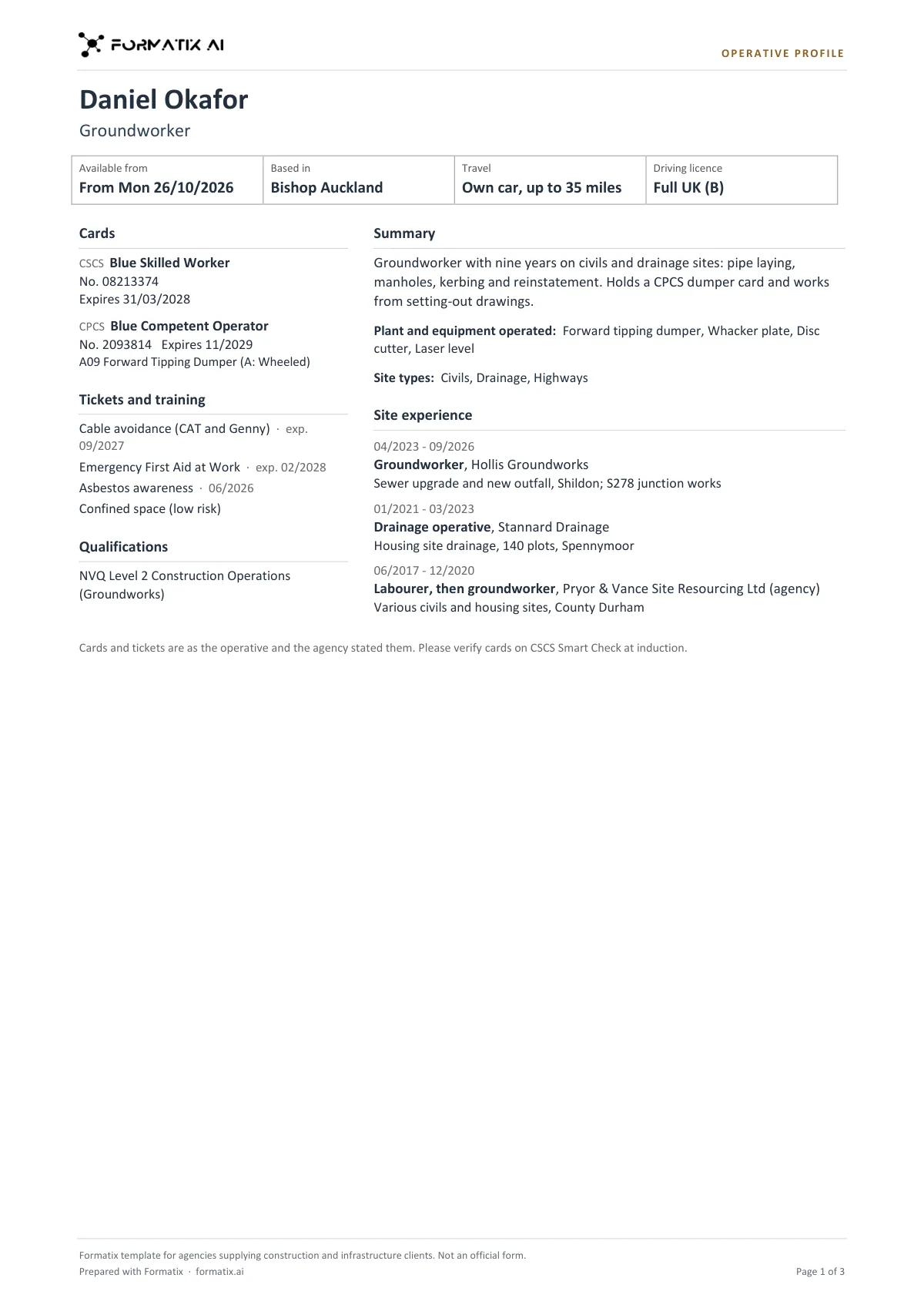
A construction operative profile is the page a labour agency sends a site with an operative, so the site manager can see the trade, when the operative can start and which cards they hold. This Word template keeps it to two pages at most, in your brand: name and trade; a strip with the start date, base, travel and driving licence; the CSCS card type, number and expiry as printed; CPCS or NPORS plant cards with their categories and expiry; tickets and training with dates; qualifications; a short summary; plant operated and site types; and up to five recent site roles. Formatix fills it from the operative's CV, card scans and your registration notes. Card types, categories and expiry dates are copied as printed, never worked out, and a card is marked Expired only when a stated date has passed. A line at the foot asks the site to verify cards on CSCS Smart Check. It is a Formatix template, not an official form.
Site managers want the card details before they want the CV. Most agencies retype them from a photo of the card into a profile, and that is where a red card becomes a blue one or an expiry date slips. This template copies the cards as printed and never adds a category because the operative has driven that machine.
10 free credits, no card needed. One credit fills one document.
An editable file with neutral branding and a fictional example candidate, to fill in by hand. Formatix fills it automatically from a CV.
What's in the template
The profile a labour agency sends a construction or civils client with an operative: trade, start date, base, travel and driving licence across the top, then the cards a site manager asks about (CSCS card type, number and expiry; CPCS or NPORS plant cards with their categories), tickets and training, qualifications, plant operated and recent site experience. Cards, categories and expiry dates only as printed or stated; a card is marked Expired only when a stated date has passed. Two pages at most. Not an official form.
- Name, trade, available from, base, travel and driving licence
- CSCS card type, number and expiry, as printed
- CPCS or NPORS plant cards with categories and expiry
- Tickets and training with dates, and qualifications
- Summary, plant operated and site types
- Up to five recent site roles with employer and project
What it's for: Sending an operative to a site with their cards and tickets on the first page.
WordDelivered as an editable Word file, or saved as PDF.
Who uses it
Construction and civils labour agencies
A profile for every operative you send to site, with the cards on the first page.
Plant desks
CPCS and NPORS cards with their categories, exactly as printed.
Agencies on infrastructure frameworks
One consistent profile across all your clients, in your brand.
How you use it
- 1
Pick the template
Open Formatix, choose this template in Studio, and give us your website. We pull your logo, colours and fonts and rebuild the template in your brand. You see a sample before you use it.
- 2
Drop the CV and card scans
Upload the operative's CV with photos or scans of their cards and tickets and your registration notes: availability, base and travel. One credit fills one document.
- 3
Check and send
The filled profile appears beside the originals for checking. Edit anything in place, then download the Word file or a PDF for the site.
Download or automate? The free download is a plain file you fill in by hand. In Formatix the template is rebuilt in your brand, with your logo, colours and fonts taken from your website, and filled from a CV or your notes in about a minute. What you keep is the finished document: an editable Word, PowerPoint or Excel file.
Ask for changes in plain words, such as "move the photo to the right" or "add a Languages section", and the template is updated with the rest of its formatting kept. If you already have a document you send clients, upload that instead and Formatix turns it into a template. How Studio builds templates
Questions about this template
- Does Formatix check the CSCS card?
- No. It copies the card type, number and expiry from the card scan or your notes. The profile footer asks the site to verify cards on CSCS Smart Check at induction, because a visual check of a card cannot show whether it is fake or revoked.
- Will it work out when a card expires?
- No. Expiry dates are copied as written. CSCS card validity depends on the card type, so the template never calculates an expiry from an issue date or a course date.
- How does it mark an expired card?
- A card or ticket shows Expired only when the documents say it has expired, or when its stated expiry date is earlier than the date of your notes. The template never marks a card as valid.
- Does it fit on two pages?
- Yes. It shows at most ten tickets, four qualifications, eight items of plant and five recent roles, most recent first.
- What personal details stay off?
- Date of birth, home address, phone, email, National Insurance number, nationality and health details are never printed.
Related templates and pages
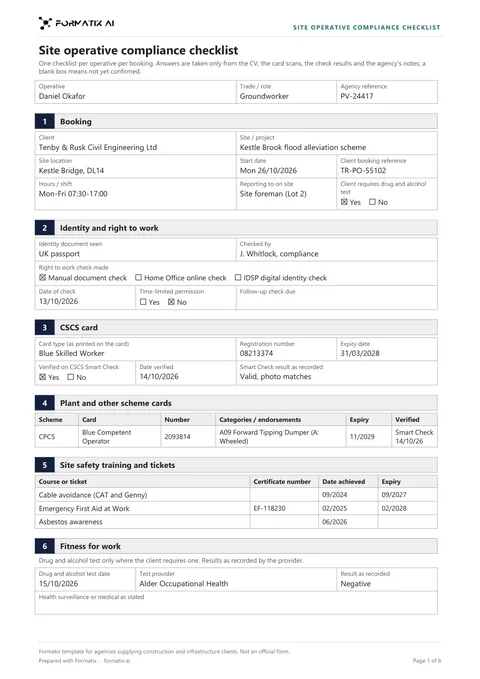 WordSite operative compliance checklistThe checklist an agency completes before an operative starts on a construction or infrastructure site: the booking, identity and right to work (manual, online or digital identity check), the CSCS card with its CSCS Smart Check result, CPCS or NPORS plant cards, SMSTS, SSSTS and other tickets, a drug and alcohol test where the client asks for one, site induction and PPE, references, and a list of what is still needed. Ticks and dates only as the documents give them. Not an official form.
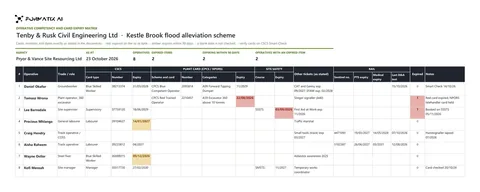 ExcelOperative competency and card expiry matrixAn Excel matrix of the operatives on a client site or framework, one row each: CSCS card type, number and expiry, CPCS or NPORS plant card with categories, SMSTS or SSSTS, other tickets, and for rail work the Sentinel number, PTS and medical expiry and the date of the last drug and alcohol test. An expiry turns red once it has passed and amber within 90 days of the as-at date, only where a full date was given, with live counts at the top. Not an official form.
Use the construction operative profile in your brand
Give us your website, and the template is rebuilt with your logo, colours and fonts. Your first ten documents are free, with no card, valid for 14 days.
Formatix fills it from the CV for you: see our CV formatting software, or bulk CV formatting for a whole shortlist at once.