Word template · Candidate profiles
Teaching assistant and SEN support profile template
A teaching assistant profile is the one page an education agency sends a school for a teaching assistant, SEN support assistant or HLTA, so the school can match the person to a child's needs. This Word template keeps everyone to one page: the name, role and base; the SEN needs supported and the support given (1:1, small group, whole class or class cover), each only as named; a short account of how they supported those needs; the TA level and qualification, key stages, first aid and availability; a short profile; training and certificates such as Team Teach or Makaton with their dates; recent placements; and a Still needed list. Formatix fills it from the CV and your notes, and never infers a level or a need.
Schools placing a TA with a child want the needs and the support first. This profile leads with them, in the words the documents use. A special school or a resourced provision on the CV does not tell you which needs someone supported, so a need appears only when it is named.
10 free credits, no card needed. One credit fills one document.
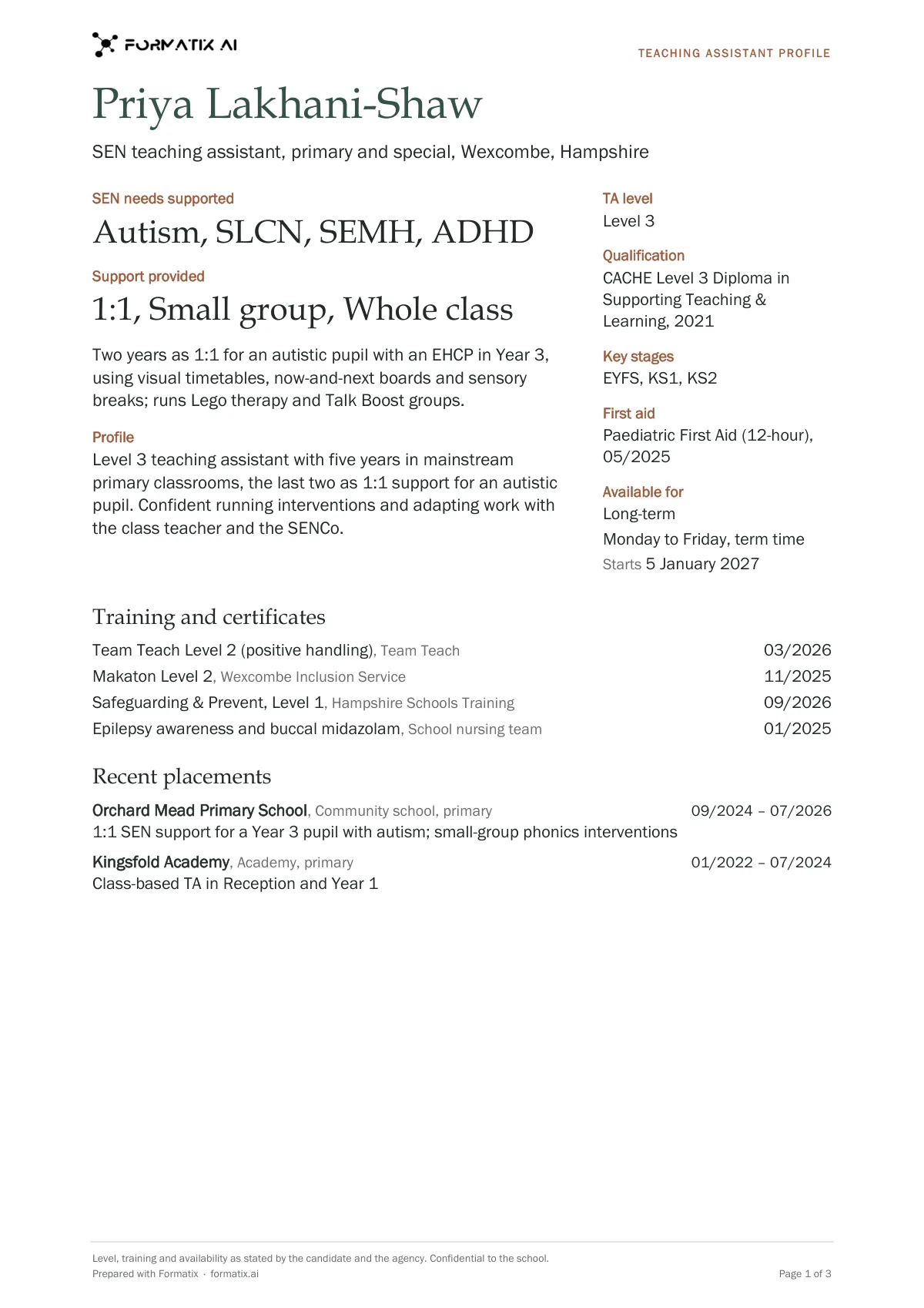
What's in the template
A one-page profile for teaching assistants, SEN support assistants and HLTAs: TA level (Level 2, Level 3, HLTA) and qualification, key stages, the support given (1:1, small groups, whole class, class cover), the SEN needs supported (autism, SEMH, PMLD ...) only as named, Team Teach and other training with dates, first aid, recent placements and availability. Never infers a level or a need; exactly one page per person.
- SEN needs supported and support provided, as named
- TA level, qualification, key stages, first aid and availability
- Profile
- Training and certificates with dates
- Recent placements
- Still needed
What it's for: Matching a teaching assistant to a school and a pupil's needs.
WordDelivered as an editable Word file, or saved as PDF.
Who uses it
Education agencies placing TAs and SEN support
One-page profiles schools can match to a pupil's needs.
SEN and special school recruiters
Needs supported, training and placements set out clearly.
Supply teaching agencies
The support-staff companion to the supply teacher profile.
How you use it
- 1
Pick the template
Open Formatix, choose this template in Studio, and give us your website. We pull your logo, colours and fonts and rebuild the template in your brand. You see a sample before you use it.
- 2
Drop the CV and your notes
Upload the CV with your registration notes, compliance file or references. One credit fills one document.
- 3
Check and send
The filled document appears beside the original for checking. Edit anything in place, then download the Word file, or save it as PDF.
Download or automate? The free download is a plain file you fill in by hand. In Formatix the template is rebuilt in your brand, with your logo, colours and fonts taken from your website, and filled from a CV or your notes in about a minute. What you keep is the finished document: an editable Word, PowerPoint or Excel file.
Ask for changes in plain words, such as "move the photo to the right" or "add a Languages section", and the template is updated with the rest of its formatting kept. If you already have a document you send clients, upload that instead and Formatix turns it into a template. How Studio builds templates
Questions about this template
- How is the TA level shown?
- As Level 2, Level 3 or HLTA only when the documents state it, through a named qualification, a job title such as "Level 3 TA" or HLTA status. A level is never inferred from years of experience or the job title "teaching assistant".
- Which SEN needs appear?
- Only needs the documents name, such as autism, SEMH, PMLD or ADHD. A need is never inferred from the kind of setting someone worked in.
- Are training dates included?
- Each course appears with its date as stated. A course without a date shows "date not stated"; a date is never guessed.
- What goes on the Still needed list?
- Up to four things a school will expect that the documents do not give, such as the TA level, the date of the Team Teach training, a first aid certificate or the days available. Unstated answers on the page read "Not stated".
Related templates and pages
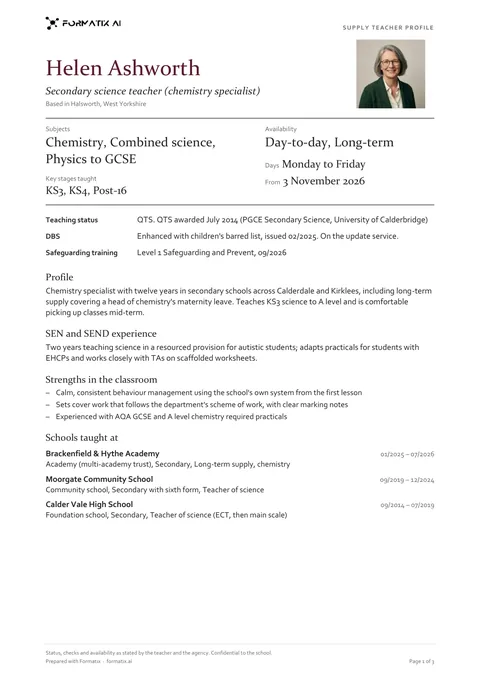 WordSupply teacher profileThe one-page profile a supply agency sends a school with a teacher: QTS, QTLS or ECT status, key stages and subjects, SEN and SEND experience, availability (day-to-day, short-term, long-term), schools taught at with type, phase and dates, behaviour management and curriculum strengths, safeguarding training date and whether the DBS is on the update service. Every status, check and tick only as stated; exactly one page per teacher.
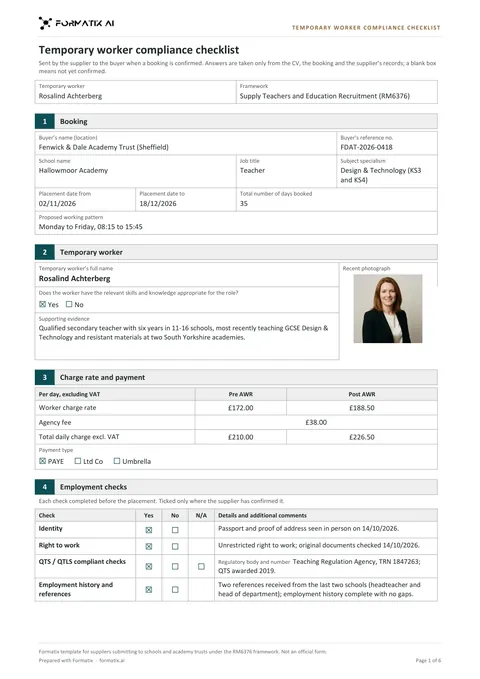 WordSupply teacher compliance checklistThe temporary worker compliance checklist a supply agency sends a school or academy trust when it confirms a booking: booking details, the worker and a recent photograph, charge rate before and after AWR, agency fee and payment type, the employment checks (identity, right to work, QTS / QTLS, references, DBS, barred list, prohibition) with their details, the buyer's extra requirements, the supplier declaration and what is still needed. Ticks and rates only as stated. Structure based on RM6376 Annex C (Open Government Licence v3.0). Not an official form.
Use the teaching assistant and sen support profile in your brand
Give us your website, and the template is rebuilt with your logo, colours and fonts. Your first ten documents are free, with no card, valid for 14 days.
Formatix fills it from the CV for you: see our CV formatting software, or bulk CV formatting for a whole shortlist at once.