Excel template · Bids & tenders
Framework bid rate card template
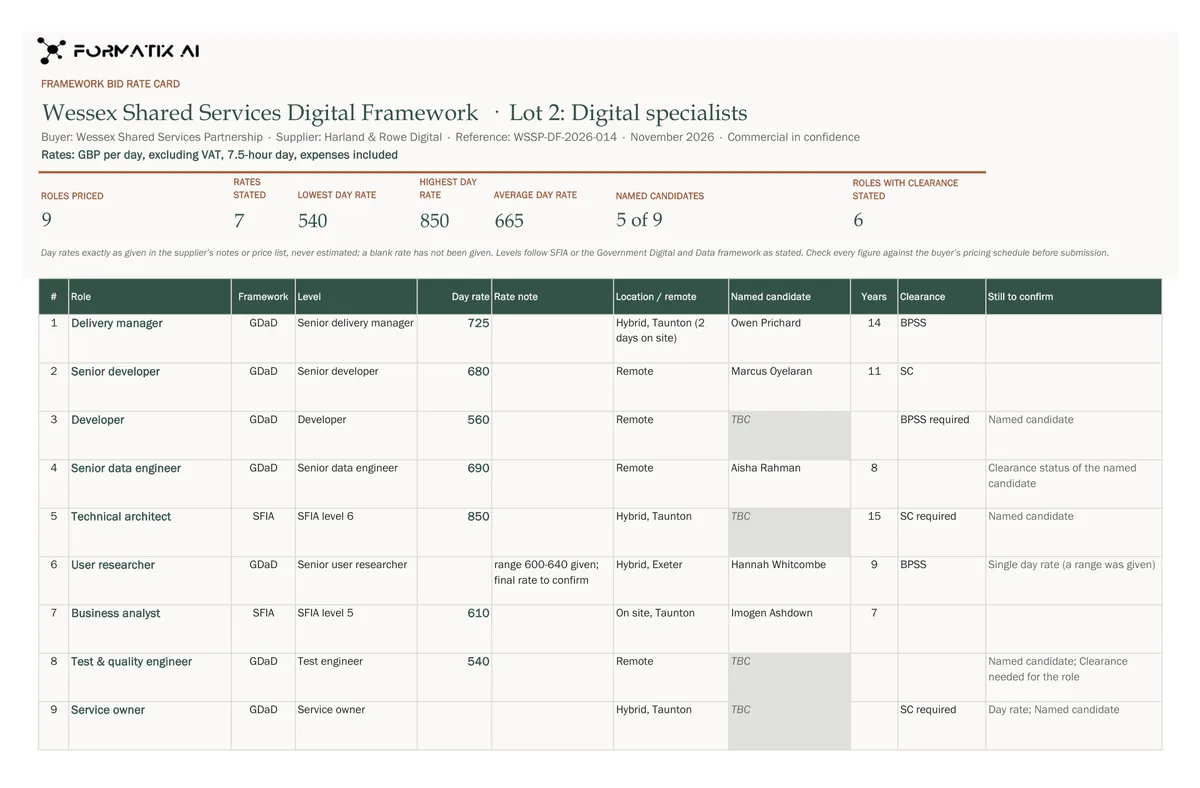
A framework bid rate card lists the roles and day rates a supplier puts into a public-sector framework bid, mini-competition or call-off. This Excel template puts one row per role with its SFIA or Government Digital and Data level, the day rate exactly as given in your notes or price list, a rate note, location and remote working, the named candidate or "TBC", years of experience, clearance and what is still to confirm, under a title block with the framework, lot, buyer, supplier, reference, date and rate basis, and a live summary of roles priced, rates stated, the lowest, highest and average day rate, named candidates and roles with clearance. Formatix fills one row per role and never estimates a rate.
A buyer contracts at the rates on this card, so every rate must be the one the supplier set. This template copies each rate from your notes or price list and nothing else. A range, an hourly rate or a TBC keeps its own wording in the rate note and stays out of the averages.
10 free credits, no card needed. One credit fills one document.
What's in the template
The roles and day rates a supplier puts into a public-sector framework bid or call-off, in Excel: one row per role with its SFIA or Government Digital and Data level, the day rate exactly as given in the supplier's notes or price list (never estimated), location and remote working, the named candidate or "TBC", years, clearance and what is still to confirm, under a live summary of roles priced, lowest, highest and average day rate, named candidates and roles with clearance.
- Framework, lot, buyer, supplier, reference, date and rate basis
- Live summary: roles priced, rates stated, lowest, highest and average day rate
- One row per role: SFIA or GDaD level, day rate as given, rate note
- Location and remote working, named candidate or TBC, years, clearance
- Still to confirm
What it's for: Pricing the roles in a framework bid or call-off.
ExcelDelivered as an Excel workbook you can edit and share.
Who uses it
Bid and commercial teams
One rate card per bid, filled from the price list and the CVs.
Digital and technology suppliers
Roles with SFIA or Government Digital and Data levels and named candidates.
Framework account managers
What is still to confirm for each role before submission.
How you use it
- 1
Pick the template
Open Formatix, choose this template in Studio, and give us your website. We pull your logo, colours and fonts and rebuild the template in your brand. You see a sample before you use it.
- 2
Drop the roles and your price list
Upload a role description or named candidate's CV for each role, with your notes or price list giving the rates, levels, location and clearance. One credit fills one row.
- 3
Check and send
The filled workbook appears for checking. Edit anything, then download the editable Excel file.
Download or automate? The free download is a plain file you fill in by hand. In Formatix the template is rebuilt in your brand, with your logo, colours and fonts taken from your website, and filled from a CV or your notes in about a minute. What you keep is the finished document: an editable Word, PowerPoint or Excel file.
Ask for changes in plain words, such as "move the photo to the right" or "add a Languages section", and the template is updated with the rest of its formatting kept. If you already have a document you send clients, upload that instead and Formatix turns it into a template. How Studio builds templates
Questions about this template
- Will it estimate a day rate?
- No. A day rate comes only from your notes or price list. It is never estimated from a CV, a market rate, a salary, a level or another role, and an hourly rate is never converted. A rate given as a range, hourly or TBC keeps its wording in the rate note and the day rate cell stays blank.
- Who chooses the SFIA or GDaD level?
- You do. The level appears only as your documents state it; Formatix never maps a role to a level itself.
- What if no one is named for a role?
- The named candidate reads "TBC" and "Named candidate" goes in the still to confirm column.
- What does the summary show?
- Roles priced, rates stated, the lowest, highest and average day rate, named candidates and roles with clearance, calculated live from the rows.
Related templates and pages
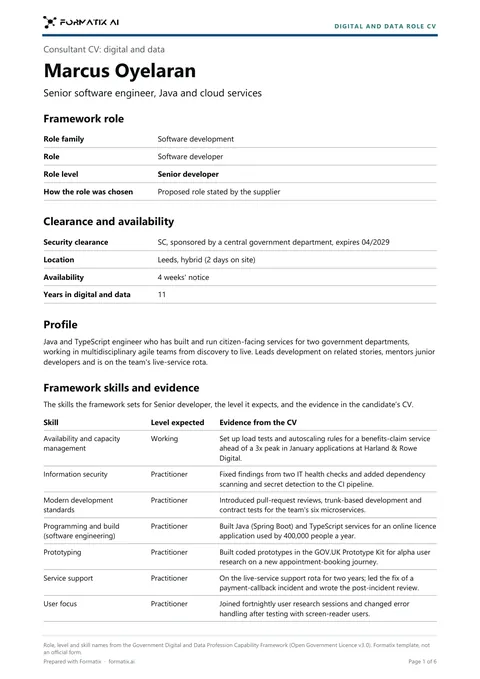 WordGovernment Digital and Data role CVA consultant CV mapped to the UK Government Digital and Data Profession Capability Framework: role family, role and role level, every framework skill for that level with the level expected and the candidate's evidence from the CV (a skill with no evidence is shown as "Evidence not stated", never invented), security clearance as stated, career history, certifications and education. Two pages at most per person. Structure based on the Government Digital and Data Profession Capability Framework (Open Government Licence v3.0).
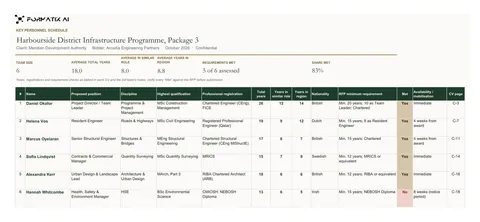 ExcelKey personnel scheduleA bid team schedule and compliance matrix in Excel: one row per proposed person with position, discipline, qualification, registration, years of experience, in a similar role and in the region, the RFP minimum requirement and whether it is met, availability and CV page, under a live summary of team size, average years and requirements met.
Use the framework bid rate card in your brand
Give us your website, and the template is rebuilt with your logo, colours and fonts. Your first ten documents are free, with no card, valid for 14 days.
Formatix fills it from the CV for you: see our CV formatting software, or bulk CV formatting for a whole shortlist at once.