Excel template · Bids & tenders
Key personnel schedule template in Excel
A key personnel schedule lists the proposed bid team in one table, one row per key person, with the position as the RFP names it, qualifications, professional registration and years of experience, set against the RFP's minimum requirements so the bid manager can see where each requirement is met. This Excel template is filled from the same batch of CVs as the tender CVs, so the schedule and the CVs agree.
Evaluators read the schedule and the CVs side by side, and the schedule is where a missing registration or a shortfall in years shows first. Filling it from the CVs, rather than retyping it, removes the most common source of inconsistency in a bid.
10 free credits, no card needed. One credit fills one document.
An editable file with neutral branding and a fictional example candidate, to fill in by hand. Formatix fills it automatically from a CV.
What's in the template
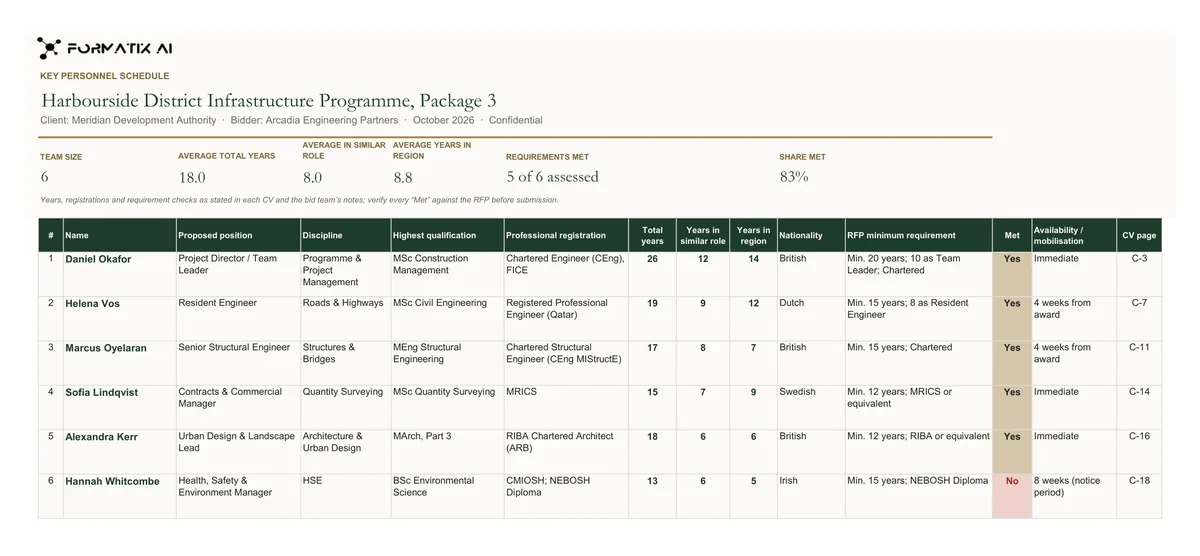
A bid team schedule and compliance matrix in Excel: one row per proposed person with position, discipline, qualification, registration, years of experience, in a similar role and in the region, the RFP minimum requirement and whether it is met, availability and CV page, under a live summary of team size, average years and requirements met.
- Live summary: team size, average total years, average years in a similar role and in the region, requirements met and share met
- One row per proposed person: name, proposed position, discipline, highest qualification, professional registration
- Total years, years in a similar role, years in the region, nationality
- RFP minimum requirement and a Met column, with a note to verify every Met against the RFP
- Availability / mobilisation and CV page
What it's for: Checking the proposed team against the RFP's minimum requirements before submission, and submitting the schedule with the proposal.
ExcelDelivered as an Excel workbook you can edit and share.
Who uses it
Bid managers
A compliance view of the whole team before submission, with a Met column and a live summary of requirements met.
Proposal coordinators
The schedule filled from the CVs in the same run, not retyped at the end.
Bid teams preparing interviews
Average years, years in the region and requirements met at a glance, from the same facts as the CVs.
How you use it
- 1
Pick the template
Choose this template in Studio and give us your website, or upload the schedule format from the RFP. You see a sample before using it.
- 2
Add the CVs and the requirements
Upload the team's CVs with a note per person giving the proposed position, and enter the RFP's minimum requirements for each position. One credit formats one CV.
- 3
Review the gaps
Each person's facts appear beside the requirement, with the Met column filled from the CVs and your notes. Your team verifies every Met, then downloads the editable Excel workbook.
Download or automate? The free download is a plain file you fill in by hand. In Formatix the template is rebuilt in your brand, with your logo, colours and fonts taken from your website, and filled from a CV or your notes in about a minute. What you keep is the finished document: an editable Word, PowerPoint or Excel file.
Ask for changes in plain words, such as "move the photo to the right" or "add a Languages section", and the template is updated with the rest of its formatting kept. If you already have a document you send clients, upload that instead and Formatix turns it into a template. How Studio builds templates
Questions about this template
- What columns does the key personnel schedule have?
- Number, name, proposed position, discipline, highest qualification, professional registration, total years, years in a similar role, years in the region, nationality, the RFP minimum requirement, a Met column, availability / mobilisation and CV page, under a live summary of team size, average years and requirements met.
- Does Formatix decide whether a requirement is met?
- No. It fills the Met column from what the CVs and your notes state, and the sheet carries a note to verify every Met against the RFP. Whether experience counts as similar or a qualification is equivalent is the bid team's judgement.
- Will the schedule match the CVs?
- Yes, when both are filled from the same batch. The tender Employee CV template and this schedule use the same extraction.
- Can the RFP's own schedule format be used?
- Yes. Upload it in Excel and Formatix turns it into a template that keeps its columns.
Related templates and pages
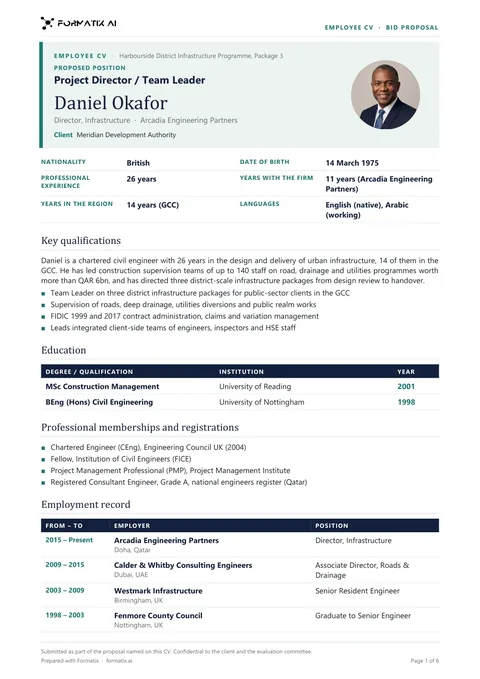 WordTender Employee CV packThe employee CV for tenders and bid proposals, one per proposed team member: proposed position, nationality, years of experience, with the firm and in the region, education, professional registrations, employment record and relevant projects with client, value, role and duties.
 PowerPointBid team presentation (PowerPoint)The proposed team for a bid interview or a proposal in PowerPoint: a cover, an overview of up to twelve people with photo, name, proposed role and years, then one slide per key person with qualifications, experience and up to four relevant projects.
Use the key personnel schedule in your brand
Give us your website, and the template is rebuilt with your logo, colours and fonts. Your first ten documents are free, with no card, valid for 14 days.