Word template · Candidate profiles
Care worker profile template, one page
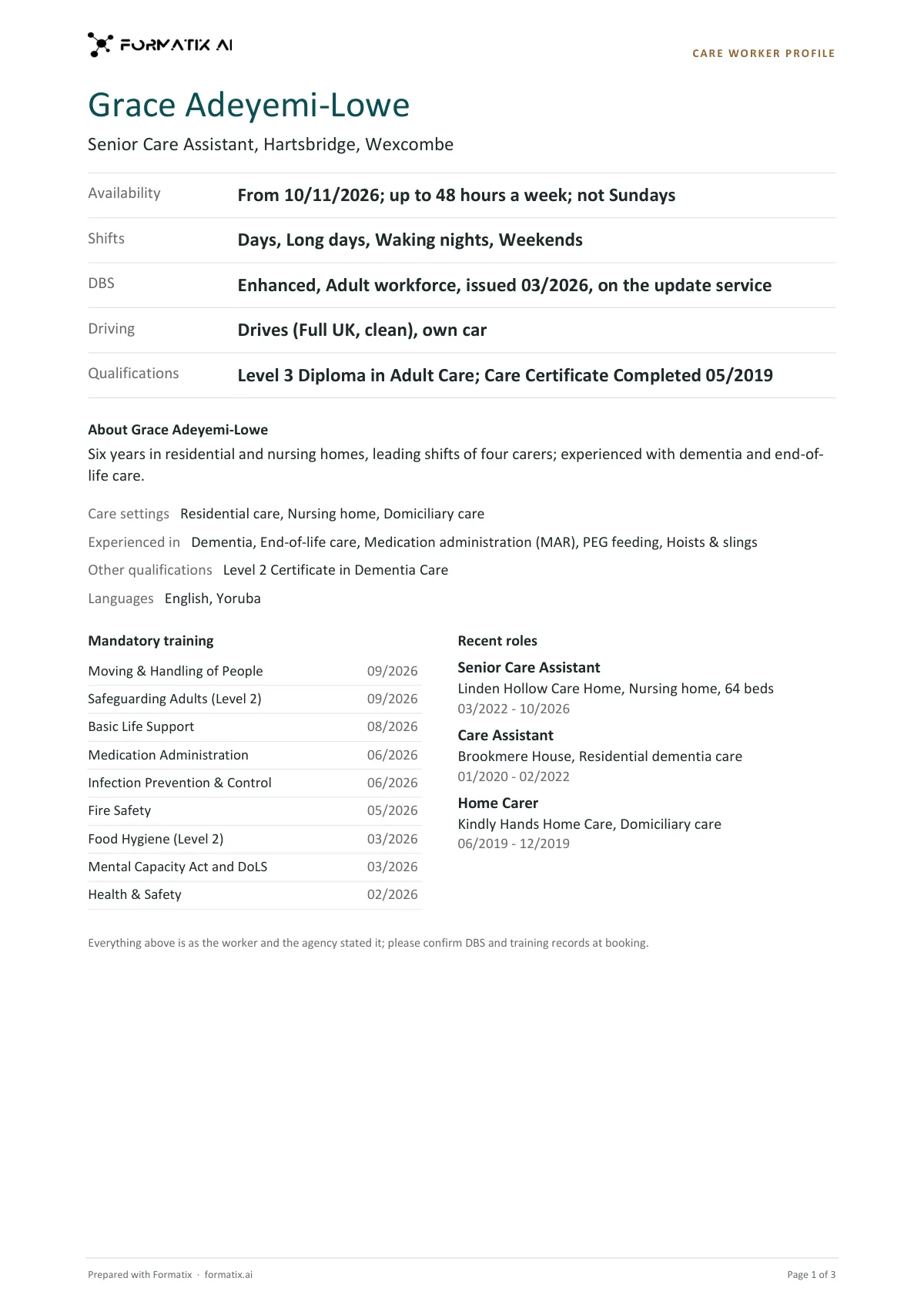
A care worker profile is the one page a care agency sends to care homes, home care and social care clients with a booking, so the client can see whether the worker can safely cover the shift. This Word template keeps every worker to exactly one page in the agency's brand: the name, role and base; then availability, shifts (days, nights, long days, waking nights, sleep-ins, weekends, live-in), DBS (level and date, adult or child workforce, update service), driving (licence and own car) and qualifications (Care Certificate and NVQ, QCF or diploma level), each answered in words; a short summary; care settings, experience and languages; mandatory training with dates; and up to three recent roles. Formatix fills it from the worker's CV and your notes, and nothing beyond them.
Care clients book on a few facts: when the worker is free, which shifts they do, their DBS, their training and whether they drive. This template puts those on one page for every worker, and fills nothing the CV or your notes do not state: a shift or setting appears only when it is supported, an unstated answer reads "Not stated", and a training course appears only if it is listed, with its date as given.
10 free credits, no card needed. One credit fills one document.
What's in the template
A one-page profile of a care worker or healthcare assistant for care homes, home care and social care bookings: the questions a manager asks answered first in plain words (availability, shifts, DBS with workforce and update service, driving, Care Certificate and NVQ / QCF / diploma level), care settings, experience, languages, mandatory training with dates and up to three recent roles. Exactly one page per worker; nothing beyond the CV and notes.
- Name, role, base and availability
- Shifts: days, nights, long days, waking nights, sleep-ins, weekends, live-in
- DBS, driving and qualifications, answered in words
- Care settings, experience and languages
- Mandatory training with dates
- Up to three recent roles
What it's for: Sending a care worker to a care client with a booking, on one page.
WordDelivered as an editable Word file, or saved as PDF.
Who uses it
Care staffing agencies
One-page profiles for care assistants and healthcare assistants, in your brand.
Domiciliary and supported living providers
Driving, own car and care settings clear at a glance.
Branch coordinators
Profiles for a run of bookings in minutes, one worker per page.
How you use it
- 1
Pick the template
Open Formatix, choose this template in Studio, and give us your website. We pull your logo, colours and fonts and rebuild the template in your brand. You see a sample before you use it.
- 2
Drop the CV and your notes
Upload the worker's CV with your registration notes, compliance records, training matrix and availability. One credit fills one document.
- 3
Check and send
The filled document appears beside the original for checking. Edit anything in place, then download the Word file, or save it as PDF.
Download or automate? The free download is a plain file you fill in by hand. In Formatix the template is rebuilt in your brand, with your logo, colours and fonts taken from your website, and filled from a CV or your notes in about a minute. What you keep is the finished document: an editable Word, PowerPoint or Excel file.
Ask for changes in plain words, such as "move the photo to the right" or "add a Languages section", and the template is updated with the rest of its formatting kept. If you already have a document you send clients, upload that instead and Formatix turns it into a template. How Studio builds templates
Questions about this template
- Will it add mandatory training the worker has not listed?
- No. Only courses the CV or the training record lists appear, each with its date as stated. A course is never added because it is mandatory in care.
- How is the DBS shown?
- Level and date, adult or child workforce, and update service, only as stated. An enhanced DBS or a barred list check is never assumed.
- What if the CV does not say whether they drive?
- Driving reads "Not stated". It is never answered No just because driving is not mentioned.
- Does it always fit on one page?
- Yes. Each part has a limit: a two-sentence summary, up to twelve training courses and up to three recent roles.
Related templates and pages
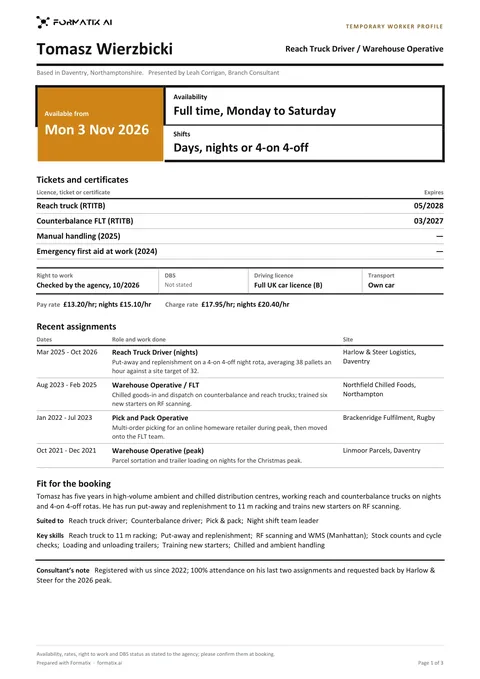 WordTemporary worker profileA strictly one-page profile a staffing agency sends a client with a temp booking: the role put forward and when the worker can start, availability and shifts in large type, tickets and licences with any stated expiry, right to work, DBS, driving licence and transport on one line, pay and charge rate only as stated, a short table of recent assignments, their fit for the booking and key skills. Never infers a rate or availability.
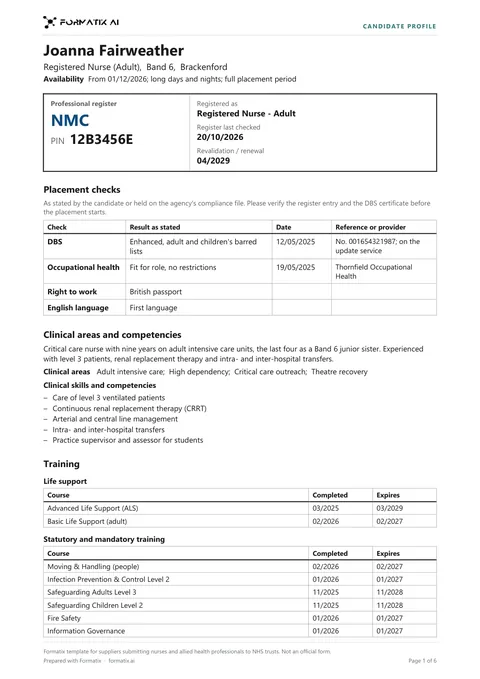 WordNurse and allied health candidate profileA placement-ready profile an agency sends to an NHS trust for a nurse, midwife or allied health professional, built around what the trust checks at placement: the professional register and PIN in a boxed register summary with the last check and revalidation date, then a checks table (enhanced DBS and the update service, occupational health, right to work, English) with result, date and reference, then clinical areas and skills, life support and mandatory training with completion and expiry dates, the employment history by trust, ward and band with every gap shown, education, references and what is still needed. Only as stated; not an official form.
Use the care worker profile in your brand
Give us your website, and the template is rebuilt with your logo, colours and fonts. Your first ten documents are free, with no card, valid for 14 days.
Formatix fills it from the CV for you: see our CV formatting software, or bulk CV formatting for a whole shortlist at once.