IT staffing vendors
Requirement vs candidate skills matrix
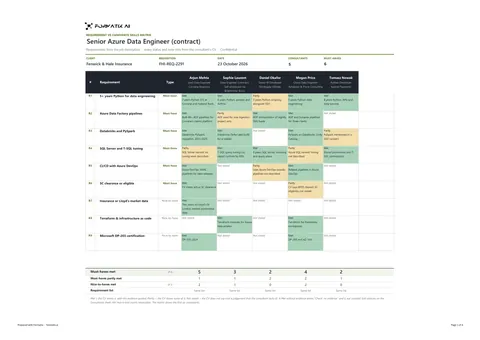
A requirement vs candidate skills matrix compares every consultant on a shortlist against the client's job description, requirement by requirement. Formatix takes the requirements from the job description, marks each consultant Met, Partly or Not stated with evidence from their own CV, and counts the must-haves met.
No credit card. Your first ten CVs are free, and the trial credits are valid for 14 days.
What it is
Clients want to see how each submitted consultant meets each requirement. A matrix puts the requirements down the side and the consultants across, so gaps are visible at once.
The Formatix template is an Excel workbook: a matrix sheet with the client, requisition and date, up to ten requirements marked must-have or nice-to-have, one column per consultant (up to six) and live counts under the grid, fed by a sheet with one row per consultant.
Every status and evidence note comes only from that consultant's CV. "Not stated" means the CV does not say; it never says the consultant lacks the skill.
What Formatix fills in
| Field | Filled from |
|---|---|
| Client, role, requisition reference and date | The job description or your notes |
| Requirements and must-have or nice-to-have | The job description, in its own order and wording |
| Consultant name, current role and employer | Each CV |
| Met, Partly or Not stated for each requirement | Each consultant's CV only |
| Evidence note | A short quote or close paraphrase of the CV |
| Must-haves met, partly met and nice-to-haves met | Counted live from the grid |
What stays blank
| Field | Why it stays blank |
|---|---|
| Evidence for a Not stated requirement | Left blank: the CV does not mention it. |
| A Met that arrives without evidence | Shown as "Check: no evidence" and not counted. |
| A requirement the job description does not ask for | Never added, merged or reworded. |
Frequently asked questions
- What if two consultants' requirement lists differ?
- Each CV is read separately against the same job description; the matrix flags a consultant whose extracted requirement list differs from the one shown.
- Our client has its own resume format. Can we use that?
- Yes. Upload your client's mandated format and Formatix builds the template from it, so every consultant you submit goes in the layout the client asked for.
- Does it work with our ATS or CRM?
- JobAdder, Salesforce, HubSpot and Ezekia connect to Formatix natively on every plan, including the free trial. Any other ATS or CRM works with Formatix by email: send the job description and the CVs to [email protected] and the filled document comes back.
More for this kind of firm
- For IT staffing vendorsConsultant resumes in each client's format, and a bench hotlist that stays current.
- IT consultant submission resumeAn IT consultant submission resume is the one-page resume a vendor sends with each consultant it submits to an end client or prime vendor.
- IT consultant bench hotlistA bench hotlist is the weekly list of available consultants an IT staffing vendor sends to clients and prime vendors.
- Interview availability trackerAn interview availability tracker shows, for one requisition, where every consultant is in the interview process and which slots are offered or confirmed.
Try it on your next requirement
Upload your client's resume template and two or three consultant resumes, and see them in that format.
No credit card. Your first ten CVs are free, and the trial credits are valid for 14 days.