Word template · Reports
Locum CV compliance review template
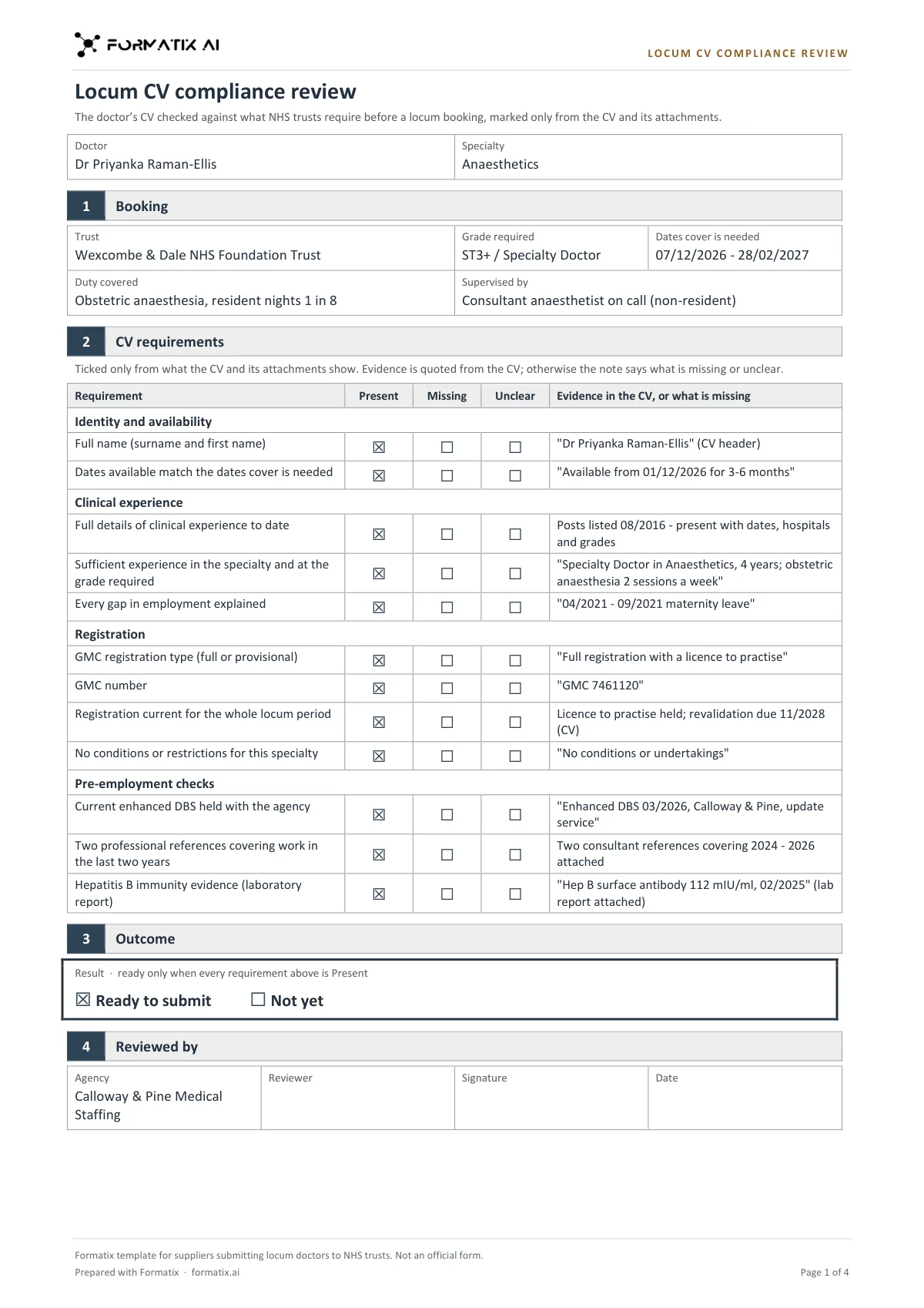
A locum CV compliance review checks a locum doctor's CV against what trusts require in the CV before the doctor is deemed suitable, before the agency submits it. This Word template sets it out on one to two pages in the agency's brand: the doctor, specialty and booking as stated; then each requirement (full name, availability for the dates needed, clinical and specialty experience, every gap explained, GMC registration type, number, currency and restrictions, a current enhanced DBS, two references covering the last two years, and hepatitis B evidence) marked Present, Missing or Unclear, with the evidence quoted from the CV or a note of what is missing. Ready to submit is ticked only when every requirement is Present; otherwise Not yet, followed by a list of what to get from the doctor and a Reviewed by sign-off left blank for the reviewer. Formatix fills it from the CV, its attachments and your notes. It is a Formatix template, not an official form.
Before a locum CV goes to a trust, someone checks it line by line: is every post dated, is every gap explained, is the GMC registration current for the whole booking, are there two recent references. This template does that first pass and shows its working: every Present quotes the CV, every Missing or Unclear says what is needed, and the template itself, not the AI, decides whether the CV is ready to submit.
10 free credits, no card needed. One credit fills one document.
What's in the template
A one-to-two-page review of a locum doctor's CV against what trusts require before a doctor is deemed suitable: full name, availability, clinical and specialty experience, gaps explained, GMC registration type, number, currency and restrictions, DBS, two recent references and hepatitis B evidence, each marked Present / Missing / Unclear from the CV with the evidence quoted or what is missing. Ready to submit is ticked only when every requirement is Present; a still-needed list follows. Not an official form.
- Doctor, specialty and booking as stated
- Twelve requirements, each Present, Missing or Unclear
- Evidence quoted from the CV, or what is missing
- Outcome: Ready to submit or Not yet
- Still needed from the doctor
- Reviewed by (reviewer, signature and date left blank)
What it's for: Checking a locum CV before it is submitted to a trust.
WordDelivered as an editable Word file, or saved as PDF.
Who uses it
Locum compliance teams
A first check of every locum CV before it is submitted, with the evidence quoted.
Medical recruitment consultants
A clear list of what to ask the doctor for before the CV goes out.
Agency managers
A consistent, signed-off review on file for every submission.
How you use it
- 1
Pick the template
Open Formatix, choose this template in Studio, and give us your website. We pull your logo, colours and fonts and rebuild the template in your brand. You see a sample before you use it.
- 2
Drop the CV and attachments
Upload the doctor's CV with any attachments (references, a registration print-out, DBS, immunisation records) and the booking details. One credit fills one document.
- 3
Check, chase and review again
The review appears beside the original for checking. Get the items on the Still needed list from the doctor, then review the CV again before submitting.
Download or automate? The free download is a plain file you fill in by hand. In Formatix the template is rebuilt in your brand, with your logo, colours and fonts taken from your website, and filled from a CV or your notes in about a minute. What you keep is the finished document: an editable Word, PowerPoint or Excel file.
Ask for changes in plain words, such as "move the photo to the right" or "add a Languages section", and the template is updated with the rest of its formatting kept. If you already have a document you send clients, upload that instead and Formatix turns it into a template. How Studio builds templates
Questions about this template
- How does it decide Ready to submit?
- The template ticks Ready to submit only when every requirement is marked Present. If any requirement is Missing or Unclear, it ticks Not yet. The AI only marks each requirement; it never makes the overall call.
- When is a requirement marked Unclear?
- When the evidence is partial, out of date or contradictory: for example one reference only, a reference covering work more than two years ago, "Hep B immune" without a laboratory report, or availability given without dates.
- Will it mark something Present because the agency usually holds it?
- No. Present means the CV or an attached document clearly shows it, and the evidence column quotes it. Nothing is marked Present because it is usual for the grade.
- Is this an official NHS checklist?
- No. It is a generic Formatix template for suppliers submitting locum doctors to NHS trusts, and its footer says it is not an official form.
Related templates and pages
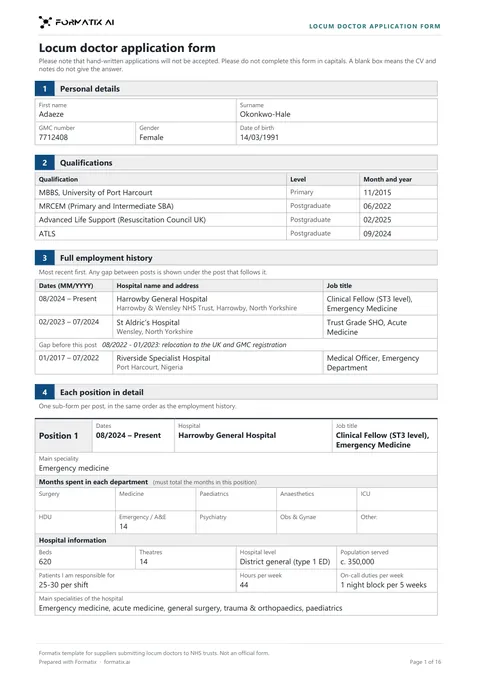 WordLocum doctor application formThe detailed application form a locum agency completes for a doctor before submitting them to an NHS trust: GMC number and qualifications, full employment history with gaps explained, each post in detail (months per department, hospital information, departments worked, daily duties, procedures per week), career totals per procedure, the self-declaration procedures checklist, the consolidated summary of experience and a list of what is still needed. Ticks and numbers only as stated. Not an official form.
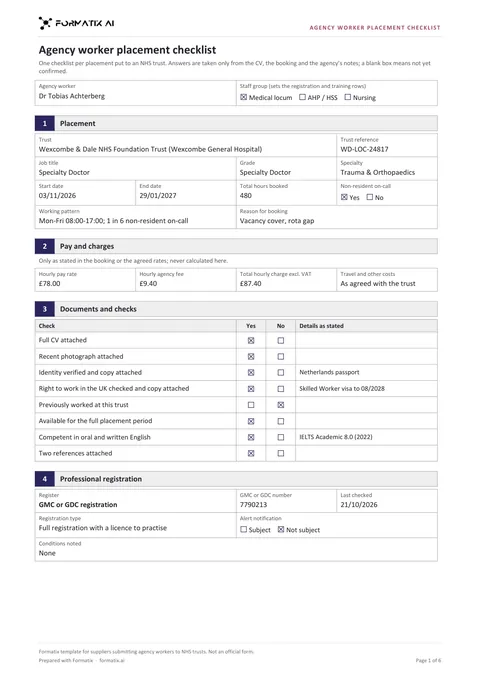 WordAgency worker placement checklistThe checklist an agency completes for each placement it puts to an NHS trust, in three variants by staff group (medical locum, AHP / healthcare science, nursing) that switch the registration and training rows: booking, grade or band, dates, hours and on-call, pay and agency fee only as stated, CV, photo, ID and right to work, registration and last check, DBS, occupational health, life support and appraisal or mandatory training, English, two references, a still-needed list and a blank supplier sign-off. Ticks only as stated. Not an official form.
Use the locum cv compliance review in your brand
Give us your website, and the template is rebuilt with your logo, colours and fonts. Your first ten documents are free, with no card, valid for 14 days.
Formatix fills it from the CV for you: see our CV formatting software, or bulk CV formatting for a whole shortlist at once.