Use case · US government contracting
SF330 and federal proposal resume formatting, for A/E firms and proposal teams
Formatix AI converts your staff resumes into the format a federal proposal requires, in bulk: Standard Form 330 Section E for architect-engineer contracts, or the key personnel resume a solicitation's Section L asks for. It works the same way with your company template or a client's resume template. You upload the format once, then the proposed team's resumes in whatever layout each person keeps; Formatix fills one resume per person as an editable Word file, which your proposal team checks beside the original before it goes into the volume.
It is built for architecture and engineering firms that submit SF330s to federal agencies, and for government contractors whose technical volumes carry key personnel resumes: proposal managers and coordinators who rebuild the same people's resumes for every pursuit, to a different page limit and a different set of required fields.
No credit card. Your first ten resumes are free, and the trial credits are valid for 14 days.
Two formats, the same problem
Architect-engineer selections run on the SF330. FAR 36.702(b) says the SF 330, Architect-Engineer Qualifications, shall be used to evaluate firms before awarding a contract, and Part I Section E holds a resume for each key person: name, role in this contract, years of experience in total and with the current firm, firm name and location, education, current professional registration, other professional qualifications, and up to five relevant projects with the year completed, a brief description and the person's specific role. The current edition is SF 330 (Rev. 7/2021), prescribed by FAR 53.236-2(b).
Other federal proposals have no standard resume form. We found no FAR provision that sets one; instead, each solicitation's Section L (instructions to offerors) sets the format, page limits and required content, and Section M sets how key personnel are evaluated. One RFP wants two pages per resume with certifications and clearances up front; the next wants a table of education, years of experience and a list of relevant contracts.
Either way, a proposal coordinator ends up rebuilding resumes by hand, under the deadline, from whatever the engineers and project managers last saved, and re-checking that every role title matches the organization chart and the staffing plan.
How to convert resumes into the solicitation's or your company's format
- 1
Upload the format once
Use the SF330 Section E or federal key personnel resume template from the Studio library, or upload the resume format from your solicitation or your firm's own proposal template in Word. Formatix keeps the layout and tables and emails you a filled sample to check.
- 2
Drop in the team's resumes
Upload the proposed team's resumes as a batch: Word, PDF, scans or resumes from a previous proposal. Add a note per person with the role in this contract and the projects to lead with, so each resume answers this solicitation.
- 3
Check and assemble
Each resume comes back in the required format, about thirty seconds per resume, shown beside the original. Edit in place, then download editable Word files, one per person or one combined section, ready for your volume.
Templates for federal proposals
Each template is rebuilt in your brand before use. When a solicitation prescribes its own resume format, upload that instead: the solicitation always wins.
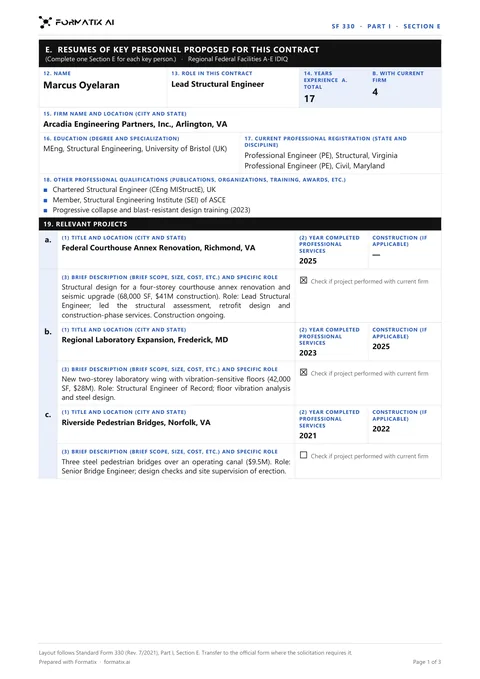 WordSF330 Section E resume (Word)One Section E per key person, following blocks 12 to 19 of SF 330 (Rev. 7/2021): role in this contract, years of experience, firm, education, registration, other qualifications and up to five relevant projects.
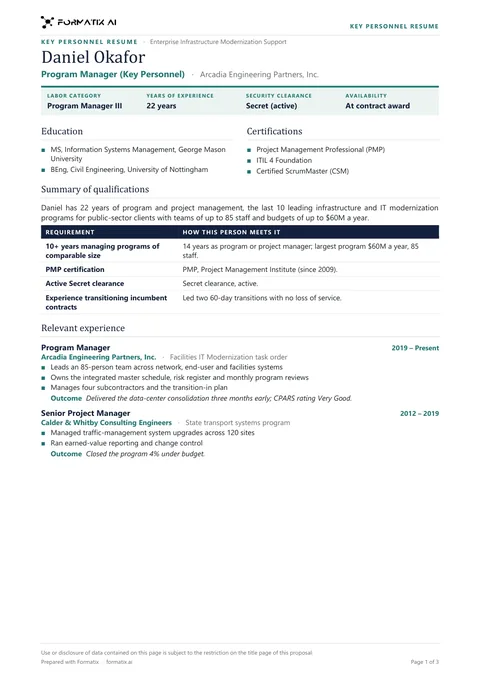 WordFederal key personnel resume (Word)A two-page proposal resume: labor category, clearance when stated, education, certifications, years of experience, a requirement-by-requirement table and relevant experience with outcomes.
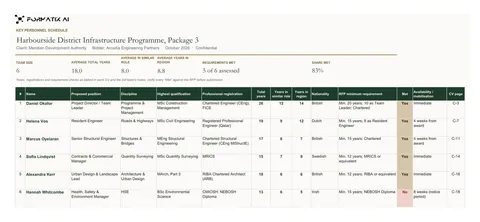 ExcelKey personnel schedule (Excel)The proposed team on one sheet, each person's qualifications and experience beside the solicitation's minimums, from the same batch.
What Formatix does with each field
- Role in this contract or labor category: from your note, so it matches the organization chart exactly.
- Years of experience in total and with the current firm: derived from the dates in the resume, then checked by your team.
- Education and current professional registration (state and discipline on the SF330): from the resume.
- Other qualifications, such as certifications, training, memberships, publications and languages: from the resume, in the order the format sets.
- Relevant projects: the projects named in the resume, with title and location, year completed, description and the person's role, the most relevant first as your note directs, up to the format's limit (five on Section E).
- Clearances and certifications: placed only if the resume or your note states them.
Formatix only places what the resume and your notes contain. If a resume has no completion year or no registration number, the field stays empty for your team to complete. Nothing is invented.
A worked example
Take Corran Hale Engineers, a fictional A/E firm responding to a public notice for an indefinite-delivery contract. The agency wants SF330 Part I with Section E resumes for 12 key personnel, limited to the format's five projects each.
The proposal coordinator picks the SF330 Section E template, uploads the 12 resumes with a note per person (role in this contract, and the three projects closest to the agency's work), and gets 12 Section E pages back in the form's block order. She fixes a registration state one engineer left off and trims one description, and the section goes to the proposal manager for review the same day.
Data handling
Formatix AI Ltd (company number 15626717) is registered with the UK Information Commissioner's Office (ICO) under registration number ZC184545. Processing is hosted in the UK and EU, encrypted in transit. Files are kept for the retention period your account sets, then deleted. Customer data and uploaded CVs are not used to train AI models.
Formatix does not claim any US government security authorization, such as FedRAMP. Use it for staff resumes, and keep classified or controlled unclassified information out of what you upload.
What it costs
Formatix is free to try: 10 free CVs, no card, with trial credits valid for 14 days. Plans start at US$30 a month for 20 credits, charged in US dollars. One credit formats one resume, so a 12-person Section E set uses 12 credits. All prices are public on the pricing page.
Frequently asked questions
- Can Formatix fill SF330 Section E for our key personnel?
- Yes. The SF330 Section E template follows blocks 12 to 19 of SF 330 (Rev. 7/2021). Upload each person's resume with a note of their role in this contract, and Formatix fills one Section E per person, with up to five relevant projects, as an editable Word file.
- Does it do SF330 Part II or Section F?
- The library template covers Section E resumes. Section F project sheets and Part II firm qualifications come from your firm's records rather than individual resumes; you can upload your own format for them, but this page is about the resumes.
- Can it follow the resume format in our RFP's Section L?
- Yes. Upload the format, or a resume laid out the way Section L describes, and Formatix turns it into a template. Page limits and required fields are set in the template, and your team checks each result.
- Will it add experience or clearances a person does not have?
- No. It places only what is in the resume and your notes; anything missing stays blank. Whether a person meets a solicitation's minimum qualifications is your team's judgement.
- Is Formatix FedRAMP authorized?
- No. Formatix does not claim any US government security authorization. Data is processed in the UK and EU. Use it for staff resumes, not for classified or controlled unclassified information.
- What does it cost?
- Free to try: 10 free CVs, no card. Plans start at US$30 a month for 20 credits, and one credit formats one resume.
Try it on your next proposal
Upload the resume format from a solicitation and two or three staff resumes, and see the result before your color review.