Use case · Management and IT consultancies
Consultant CV formatting for framework bids, tenders and client proposals
Formatix AI reformats employee CVs into your standard format, or into a client's resume template or a bid's required format, in bulk. You upload the required CV format, or your firm's own consultant profile, once; then the proposed team's CVs in whatever layout each consultant keeps; Formatix fills one CV per consultant as an editable Word file, with the role, skills and engagements this bid needs first. Your bid team checks each CV beside the original before it is submitted.
It is built for management, IT and digital consultancies that put named consultants into public-sector call-off competitions, EU and international tenders, and client proposals, where every buyer wants the team presented a little differently and the CVs are rebuilt by hand each time.
No credit card. Your first ten CVs are free, and the trial credits are valid for 14 days.
Why consultant CVs are rebuilt for every bid
In the UK, central government buys consultancy and digital services through frameworks run by the Government Commercial Agency (GCA), which Crown Commercial Service became on 1 April 2026: among them G-Cloud 15 (RM1557.15, which replaced G-Cloud 14), the Management Consultancy Framework Four (MCF4, RM6309), Digital Outcomes and Specialists 7 (DOS7, RM1043.9, the successor to Digital Specialists and Programmes) and Technology Services 4 (RM6190). The framework agreement pages do not set a CV format. Requirements for CVs, where there are any, come from each buyer's call-off: DOS7, for example, has buyers set their own specification and assessment criteria.
So the format changes with every competition. One buyer wants two-page CVs against named skills; another wants a short profile per role in a table; an EU institution's call for tenders may ask for CVs in the European (Europass) format. Meanwhile clients outside the public sector expect consultant profiles in the firm's own house style.
A bid manager or a resourcing coordinator ends up re-cutting the same consultants' CVs for each one, chasing up-to-date engagements, and checking that role titles and day-rate grades match the pricing schedule.
How to reformat consultants' CVs into your standard format
- 1
Upload the format once
Use the consultant framework CV from the Studio library, upload the format a buyer has issued, or upload your firm's own consultant profile in Word. Formatix keeps the layout and emails you a filled sample to check.
- 2
Drop in the team's CVs
Upload the proposed consultants' CVs as a batch, in any layout or language, with a note per person: the role in this bid, and the skills and engagements to put first.
- 3
Check and submit
Each CV comes back in the required format, about thirty seconds per CV, beside the original. Edit in place, then download editable Word files, one per consultant or one combined pack.
Templates for consultancies
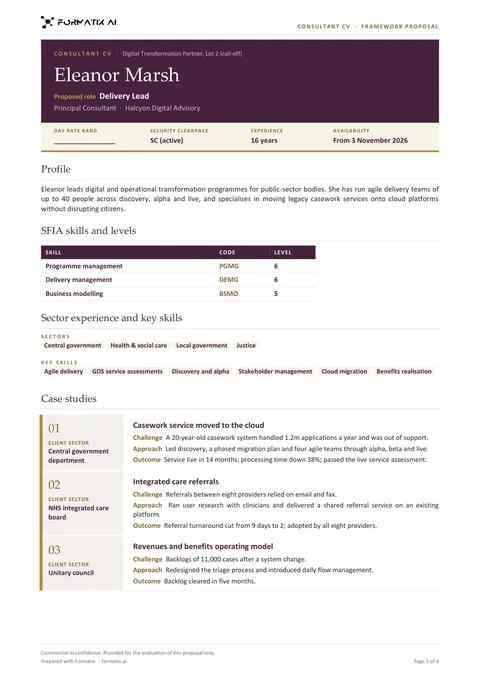 WordConsultant framework CV (Word)A bid CV for framework call-offs and consultancy tenders: proposed role, day-rate band to complete, clearance when stated, SFIA skills and levels, sectors, case studies and career history.
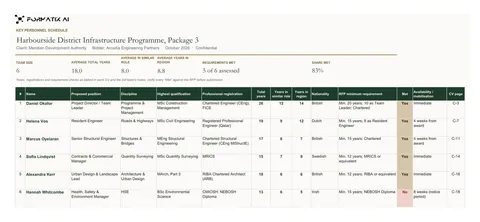 ExcelKey personnel schedule (Excel)The proposed team on one sheet, each consultant's skills and experience beside the buyer's requirements.
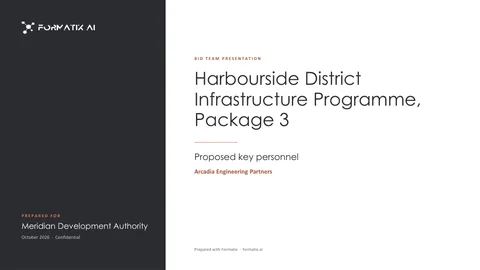 PowerPointBid team presentation (PowerPoint)A team overview and one slide per consultant for a bid presentation or a client meeting.
Each template is rebuilt in your brand before you use it. When a buyer issues its own CV format, upload that instead.
What a consultant bid CV usually needs
- Proposed role and grade: from your note, so it matches the pricing schedule and the team structure.
- A short profile written to the buyer's requirement: drafted from the CV and your note, for your team to edit.
- Skills, methods and certifications (for example a project management, agile or cloud certification): from the CV.
- Security clearance level: only if the CV or your note states it.
- Relevant engagements: client sector, dates, role and outcomes as the CV describes them, the most relevant first.
- Employment history and education, in the order the format sets.
Formatix only places what the CV and your notes contain. Missing information stays blank for your team; nothing is invented.
Your company CV format for proposals, not only bids
The same workflow gives you consultant profiles in your house style for client proposals and statements of work: upload your profile template once, and every consultant's CV comes out the same way, whoever wrote it. Run a whole proposed team in one batch and the profiles read as if one person wrote them.
A worked example
Take Larkfield Advisory, a fictional management consultancy on a public-sector framework. A department runs a call-off for a twelve-week operating model review and asks for CVs of the five named consultants, no more than two pages each, set against six skills in its specification.
The bid manager uploads the buyer's CV format as the template and gets a filled sample by email. She uploads the five consultants' CVs, two of them still in the layout of a previous client's proposal, with a note for each giving the proposed role and the two engagements closest to the department's problem. Formatix returns five CVs in the buyer's format, each opening with a short profile drafted against the role. She sharpens two profiles, corrects one certification date, and the CV annex is ready for the bid review, alongside a team schedule in Excel from the same batch.
Data handling and cost
Formatix AI Ltd (company number 15626717) is registered with the UK Information Commissioner's Office (ICO) under registration number ZC184545. Personal data is handled under the UK GDPR and the Data Protection Act 2018 (and the EU GDPR for EU customers). For the CVs your firm uploads, Formatix acts as a processor for your firm, and a data processing agreement is available on request. Processing is hosted in the UK and EU, encrypted in transit, and customer data and uploaded CVs are not used to train AI models.
Formatix is free to try: 10 free CVs, no card, with trial credits valid for 14 days. Paid plans start at £20 a month for 20 credits, and one credit formats one CV.
Frequently asked questions
- Can Formatix convert our staff CVs into our own company template?
- Yes. Upload your own Word, PowerPoint or Excel template, or a finished sample document your firm already sends, and Formatix builds a reusable template from it that keeps your layout, fonts and logo. You check a filled sample, then upload staff CVs one at a time or in bulk, and each is filled into your template as an editable file. Formatix is free to try: 10 free CVs, no card.
- Do G-Cloud, MCF4 or DOS7 require a particular CV format?
- The framework agreement pages on gca.gov.uk do not set one. Where CVs are required, the buyer sets the format and criteria in its call-off competition, so check each buyer's documents. Formatix uses whatever format you upload.
- Can Formatix produce Europass CVs for an EU tender?
- Yes, if you upload a Europass CV layout as the template; Formatix fills it from each consultant's CV. Check the tender documents for the exact format required, since calls differ.
- Can it tailor each CV to the bid?
- Yes, within what the CV says. Your note per consultant sets the proposed role and the skills and engagements to lead with, and Formatix drafts a short profile from the CV for your team to edit. It does not add experience the consultant does not have.
- Can we use a client's resume template instead of ours?
- Yes. Upload the client's resume template, or a filled example of it, and Formatix turns it into a template that keeps its fonts, colours and layout. Keep your own company template alongside it and choose which one each batch uses.
- What does it cost?
- Free to try: 10 free CVs, no card. Paid plans start at £20 a month for 20 credits, and one credit formats one CV.
Try it on your next call-off
Upload the CV format a buyer has asked for and two or three consultant CVs, and see the result before the clarification deadline.